WIRELESS REMOTE SENSOR REGISTRATION PROCEDURE
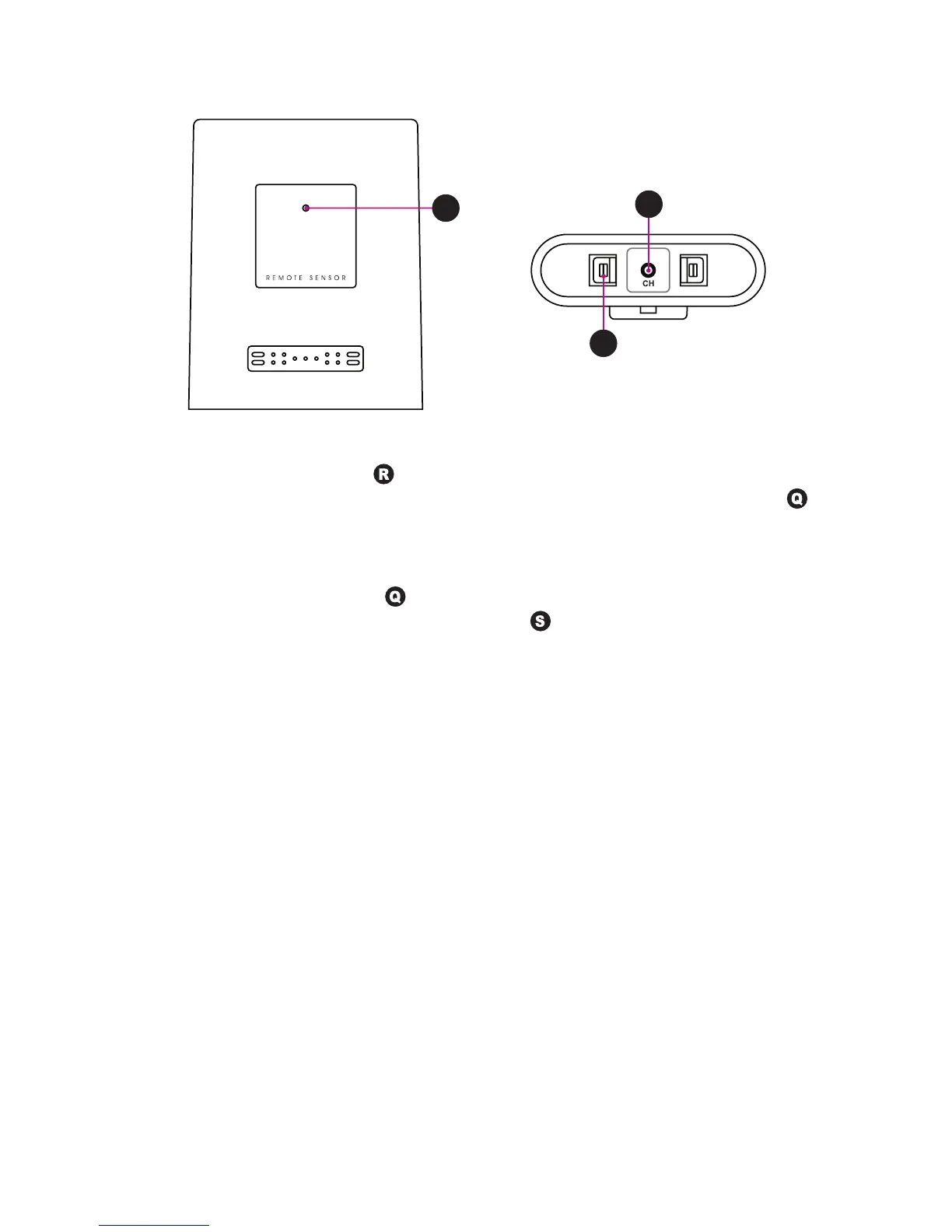
Q
R
S
1. Insertthe2AAbatteriesinthecorrectpolarity(ifyouholdthesensorasindicated
above, the left side, where
is pointing directly to, has to show the + polarity
of the battery, the other side, on the right, the – polarity). The small red LED
onthefrontpanelwillstarttoashforabout10seconds.Thedefaultashing
frequencyisonceevery2secondstoindicatethissensorwillberegisteredon
channel 1 if not set manually within 10 seconds.
2. WhilethetransmissionLED
isashing,youmaychangethetransmissionchan-
nelofthesensor.Pressoncethe[CH]button
at the bottom of the remote sen-
soranditwillashtwicetoindicatethissensorwillnowberegisteredonchannel
2.Keeponpressingthe[CH]buttonwillchangethechannelsettingupto3and
the next pressing then back to channel 1.
3. Once a remote sensor is registered, the main unit will display its temperature in the
corresponding remote channel.
4. Theremotesensorwillautomaticallystarta10minuteDCF77timereceptionafter
2minuteschannelregistration.
It will not send the temperature to the main unit during these 10 minutes of time
reception.
5. The remote sensor will then send the received time signal to the main unit.
TRANSMISSION RANGE
The maximum transmission range between outdoor sensor and weather station is 30m
under optimum conditions in an open area. The actual distance will be reduced by
many factors:
• Walls,reinforcedconcreteceilings
• Trees,bushes,earth,rocks
• Metal&conductingobjects(egradiators)
• Broadbandinterferencesinresidentialareas(DECTtelephones,mobiles,radio
controlled headphones, radio-controlled speakers, other radio-controlled weather
stations, etc.)
~25~
(ENG)


 To Next Page