21
Troubleshooting
Argo app error messages
For this topic, see “Argo app error messages” in the Argo User Manual, available at:
https://app.iseo.com/?parm=ARGO
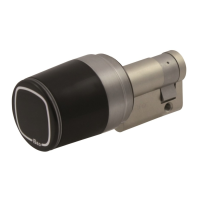
Libra Smart troubleshooting
Libra does not sound and
illuminate.
Issue Analysis
Libra correctly sounds and
illuminates but does not
open.
Libra does not open and
does not correctly sound
and illuminate.
• Check battery connection or replace
the battery.
• Replace the electronic knob.
• Battery empty or disconnected.
• Electronic board malfunction.
Solution
• Replace battery.
• Replace the electronic knob.
• Battery low.
• Electronic board or mechanic mal-
function.
• Contact the ISEOZero1 Technical
Support (see “Technical assistance”).
• Replace the electronic knob.
• Software corrupted.
• Electronic board or mechanic mal-
function.
• Fix the knob cover using the Cover
assembly/disassembly tooling kit.
• Replace the o-ring with an equal one.
• Cover not fixed by proper tools
(see “Battery replacement”).
• Cover o-ring damaged.
Knob cover unscrewing du-
ring opening
To get the Libra spare part codes, refer to the on-line catalogue at :
http://iseozero1.com/iseozero1/index.html


 To Next Page