EasyManua.ls Logo

iSimple TranzIt - User Manual

iSimple TranzIt
8 pages
Print Icon
To Next Page IconTo Next Page
Loading...
IS77
Owners Manual
TranzIt
TM
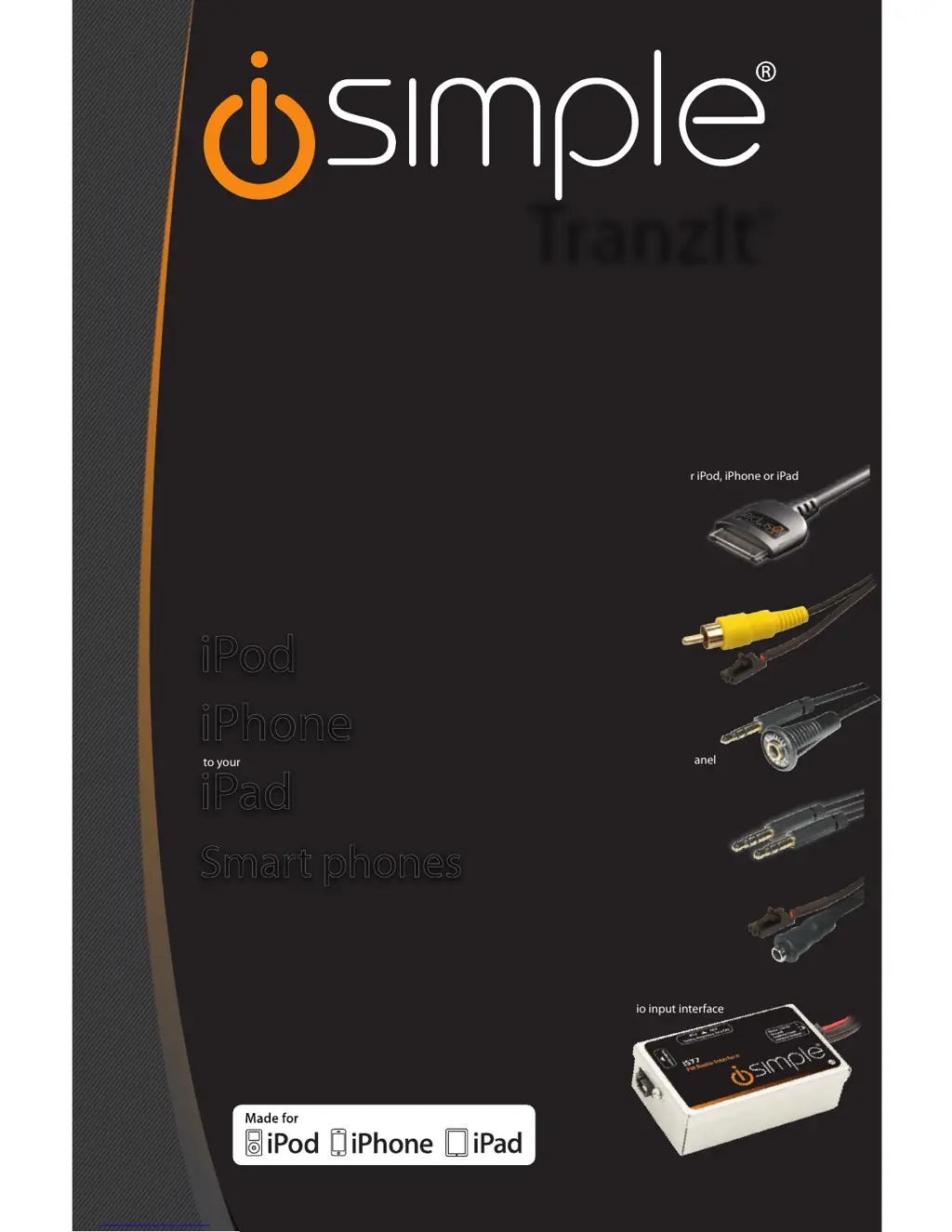
radio input interface
“factory look”
3.5 mm dash panel
mount audio input
3.5 mm to 3.5 mm
audio cable
connection for iPod, iPhone or iPad
3.5 mm to audio input
audio/video output
AFTERMARKET OR
FACTORY RADIO
INTEGRATION
FOR YOUR iPod, iPhone or iPad
MAKE THE CONNECTION
iPod
to your
iPad
to your
iPhone
to your
Smart phones
other
iSimple®
A Division of AAMP of America™
13190 56th Court Clearwater, FL 33760
Ph. 866-788-4237
support@isimplesolutions.com
©2011 AAMP of Florida, Inc.
www.isimplesolutions.com
Rev. 101011

Questions and Answers

  • J
    James RobersonJul 26, 2025
    What to do if I hear noise/static when using iSimple TranzIt Cables and connectors?
    • N
      Nathan BurnettJul 26, 2025
      If you are experiencing noise or static, it could be due to a couple of reasons. First, ensure you are tuned to the correct frequency specified on the side of your iSimple TranzIt™ interface. If a local radio station is interfering, try changing the frequency setting on the side of the TranzIt™ to the alternative position and tune your radio to the new frequency.
  • W
    williamsontiffanyAug 2, 2025
    Why is there no audio from the Aux source with my iSimple TranzIt Cables and connectors?
    • C
      Cheryl BenitezAug 3, 2025
      If you are not getting any audio from the auxiliary source, there are a few potential causes: * The iSimple TranzIt™ might be turned off. Ensure the rocker switch is in the ON position. * The connection cables could be disconnected. Check all interconnects to make sure they are properly connected. * The radio may not be on the correct station. Verify that your FM radio is tuned to the frequency indicated on the side of the interface.
  • K
    Kim KaufmanAug 11, 2025
    How to fix low audio from iSimple TranzIt?
    • B
      Brandon RamosAug 11, 2025
      If you're experiencing low audio, the issue might stem from a couple of sources. First, check the volume level on your audio source and increase it to ensure optimal sound quality through the iSimple TranzIt™. Also, the TranzIt™ gain might be set too low; adjust the gain setting located on the back of the TranzIt™.
  • M
    Melissa WalkerAug 17, 2025
    What to do if my iPod, iPhone, or iPad is not charging with iSimple Cables and connectors?
    • A
      Adrian HillAug 17, 2025
      If your device isn't charging, it could be due to a disconnected power connection on the TranzIt™. Connect the power cable according to Configuration A in Section 3. Alternatively, the fuse in the power plug on the docking cable might be blown. If it is, replace it with an equivalent fuse.

Summary

Introduction

Tranzlt Components

Installation: Connecting iPod, iPhone, iPad

Connecting iPod, iPhone, iPad

Connects iPod, iPhone, or iPad via docking cable for audio and video output.

Installation: Connecting Other Audio Sources

Connecting Other Audio Sources

Connects audio devices with headphone/line out via 3.5mm cables.

Radio Input Interface Installation: Mounting

Installing 3.5 mm Dash Panel Mount Audio Input

Guide for installing the 3.5mm dash panel mount audio input connector.

Radio Input Interface Installation: Gain Adjustment

Tranzlt Gain Adjustment

Adjusts Tranzit gain to match audio levels with FM radio stations.

Troubleshooting

Troubleshooting: No Audio from Aux Source

Diagnose and resolve issues with no sound from the auxiliary input.

Troubleshooting: iPod, iPhone, iPad Not Charging

Troubleshoot charging problems for Apple devices connected to the Tranzit.

Troubleshooting: Noise and Static

Steps to eliminate or reduce unwanted noise and static interference.

Troubleshooting: Low Audio Volume

Solutions for low audio volume when using the Tranzit with an audio source.

Warranty Information

iSimple TranzIt Specifications

General IconGeneral
BrandiSimple
ModelTranzIt
CategoryCables and connectors
LanguageEnglish

Related product manuals