EasyManua.ls Logo

iSimple TranzIt - Installation: Connecting Other Audio Sources; Connecting Other Audio Sources; Radio Input Interface Installation: Mounting; Installing 3.5 mm Dash Panel Mount Audio Input

iSimple TranzIt
8 pages
Print Icon
To Next Page IconTo Next Page
To Previous Page IconTo Previous Page
Loading...
2
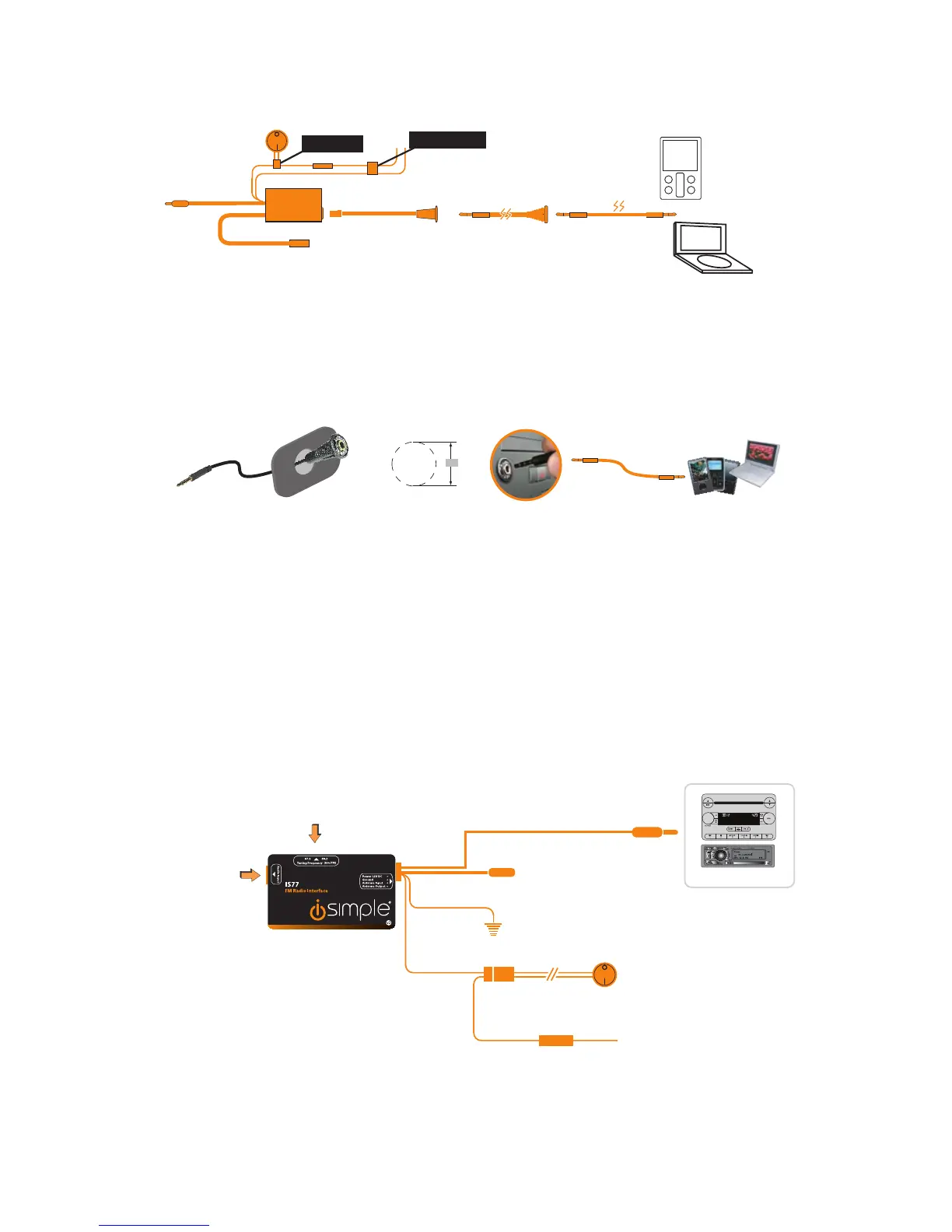
B. Connecting a Source with a Headphone or Line Output
Installing the 3.5 Dash Panel Mount Audio Input
Antenna Out *
Antenna In *
Connects to
On/Off Switch
3. Connecting a source with RCA outputs
Audio Cable
(5 ft.)
Fuse
Fuse
Antenna Out *
Antenna In *
Connects to
On/Off Switch
Fuse
3.5 mm to 3.5 mm
Audio Cable (4 ft.)
Factory Look 3.5 mm
Dash/Panel Mount
Audio Input Cable (6 ft.)
3/8” Hole
RCA to RCA
(not included)
Antenna Out *
Antenna In *
PURI
Connects to
On/Off Switch
Fuse
audio source
(not included)
MP3
(not included)
iPod, iPhone, or iPad
(not included)
* Some radios require the addition of antenna connection adapters
Connect To
SWITCH
Connect To
iPod
Connect To
SWITCH
Connection for iPod
Not USED
Connect To
SWITCH
iPod Conection
Not USE
Audio Source
(not included)
OR
Header Plug
TranzIt
Connects to
iPod, iPhone, or iPad
3.5 mm to Audio Input
Adapte r
TranzIt
1) Choose mounting position of dash mount
audio input and carefully drill 3/8” mounting
hole. Install connector.
2) Connect your audio device to the newly
installed audio input via the supplied 3.5 mm
to 3.5 mm connection cable.
3.5 mm to 3.5 mm Audio Cable (4 ft.)
Factory Look 3.5 mm Dash Panel Mount Audio input (6 ft.)
3/8”
4. Radio Input Interface (TranzIt)
Installation
Radio Tuning Frequency
Use to select best operating
frequency for your area
Audio Input
Antenna Out
to FM rad io*
Antenna Input
from vehic le antenna*
Ground Connection
C onnec t to a c lean ground p oint
Factory or Upgraded Radio*
On/Off Switch
9/16 mounting hole
Connects to Power Source
ACC 12VDC
Power when key-on
2A Fuse

Gain Adjustment
Use to match volume of IS77
to volume of FM radio stations
BACK VIEW
HL
LEVEL
+
TOP VIEW
* Antenna Adapter May Be Required

Related product manuals