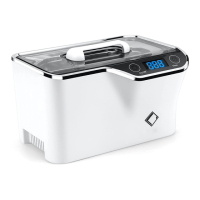
5 INDICATOR LIGHT 6 TOUCH-SENSING START/STOP SWITCH
7 DC SOCKET 8 “MIN” MARK
9 “MAX” MARK 10 LIFTABLE STRAINER
11 JEWELRY HANGER 12 RECHARGEABLE BATTERY PACK
13 POWER SWITCH FOR BATTERY 14 DC CONNECTOR
Note: Strainer is not needed to clean denture, retainer and other soft items.
It absorbs approximately 20-30% of ultrasonic energy. It can be used to prevent scratching if needed.
8
CLEANING METHODS
1. Daily Cleaning
Use tap water and add iSonic® AlignerClean™ to clean, to remove odor and to kill bacteria. Caution: Do not use
chilling cold water or hot water. Use room temperature or lukewarm water.
1. Add water to the cleaning tank between MIN and MAX, and above the area to be cleaned. Do not allow water
level rise above MAX line after adding the items.
2. Add half tablet of iSonic® AlignerClean™ in the water.
3. Put items to be cleaned inside the tank.
4. Touch the power switch twice to start cleaning. The unit will stop running automatically after 3 minutes.
5. Rinse the items thoroughly under running water.
2. To remove stains or buildups
Add iSonic® White™ denture cleaning crystal in the water to help remove stains, calculus and other types of buildup,
and to disinfect.
1. Add water same as in 1.
2. Add half teaspoon of iSonic® White™ denture cleaning powder.
3. Put the items in the tank.
4. Touch the power switch twice to start cleaning. The unit will stop running automatically after 3 minutes. Touch
the power switch twice again if additional time is needed.
Caution: Do not run it continuously for more than 5 cycles. Take breaks in between will help to avoid
overheating.
9
CLEANING METHODS
5. Use mouth washing liquid in the tank to clean the items with one cycle will help to remove the trace of taste of
chemicals if desired.
6. Rinse the item under running water thoroughly to remove the solution.
To ensure strong cavitation:
1. Make sure water level is between MIN and MAX lines.
2. Add cleaning crystal or tablet (or jewelry solution if it’s for jewelry).
3. If fresh tap water is used and cavitation is not strong, run it a couple of cycles first or let it sit for one hour or
more, or use bottle water instead.
Note: Use an appropriate solution for the job.
Typical cleaning time is 1 or 2 cycles. If the an item is not cleaned for over 15 minutes, it usually indicates that the
solution is not appropriate for the task. To remove stains, for instance, an effective solution must be used. Running
with water alone will never remove stains. An ineffective solution or tablet will also not be able to remove stains
quickly.
Jewelry typically has lotions and human oil but water doesn’t separate oily substances well. An appropriate solution
will render a better result. iSonic® Jewelry / Eye Wear cleaning solution concentrate (#CSGJ01) will make diamonds



 To Next Page