2.2.0
SEAT CUSHION/ SLIDERS FOR SEAT CUSHION
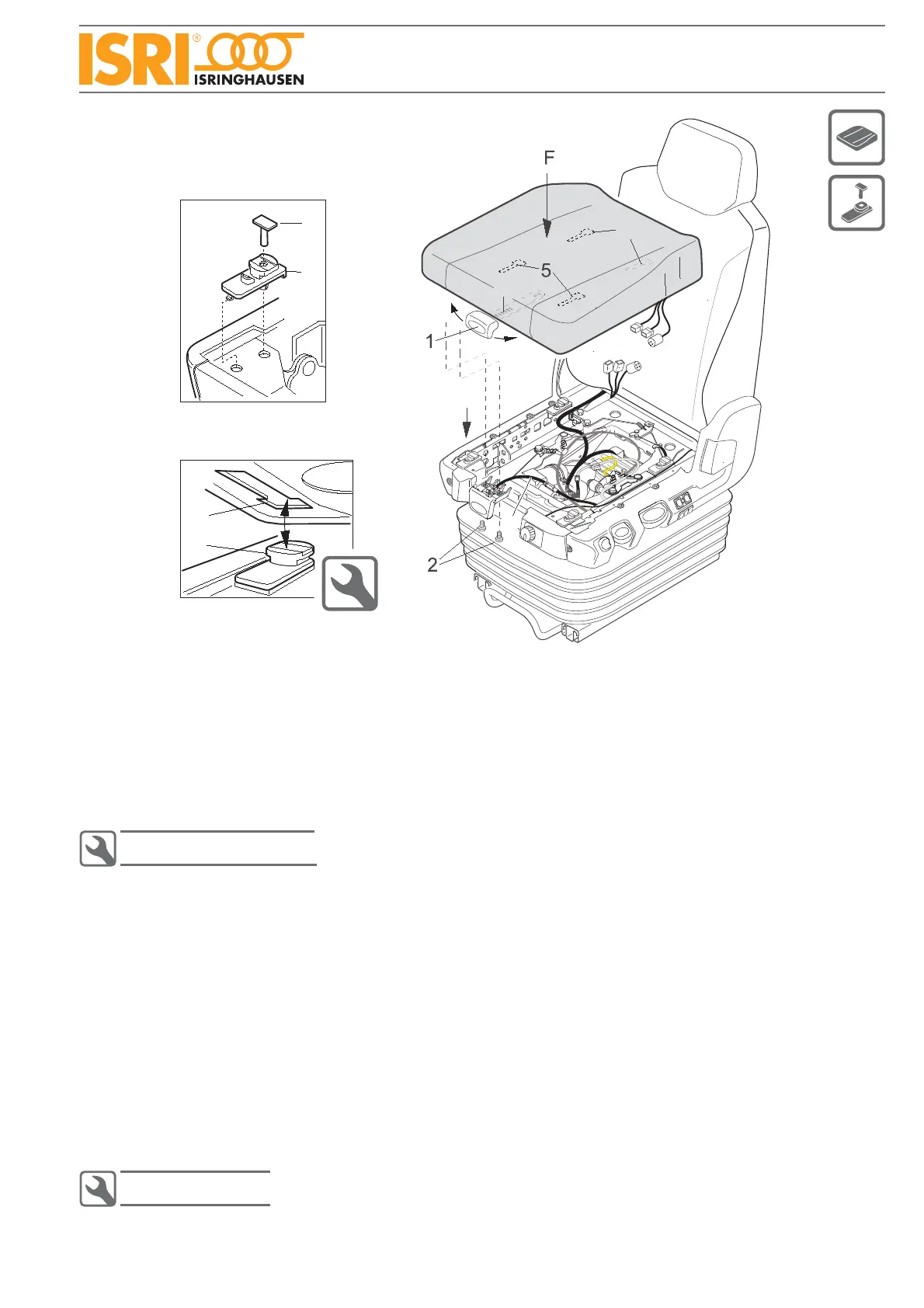
Seat cushion
Lift up lever (1) and push seat cushion in foremost position. •
Undo two screws (2).•
Hold on lever (1) in upper position and push it sidewards (see arrow A).•
Move seat cushion forwards completely and lift it up. •
Disconnect electrical feeders.•
Installation seat cushion
Bowden cable (8) must be positioned between lever (9) and seat cushion ground plate.•
Push the rear keyholes (4) (on cushion‘s bottom side, view B) onto the rear sliders (7).•
Lift up lever (1) (don`t move seat cushion) and push it in direction of arrow A sidewards.•
Press down the seat cushion‘s front keyholes (5) onto the sliders at the front and press down cushion in direction •
of arrow (F).
Push the cushion in direction of backrest (till stop) while still pressing down the complete seat cushion.•
Check now, if all four sliders are locked in the keyholes (no vertival movement allowed).•
Push lever (1) in direction of arrow D and push cushion further in direction of backrest, till lever (1) engages.•
Take care, that the cushion is locked in horizontal and vertical direction.
Tighten lever for tilt adjustment.•
Sliders for seat cushion (view C)
Demount seat cushion (see 2.2.0).•
Pull out plastic pin (6) and take off slider (7).•
Installation sliders
Push slider (7) at the seat frame.•
Push in pin (6) ( level of pin head fl at must fi t to the fl at on the slider head).•
4
7
B
6
7
C
4
9
A
D
C
8


 To Next Page