12
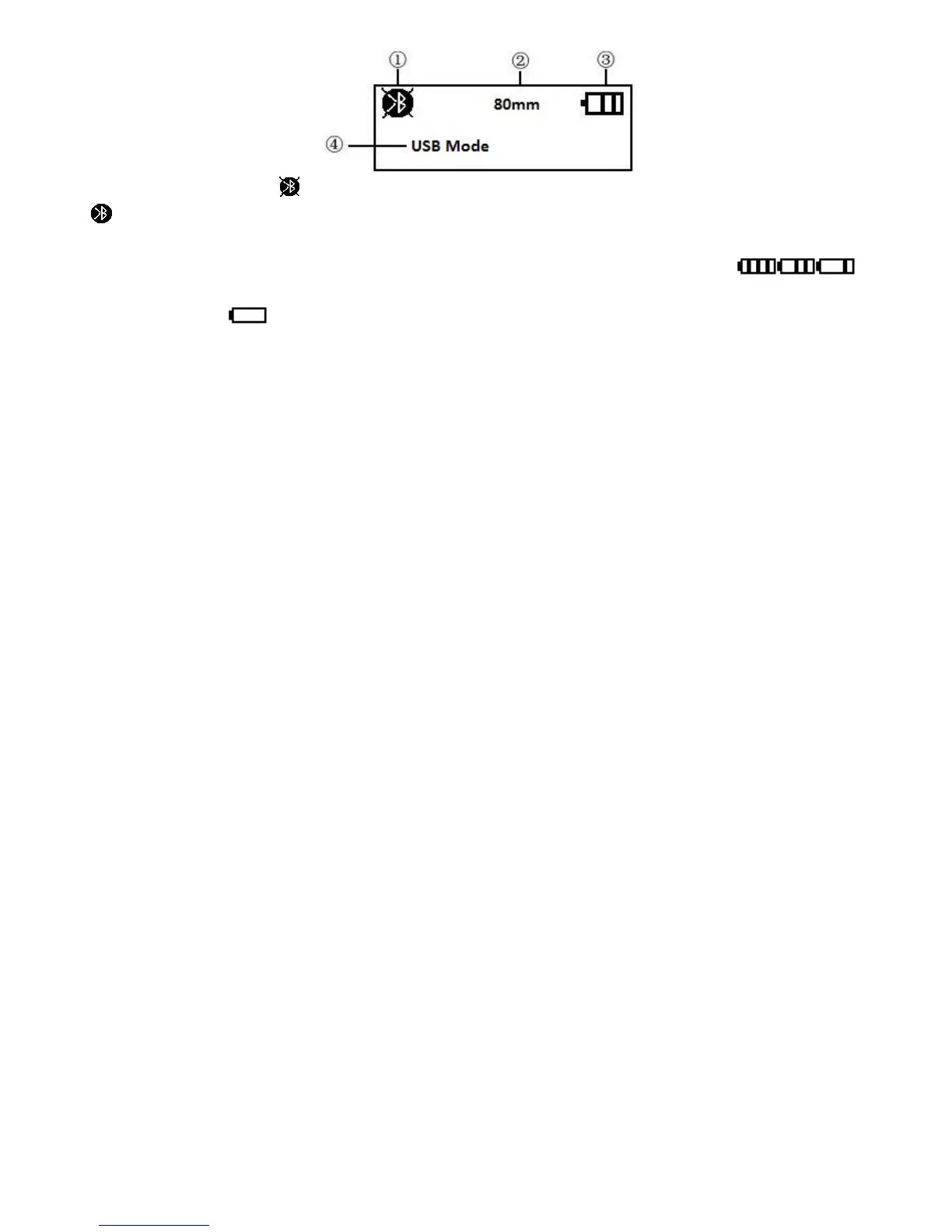
① When the icon is , it means there’s no Bluetooth connection; When the icon is
, it means the Bluetooth is on connecting state.
② It shows the different paper type, 112mm, 100mm, 80mm, 58mm and 44mm.
③ The current capacity level of printer battery icon. The different icons
shows the current battery level. When it comes to low battery level, it’ll become to
show this icon
with flickering
④ Text indication display. Printer current state is showed by text.
It shows USB mode when the printer have not connected with external device.
It shows USB connected when the printer connect with main device via USB.
It shows USB communicating when the printer received data via USB connection.
It shows Bluetooth connected when the printer connect with main device via
Bluetooth and open the corresponding port.
It shows USB and Bluetooth connected when the printer connect with main device
via both Bluetooth and USB.
It shows Bluetooth communicating when the printer received data via Bluetooth
connection.
Chapter 4 Other Information
4.1 Command Programming Manual


 To Next Page