Wall Mount
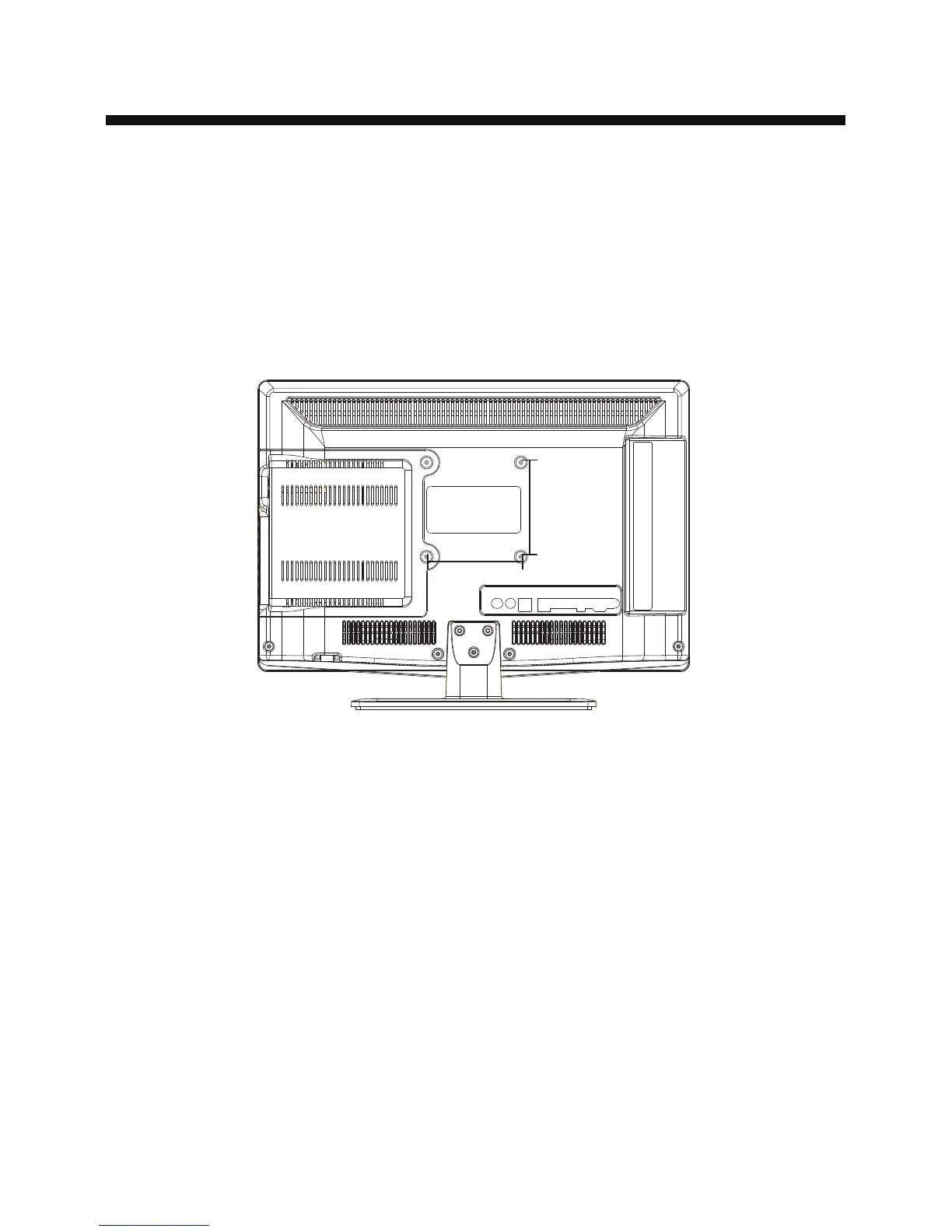
Dimensions for Mounting Hole Pattern
A wall mount kit (purchased separately) would allow you to mount your iSymphony
TV on the wall. For detailed information on installing the wall mount, refer
to the instructions provided by the wall mount manufacturer. It is strongly
recommended to contact a technician for professional assistance for wall mount
installation. iSymphony is not responsible for any damage to the product or injury to
yourself or others resulting from the wall-mounting.
- This iSymphony TV is compatible with a 100mm x 100mm mounting hole pattern.
- Do not mount your iSymphony TV at more than a 15 degree tilt.
- Always use two people to mount the TV to a wall.
- Do not install your Wall Mount Kit while your TV is turned on. It may result in
personal injury due to electric shock.
- 4 pcs of type M4 screws are required for installing the wall mount bracket to
your iSymphony TV. Do not use screws that are longer than 10 mm. Screws that
are too long may cause damage to the inside of the TV set.
- Do not fasten the screws too tight for this may damage the TV or cause the
TV to fall, resulting in personal injury. iSymphony is not liable for these kinds of
incidents.
Instruction for Wall Mount
-9-
100mm
100mm


 To Next Page