INSTALLATION
KEYBOARD
-5-
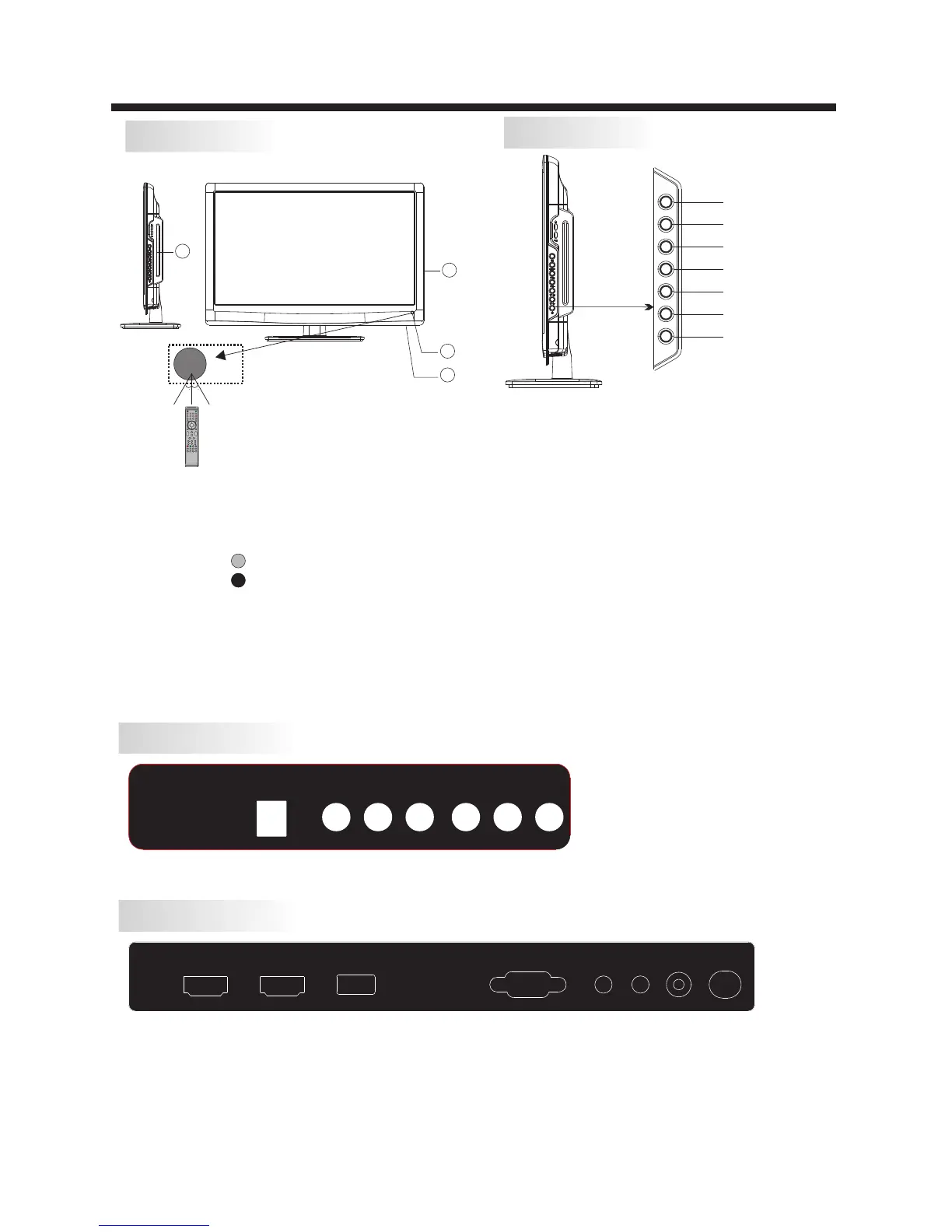
Front panel
REAR Connections
All the terminals are(from left to right):POWER SOCKET,CVBS,AUDIO INPUT,YPbPr INPUT
Note: CVBS and YPbPr share one audio channel.
SIDE Connections
All the terminals are(from left to right):
HDMI1,HDMI2,USB,VGA,HEADPHONE ,PC AUDIO ,COAXIAL ,RF
Note: 1. When HDMI1 port get DVI signal ,the audio signal receives from the PC
Audio channel.
2. When HDMI2 port get DVI signal ,the audio signal receives from the YPbPr/AV
Audio channel.
1.SOURCE:
Display the input source menu.In
MENU mode,press“SOURCE”to
confirm the selected item.
2.MENU:
Display main MENU.
3.CH+/CH-
In TV mode,press“CH+”or“CH-”
to change the channel up and down.
In MENU mode, press “CH+”or
“CH-”to select items .
4.VOL+/VOL-
Adjust sound level.
In MENU mode, press“VOL+”or“
VOL-”to adjust the item that you selected.
5. STANDBY
Press this button to turn the unit ON from
STANDBY mode.
Press it again to turn the set back to
STANDBY.
30 30
1
3
2
POWER CVBS R
L Y Pb Pr
VGA
HEADPHONE
RF
PC AUDIO COAXIAL
HDMI1 HDMI2
USB
SOURCE
MENU
CH+
CH-
VOL+
VOL-
STANDBY
1: Remote control sensor.
2: Indicator LED:
BLUE POWER ON.
RED STAND BY.
3: Key board.
4: DVD Disc loading Slot
4


 To Next Page