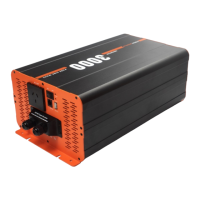
The iTechworld Pure Sine Wave Inverter is a versatile power solution designed to provide clean and stable AC power, similar to that found in a standard home outlet. These inverters are available in 1000W, 2000W, and 3000W models, all operating on a 12-volt DC input. They are ideal for powering sensitive electronic appliances like laptops and various other AC-powered devices in remote locations or during travel. In addition to AC power, the iTechworld inverter also features a 5V USB port, enabling users to power or charge a wide range of USB-compatible devices.
Function Description
The primary function of the iTechworld Pure Sine Wave Inverter is to convert 12V DC power from a battery into 240V AC pure sine wave power. This pure sine wave output is crucial for sensitive electronics, as it replicates the smooth, consistent power supplied by the utility grid, preventing potential damage or malfunction that can occur with modified sine wave inverters.
The inverter incorporates several safety and operational features to ensure reliable performance. It includes a main switch for turning the AC output on or off, along with LED indicators for power and fault conditions. The green power LED illuminates when the inverter is actively producing 240V AC power, accompanied by a single beep. A red fault LED will light up or flash if a fault is detected, at which point the 240V AC output will be automatically shut off to protect the inverter and connected devices.
For added convenience, the inverter is equipped with a 5V USB socket (5V 2.1A) that provides continuous power for charging or powering USB devices, regardless of the main switch's AC output status. This means you can charge your mobile phone or other USB gadgets even when the inverter's AC output is turned off.
Cooling is managed by temperature and load-controlled fans. These fans automatically activate when the AC load reaches 20% or more, or when the internal temperature exceeds 45°C, ensuring optimal performance and preventing overheating. The inverter is housed in a heavy-duty aluminum case, which not only provides durability but also aids in heat dissipation.
For the 3000W model, a hard-wire terminal block is included for connecting loads requiring 15A or more. This feature requires installation by a licensed electrician to ensure compliance with electrical wiring regulations and safety standards.
An optional remote control (sold separately) is available, offering the convenience of operating the inverter from a distance. The remote control features its own main switch, fault LED indicator, AC output indicator, inverter load indicator, DC input power indicator, and battery capacity indicator. When using the remote control, it's important to ensure the main switch on the inverter's front panel is in the OFF position for the remote control to function correctly.
Usage Features
To ensure safe and optimal operation, users must adhere to specific guidelines. Before connecting the inverter to a battery, both the main switch on the inverter and any optional remote control switch must be in the OFF position.
Connecting the inverter involves a precise sequence:
- Connect one end of the positive DC input cable to the inverter's positive DC input terminal.
- Connect the other end of the positive DC input cable to one terminal of a fuse holder or circuit breaker (not included), then connect another DC input cable from the other terminal of the fuse holder/circuit breaker to the positive terminal of the battery. A fuse or DC circuit breaker is mandatory and must be installed no more than 20cm from the positive terminal of the battery to prevent fire hazards in case of a short circuit.
- Connect one end of the negative DC input cable to the inverter's negative DC input terminal.
- Connect the other end of the negative DC input cable to the negative battery terminal. A slight spark may occur when connecting the negative cable, which is normal due to the internal capacitors charging. For optimal load distribution, it is recommended to spread the load across multiple batteries in a parallel array, connecting the positive to one battery and the negative to the last battery in the array.
- All DC connections must be tight to prevent overheating and potential fire hazards.
Once connected, operating the inverter is straightforward:
- Ensure any connected AC appliance is turned OFF before powering on the inverter.
- Turn on the inverter by moving the main switch to the ON position.
- Once the power LED indicator illuminates green, turn on the connected AC appliance.
- After use, turn off the AC appliance first, then turn off the inverter by moving the main switch to the OFF position.
The inverter is designed to handle surge power up to double its rated output for short durations (e.g., 10 seconds or 2 seconds, depending on the model), which is useful for starting motors or compressors. However, some appliances may still trigger the overload protection, in which case a larger inverter model might be necessary.
Maintenance Features
Maintaining the iTechworld inverter is simple and requires minimal effort to ensure its longevity and proper functioning.
- Safety First: Always ensure the inverter is turned OFF before performing any maintenance tasks.
- Exterior Cleaning: Periodically clean the exterior of the inverter with a dry cloth to prevent the build-up of dust and dirt. This is particularly important because the inverter contains cooling fans that can draw in dust, potentially damaging internal components or shortening the inverter's lifespan.
- Terminal Check: Regularly check and tighten the fasteners on the DC input terminals. Loose connections can lead to overheating and pose a fire hazard.
- Ventilation: Ensure that all ventilation vents and fan openings are not obstructed. A minimum clearance of 60mm around the inverter is recommended to allow for adequate airflow and efficient cooling. Failure to do so can lead to overheating and inverter failure.
- Installation Environment: The inverter should be mounted in a dry, cool, and well-ventilated location. Avoid direct sunlight, proximity to heat sources, and dusty environments. The ideal ambient air temperature for operation is between 15°C and 25°C.
- Battery Proximity: Keep the inverter close to the batteries to minimize cable lengths. Excessive cable lengths can cause voltage drop, reducing the inverter's performance.
- Fuse Installation: A fuse must always be installed on the positive supply cable as close as practical to the battery. This provides critical protection against short circuits and potential fire hazards.
The inverter is not intended for use with life support systems or other medical equipment. It is also important to note that the inverter should not be installed in the same compartment as lead-acid, AGM, Gel, or sealed lead-acid batteries to prevent corrosion from battery fumes. It should also be kept away from any compartments where flammable liquids or gases may be present to avoid explosion hazards.
In the event of troubleshooting, the user guide provides solutions for common issues such as no AC output, inverter beeping, or fault indicators. For instance, if there's no AC output, users should check the battery fuse, DC input connections, and the continuity of the DC input circuit. If a lithium battery is used, checking if it has entered protection mode and following the battery manufacturer's reset instructions is advised. Reverse polarity connections will cause permanent damage and void the warranty, necessitating professional assessment. Overheating issues require checking fan functionality, ensuring clear ventilation, and reducing the AC load. Short circuits in the AC output or connected devices also trigger fault conditions, requiring a check of the wiring and appliances, potentially by a licensed electrician.
The iTechworld inverter comes with a 12-month warranty covering defects in materials and workmanship from the date of purchase. However, the warranty is void if the unit has been misused, altered, or accidentally damaged. It does not cover accessories, normal wear and tear, shipping damage, unauthorized repairs, neglect, misuse, abuse, or failure to follow care and maintenance instructions. The warranty also specifically excludes damage resulting from incorrect installation or connection, including improper polarity. For any technical problems, customers are advised to contact iTechworld customer service.



 To Next Page
 General