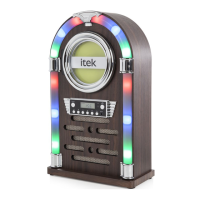
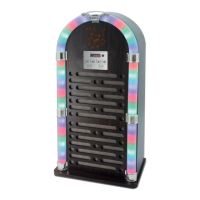
The Itek Bluetooth Jukebox, model I60017, is a versatile audio appliance designed for household use, offering a blend of classic jukebox aesthetics with modern connectivity. It features CD playback, Bluetooth streaming, FM radio, and auxiliary input options, all controllable via a front panel or a remote control.
Function Description:
The jukebox serves as a multi-functional audio system. Its primary functions include:
- CD Player: Allows playback of audio CDs with features like track programming (up to 20 tracks), repeat functions (single track or all tracks), and standard play/pause, skip, and stop controls.
- Bluetooth Connectivity: Enables wireless streaming of audio from Bluetooth-enabled devices such as smartphones or tablets. The device pairs as 'I60017' and supports a password '0000' if required.
- FM Radio: Features an FM tuner with a bandwidth of 87.5-108 MHz, allowing users to scan for and save radio stations.
- Auxiliary Inputs:
- Aux-in 1 (3.5mm): For connecting external audio devices like MP3 players or PCs using the included 3.5mm Aux cable.
- Aux-in 2 (RCA): For connecting audio/video devices such as TVs, DVD players, VCRs, or DVRs using an RCA cable (not included).
- LED Lights: The jukebox is equipped with LED lights that can be switched on or off, adding to its aesthetic appeal.
- Volume Control: Adjustable via the control panel or remote, with separate treble and bass controls on the remote for sound customization.
Important Technical Specifications:
- Model: I60017
- Product Rating: DC 12V 2.0A
- Adaptor Input: 100-240V~50/60Hz 0.6A
- Adaptor Output: 12V 2.0A
- Radio FM Bandwidth: 87.5-108 MHz
- Bluetooth Pairing Name: I60017
- Bluetooth Password (if required): 0000
- CD Programming Capacity: Up to 20 tracks
- Remote Control Battery: 3V CR2025
Usage Features:
- Control Panel: Located on the front of the jukebox, it includes buttons for CD tray (Open/Close), LED display, Power/Mode, Stop, Skip Backward, Volume -, Play/Pause, Skip Forward, Volume +, LED On/Off, and Open/Close.
- Remote Control: Provides comprehensive control over all functions, including Standby, Mode selection (CD, Radio, Bluetooth, Aux. 1, Aux. 2), Mute, Skip Forward/Backward, Play/Pause, Repeat, Stop, Program, Open/Close, LED On/Off, Treble adjustment (+/-), Bass adjustment (+/-), and Volume adjustment (+/-).
- Power On/Off: Long press the Power/Mode button on the control panel or press the Standby button on the remote.
- Mode Switching: Short press the Power/Mode button on the control panel or use the Mode button on the remote to cycle through CD, Bluetooth, FM, Aux-in, and RCA modes.
- Volume Adjustment: Use Volume +/- buttons on the control panel or remote.
- LED Lights Control: Long press the LED ON/OFF – Open/Close button on the control panel or press the LED ON/OFF button on the remote.
- CD Tray Operation: Short press Open/Close on the control panel or remote to eject/close the CD tray.
- CD Programming: Before programming, ensure CD function is selected and playback is stopped. Press the program button, select tracks using skip buttons, then press program again to store. Play programmed tracks using Play/Pause. Clear memory by repeatedly pressing Stop.
- FM Radio Scanning: Press and hold Skip Forward or Skip Backward to scan. Long press Play/Pause or press Prog to save stations.
- Bluetooth Pairing: Select 'bt' mode, enable Bluetooth on your device, and select 'I60017'.
- Aux-in Connection: Connect external devices to either the 3.5mm Aux-in 1 or RCA Aux-in 2 jacks and select the corresponding mode.
Maintenance Features:
- Cleaning the Jukebox:
- Always disconnect from power before cleaning.
- Use a soft, damp, lint-free cloth.
- Do not use abrasives or harsh cleaners.
- Do not immerse any electrical part (motor units, plugs) in water.
- Cleaning CDs:
- Use a soft cloth to wipe fingerprints and dust.
- Wipe in a straight line from the center to the outside.
- Avoid chemicals like record sprays, anti-static sprays, benzene, or thinners.
- Store CDs in bags to prevent scratches.
- Do not expose CDs to direct sunlight, high humidity, or high temperatures.
- Do not stick paper or write on CDs.
- Cleaning the Lens:
- A dirty lens can cause sound skipping.
- Use a CD cleaning disc.
- Troubleshooting: The manual provides a troubleshooting guide for common issues like no power, no sound, Bluetooth pairing problems, remote control malfunction, and distorted sound, offering solutions such as checking connections, volume levels, battery replacement, and mode selection. In case of strong Electro-Magnetic Interference, resetting the product or moving it to another location is recommended.
Safety Precautions (Summarized):
- Verify main circuit voltage matches appliance rating.
- Use on a stable, level, heat-resistant surface.
- DO NOT immerse cords, plugs, or any part in liquid.
- DO NOT leave unattended when operating.
- Supervise children/pets near the appliance.
- Suitable for children aged 8+ and persons with reduced capabilities under supervision.
- Children should not play with the appliance.
- Cleaning/user maintenance not by children without supervision.
- Switch off and unplug when not in use or before cleaning.
- Stop using if damaged and seek advice.
- DO NOT let cord hang over edges or touch hot surfaces.
- Use only manufacturer-supplied accessories; DO NOT use extension cords.
- DO NOT pull plug by the cord.
- Use only for intended domestic purposes.
- DO NOT carry by the power cord.
- DO NOT use outdoors, in direct sunlight, or wet/damp conditions.
- Avoid placing near electromagnetic pollution, vibration, or poor ventilation.
- DO NOT place liquid-filled containers on top.
- Ensure hands are dry when handling electrical items.
- Never disconnect by pulling the power cable.
- If water enters, switch off and consult an electrician.
- In case of electrostatic discharge malfunction, switch off, wait 30 minutes, then reconnect.
- Ensure no metallic objects are placed inside.
- If a fault develops, stop using and contact customer support.
The product comes with a 12-month guarantee, with an option for an extended 1-year guarantee upon online registration within 28 days of purchase. Customer support is available via phone.


 To Next Page
 General