6
9
7 8
4. Product Overview
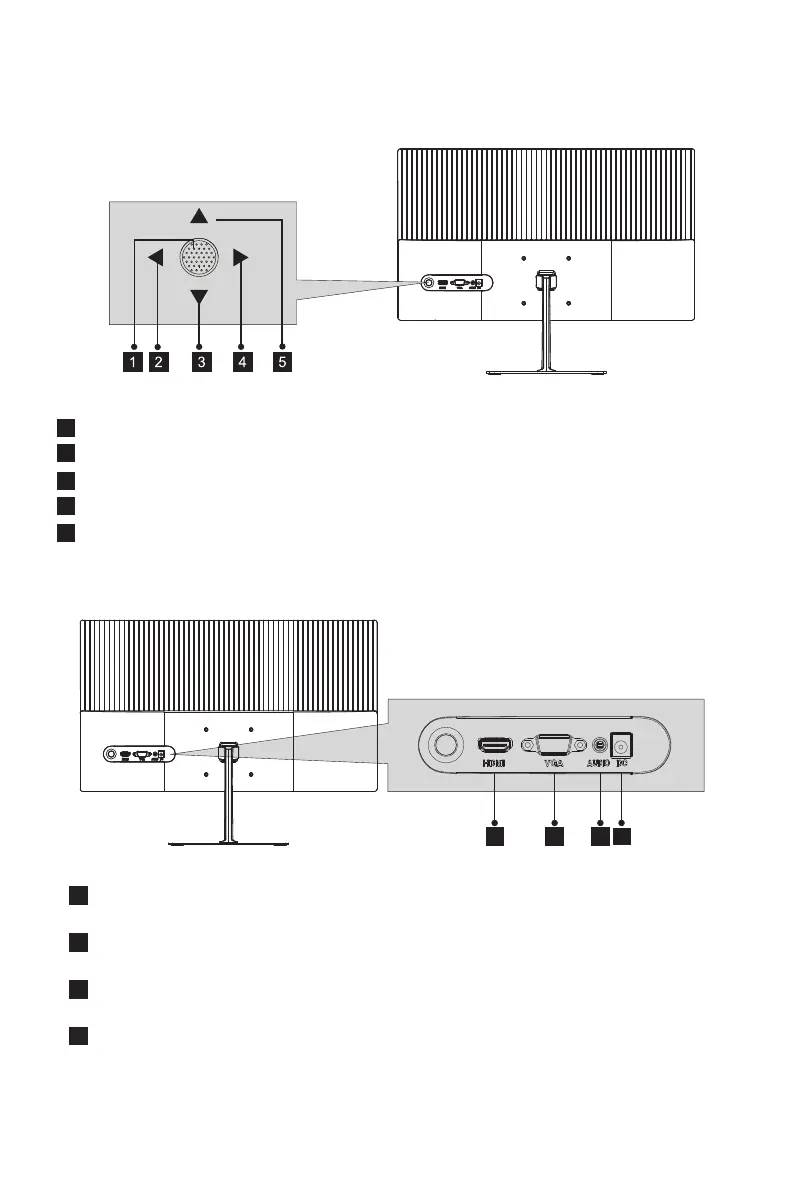
4.1 – Monitor Buttons
Rocker switch button: Press to turn on or turn off the monitor.
Left rocker button: Push the rocker left to exit OSD menu.
Down rocker button: Push the rocker down to move down in menus.
Right rocker button: Push the rocker right to enter sub-menus/ quickly enter the main menu.
Up rocker button: Push the rocker up to move up in menus.
2
1
3
4
5
8
6
7
9
HDMI Connectors: Insert one end of the HDMI cable into the computer’s HDMI
output and connect the other end to the monitor’s HDMI port.
VGA Connectors:
Insert one end of the VGA cable into the VGA output device
and connect the other end to the monitor's VGA port.
Audio Output: Insert one end of the Audio cable into the computer’s Audio output
to receive the Audio signals from your monitor.
Power Connector: Insert the power Cable to supply power to the monitor.
4.2 – Monitor Ports
Eng-3


 To Next Page