21
21
When either ▲ or ▼ (Phase duration key) is pressed on the center LCD, the unit is
switched to the Ryodoraku point measurement mode. If ▲ or ▼ is held down, the
sensitivity level can be set to any one of L6 (6 V), L12 (12 V), or L21 (21 V). Set the
level properly according to the degree of the patient's skin resistance (continuity).
① Pressing the Search/Stimulation selector key,
the left LCD displays
[
0
]
.
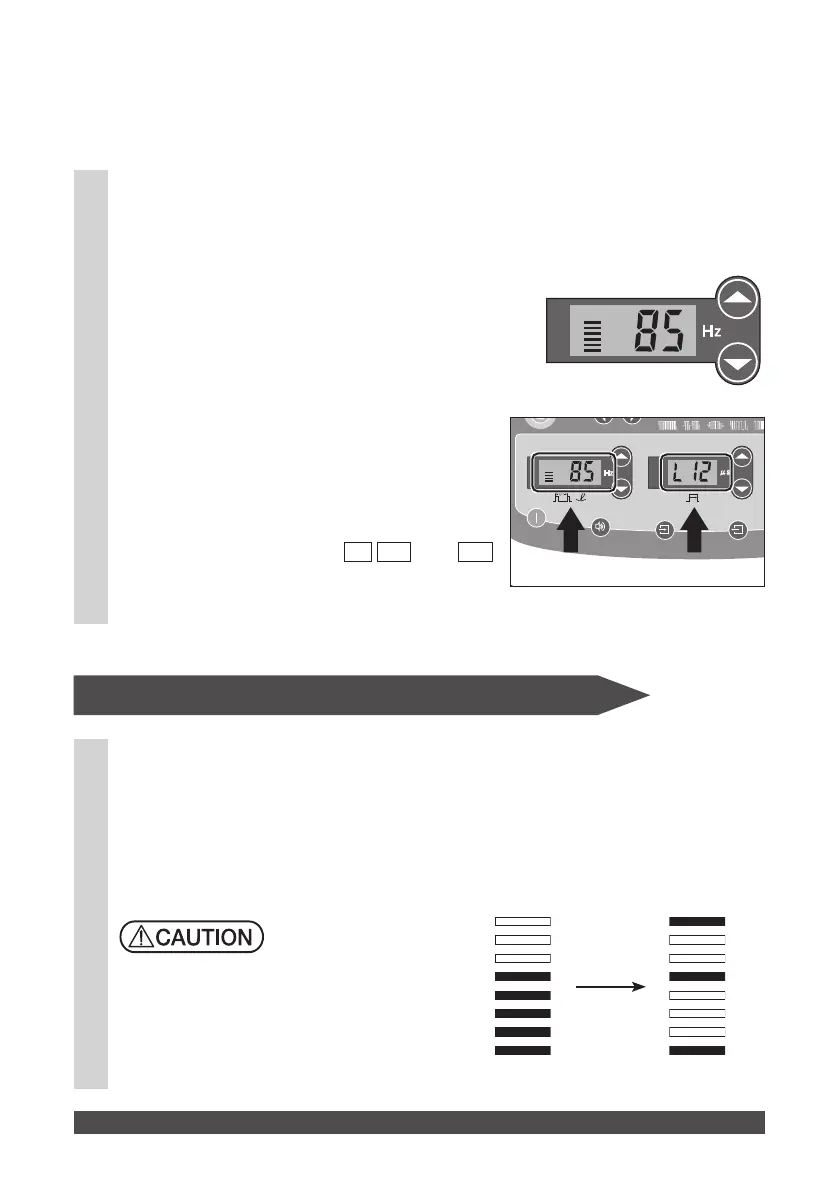
② When the search begins, the unit displays the
level of sensitivity using bars, a value, and
sound.
As the number of displayed bars increases,
the value rises, and the buzzer beeping
interval becomes shorter, the acupuncture-
point can be located. The center LCD indicates
the sensitivity level. The LCD displays the
sensitivity in three steps,
L6 L12
, and
L21
,
which are automatically switched over
according to the conductivity.
When the mode is switched to the Ryodoraku
point measurement mode, the bar indication is
changed to the figure at right.
■Display in the Search Mode
Search mode display Ryodoraku display
Conductivity
Sensitivity
Ryodoraku Point Measurement Mode


 To Next Page