EasyManua.ls Logo

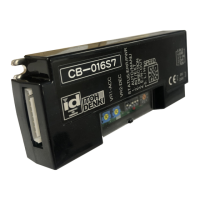
ITOH DENKI CB-016S7 - User Manual

ITOH DENKI CB-016S7
7 pages
Print Icon
To Next Page IconTo Next Page
Loading...
ITOH DENKI CO.,LTD.
1
2
2
2 )~(3
3
3 )~(4
4
4 )~(6
4 )~(6
7
7
7
8
8 )~(9
9
10)~(11
12
13
13
13
1 Safety Instructions
2 Power
3 Before Operating the Product
  3-1 Mounting
  3-2 Wiring
  3-3 Direction Setting
4 Functions
5 Operation Instructions
  5-1 Speed Variation
   5-1-1 Internal Speed Variation
   5-1-2 External Speed Variation
  5-2 Direction Setting
  5-3 Acceleration and Deceleration
6 Error Signal Output  
7 Motor Pulse Signal Output
8 Error status, Reset, History
  8-1 Error History
  8-2 Indication of Error Occurrence Frequency
9 Troubleshooting
10 Dimensions
11 Product specifications
12Applicable standards
-UL
Standard Accessories
INDEX
Power connector (CN 1)
Control connector (CN 2)
Mounting screws and nuts
Screw M4 x 15
Nut M4
1pce
1pce
2pcs
2pcs
Power connector
(CN 1)
Control connector
(CN 2)
No.491
PM486FEPM500FE
PM486FSPM500FP
PM486FP
PM570FEPM605FEPMT42FE
CB-016S7/LT-UL
Applicable MDR models Motor driver model
S : For standard motor,
NPN signal input and output
P : For standard motor,
PNP signal input and output
BS : For built-in brake motor,
NPN signal input and output
BP : For built-in brake motor,
PNP signal input and output
LT : Low Temp
UL : UL recognized
1
Maximum Surrounding Air Temperature40.
Switch off the power, when removing from conveyor, wiring or maintenance is
done, otherwise you have a risk of electrical shock or injury.
Respect the electrical regulations of the site or the equipment, where the
product in installed. (Labor safety and sanitary regulations, electrical
equipment technical standard, etc)
Operate the motor driver within its intended design and specifications to
avoid electrical shock, injury, fire, or damage to the equipment.
Do not disassemble, repair nor modify the product (for which we do not
warrant) It might cause electrical shock, injury or fire.
Separately set the circuitry to monitor the important input and/or output signal
status, which might cause accident, because the signal may stay ON or OFF
in case of the CB-016 driver card failure.
Be sure to shut off the power before inserting or removing any connector. Do
not wire connector left in the CB-016 driver card.
Do not drop, give external impact nor pressure to the CB-016 driver card. If
that happens, do not reuse it.
Make sure all the connectors are properly engaged with wiring cables.
Make sure the conveyor frame and control box where the CB-016 driver card
is mounted are grounded.
Do not switch on or off the relay or contactor in close proximity to power or
signal lines, or the CB-016 driver card as the generated noise could cause
malfunction.
Be sure to inject power or input signal for 15 milli-seconds or over to ensure
the proper reaction.
Use the MDR with built-in brake option (BR) along with CB-016 driver card
BS7BP7 if holding effect is needed.
Do not pull by force during operation. It causes the CB-016 driver card to
malfanction.
Do not force the MDR to turn. It may cause of damage to the driver card or
shorten its life cycle.
1 Safety Instructions
Connenctor may harden with low temperature.
Do not insert or pull it by force.
Mount this product to the place where MDR can be properly connected
without cable loose, extreme bend or pull, or move.
MDR speed may not reach immediately to the set speed if it is left long hours
in 0 or below. In addition, the starting current may get larger to activate
thermister, or under voltage error may be resulted. Therefore , warm up
operation is recommended before formal use.
Be careful for condensation or freeze in case the product is used in varying
temperature particularly between below and above 0. If condensation is
generated, do not use the product until it is completely removed. Use of the
product having condensation may result in malfunction or electrical accident.
<Described below are the precautions for using this product at freezing
temperature along with MDR having LT option:>
Warning & Caution
Possible danger of light or medium injury, or only a
material damage.
Warning
Incorrect handling may lead to death or serious injury,
indicating potential danger.
Shown below are the caution items for using the product safely and avoiding
danger and damage to the user.
Caution items can be classified into danger, warning and caution as described
below.
Caution
Caution
Brushless DC Motor Driver
CB-016S7〕〔BS7〕〔P7〕〔BP7〕】User Manual
Thank you for purchasing a Itoh Denki CB-016 series
motor driver. Please read this manual before operating
the product, and keep this manual readily accessible for
reference.

Questions and Answers

  • H
    Hector SmithAug 5, 2025
    What to do if ITOH DENKI DC Drives MDR does not run?
    • D
      David TorresAug 5, 2025
      If the MDR does not run, verify the following: Ensure only LED 1 (green) is illuminated. Check for a stable 24VDC supply from the power supply. Confirm correct wiring to the CN1 connector and adequate wiring of the 24VDC cable to CN1. Ensure 0V is injected into CN2-1 and that it is common to the 0V injected into CN1-2. Verify correct wiring to the CN2-1 connector and that SW2 is set to NPN. Also, check if LED 2 is illuminating or blinking and address any errors as indicated in section 8. Confirm the MDR is properly installed with adequately fixed shafts, the end housing isn't contacting the conveyor frame, the connector is properly inserted into the driver card, o-ring or belt tension isn't too strong and the number of slaved idler rollers is adequate.
  • H
    harriskimberlyAug 12, 2025
    Why is the ITOH DENKI DC Drives error signal often discharged?
    • K
      Kevin WarnerAug 12, 2025
      An error signal might be frequently discharged due to several reasons. First, check if LED 2 is blinking and refer to section 8 on page 7 to resolve the error cause. Ensure the power supply wire diameter is appropriate (0.5 to 1.5mm2) and that there are no wiring failures or loose connectors. Verify that CB-016 is not too far from the power supply to prevent voltage drops. Confirm the product is used within the ambient temperature range of 0 to 40?. Ensure the driver card back plate is affixed to a metallic plate for better heat dissipation. Also, check if the MDR is stalled, if the MDR end housing is contacting the conveyor frame, and if the MDR's connector is properly inserted or about to disconnect from the driver card.
  • J
    Jaclyn DayAug 17, 2025
    How to troubleshoot speed variation issues with ITOH DENKI DC Drives?
    • D
      Donald SimmonsAug 17, 2025
      To troubleshoot speed variation problems, verify the following: Check the MDR's nominal speed to ensure the correct model is used. Confirm SW1-2 is set correctly: ON for external, OFF for internal speed variation. For external variation, ensure 0V is common to the 0V input to CN1-2. Check for a stable 24VDC supply and proper wiring to the CN2-3 connector. Also, verify the analog voltage input is between 0 and 10V.
  • W
    walkerkelseyAug 23, 2025
    What to do if the ITOH DENKI DC Drives error signal is not discharged?
    • S
      Samantha JohnsAug 23, 2025
      If the error signal is not discharged, ensure the setting is correctly configured for normal discharge or discharge upon error. Verify the external voltage is 24VDC or less and its 0V is common to the 0V input to CN1-2. Check that a resistor larger than 1k? is mounted and the wiring to CN2-4 is correctly done.
  • M
    michael70Aug 29, 2025
    Why is reversing not working on my ITOH DENKI DC Drives?
    • G
      Gerald SchmittAug 29, 2025
      If reversing is not working, check that 0V is injected into CN2-2 and is common to the 0V input to CN1-2. Also, verify that the wiring to CN2-1 is correctly made.

Summary

Warning & Caution

Safety Classification and Precautions

Details safety classifications (Danger, Warning, Caution) and provides essential operational safety instructions.

Standard Accessories

List of Included Components

Provides an overview of standard accessories supplied with the motor driver, including connectors and hardware.

Power Supply Requirements

DC Power Supply Specifications

Details required specifications for DC power source, including voltage, current, and standards compliance.

Preparation Before Operation

Mounting Instructions

Guidance on proper driver mounting, considering heat dissipation, grounding, and fastening torque.

Wiring Procedures

Step-by-step instructions for connecting power and control signals to the driver card's connectors.

Direction Setting

How to set motor turning direction via DIP switches, depending on the MDR model.

Operation Instructions

Basic Operation Steps

Procedures for powering the driver, starting, and stopping the motor using control signals.

Speed Variation Methods

Explains internal speed control via DIP switches and external control via analog voltage input.

Motor Direction Control

Acceleration and Deceleration Adjustment

Error Signal Output

Error Signal Configuration

Details the function of the error signal output and how to configure its discharge timing via SW1-4.

Error Status, Reset, and History

LED Error Indication

Explains how LED indicators (LED1, LED2, LED3) display error status and history.

Error Reset Procedures

Describes methods for resetting errors, including signal manipulation and power cycling.

Indication of Error Occurrence Frequency

Troubleshooting Common Issues

MDR Does Not Run

Diagnoses and provides solutions for scenarios where the motor driver fails to start.

Speed Variation Not Achieved

Troubleshoots issues related to incorrect speed variation or slower-than-expected motor speed.

Reversing Not Achieved

Diagnoses and offers solutions when the motor's direction setting is not functioning.

Error Signal Issues

Addresses problems with error signal discharge or frequent error signal activation.

Dimensions

Product Specifications

Electrical and Environmental Data

Lists key specifications for power, current, operating environment, and protection features.

Applicable Standards and Contacts

Details UL/CSA standards compliance and provides contact information for support.

ITOH DENKI CB-016S7 Specifications

General IconGeneral
BrandITOH DENKI
ModelCB-016S7
CategoryDC Drives
LanguageEnglish

Related product manuals