To Next PageTo Next Page
 Need help?
Do you have a question about the Ivation Acoustix and is the answer not in the manual?
Welcome to the Acoustix speaker and brief overview of the user manual's purpose and content.
Step-by-step instructions for quickly connecting the Acoustix speaker via Bluetooth to your device.
Detailed technical data including Bluetooth version, operating range, battery capacity, and physical dimensions.
Details the intended purpose and device compatibility for the Acoustix waterproof Bluetooth speaker.
Important instructions for cleaning, maintaining water resistance, and safe handling to ensure longevity.
Lists all items included in the product packaging and explains the meaning of the Bluetooth status LED.
Comprehensive explanation of the function for each physical button on the Acoustix speaker unit.
Explanation of the main display area, mode indicators, volume, and battery level.
Description of the micro-USB charging port, auxiliary input, and included accessories like the lanyard.
Guide for initial charging, powering on, and selecting the user interface language.
Instructions for pairing the speaker with devices and basic music playback controls.
A comprehensive table summarizing all button functions for quick reference.
How to tune stations, scan for channels, and operate the built-in FM radio.
Steps to save and select favorite FM radio stations using preset slots.
Using the auxiliary input and managing phone calls, including answering, rejecting, and call waiting.
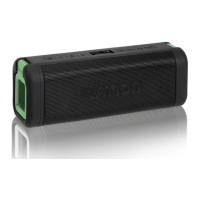
The Ivation Acoustix is a waterproof and shock-resistant, rechargeable Bluetooth speaker with optional FM and auxiliary inputs, designed to interface with most modern Bluetooth-equipped phones, tablets, and other Bluetooth-capable personal electronics. An auxiliary input jack allows connection to almost any electronic device with a headphone jack, including both Bluetooth and non-Bluetooth devices like cassette tape players or portable CD players. Additionally, the Acoustix provides FM-radio functionality and call answering capabilities.
The Acoustix features a comprehensive set of controls and indicators for intuitive operation:
The display screen provides clear indicators:
Before first use, charge the Acoustix using the included charging cable and wall outlet adapter or a computer's USB port. The red LED under the grille indicates charging, turning green when fully charged. To power on, press and hold the POWER button for several seconds. The unit defaults to Bluetooth mode, indicated by a flashing blue LED. Language selection: The default language is English. To change to French or Spanish, hold the PLAY-PAUSE button for 5 seconds, use VOLUME-UP/DOWN to select, and confirm with the POWER button or by leaving idle for 10 seconds. The display screen dims after 3 minutes of inactivity to conserve power. The unit powers off if it does not receive a signal for 10 minutes.
To pair, turn on Acoustix by holding the POWER button for three seconds. It will automatically enter pairing mode with a blinking blue LED. On your smartphone or Bluetooth-enabled device, ensure Bluetooth is on and select "Acoustix" from the list of available devices. The blue LED will glow steady for a few seconds, then blink every 10 seconds to confirm connection. During initial pairing, you may be prompted to allow Acoustix access to your contacts. Granting this permission enables caller names to display on the screen; otherwise, the phone number will be shown. Use your device's music app to play audio. Use the PLAY-PAUSE button to pause, VOLUME-UP/DOWN to adjust volume, and RIGHT/LEFT ARROW buttons to navigate songs. To pair an additional device, press and hold the Mode button for 5 seconds until the blue LED blinks, then follow the pairing procedure. To un-pair all devices, hold the MODE button for 12 seconds until two long tones are heard, and Acoustix will re-enter pairing mode.
With Acoustix powered on, press the MODE button until "Radio" is shown on the display.
With Acoustix powered off, plug one end of a 1/8-inch stereo mini-jack cable (not included) into the Auxiliary-in port under the access door, and the other end into the headphone jack of your audio device. Power on Acoustix and press the MODE button until "Aux in" is displayed. Power on the auxiliary device and begin playing audio. In Auxiliary mode, only volume can be adjusted on Acoustix; all other operations (pause, tuning, track selection) must be performed from the connected auxiliary device.
When paired to a smartphone, incoming calls will ring through Acoustix. The caller's phone number or name (if in your contacts and enabled) will be displayed.

 General