Need help?
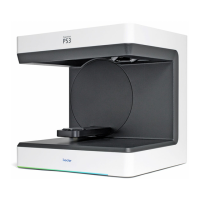
Do you have a question about the Ivoclar digital PrograScan PS3 and is the answer not in the manual?
Explains warning symbols, danger levels, and their consequences for safe operation.
Details safety labels on the scanner, their meanings, and the need for maintenance.
Information on the scanner's identification plate and CE marking compliance.
Guidance on how to contact customer support for technical issues.
Defines the proper use of the PrograScan PS3 / PS5 scanner and potential misuse.
Specifies the required environmental conditions for scanner operation.
Outlines the responsibilities of the operator for safe scanner operation.
Lists the necessary qualifications and training for operating and maintaining the scanner.
Details the duties of staff concerning safety instructions and scanner operation.
Information on required personal protective equipment for working with the scanner.
Provides safety guidelines for specific operational phases like transportation and installation.
Identifies and describes the main components of the PrograScan PS3 / PS5 scanner.
Details the layout and function of the connection panel on the rear of the scanner.
Lists and describes various accessories available for the PrograScan PS3 / PS5.
Instructions for safely unpacking the scanner and checking its contents.
Guidelines for selecting an appropriate and safe location for scanner installation.
Identifies the designated points for safely lifting and carrying the scanner.
Provides a schematic visualization of a typical system setup with the scanner.
Step-by-step instructions for installing the PrograScan PS3 / PS5 scanner.
Guidance on installing the necessary computer system for the scanner.
Instructions for installing the PrograScan PS3 / PS5 scan software.
Explains the importance and procedure for recalibrating the scanner for accurate results.
Provides detailed instructions and safety precautions for cleaning the scanner.
Offers guidance on troubleshooting common issues and when to contact support.
Specifies the minimum hardware and software requirements for the PC.
 General
| Brand | Ivoclar digital |
|---|---|
| Model | PrograScan PS3 |
| Category | Dental equipment |
| Language | English |

 To Next Page