Need help?
Do you have a question about the Ivoclar digital PrograMill Dry and is the answer not in the manual?
Information on the manual's purpose and target audience.
Explanation of symbols used in the instructions for clarity.
Defines the hierarchy and meaning of safety signal words.
Guidelines for safe operation, installation, and maintenance to prevent hazards.
Precautions against electric shock, including cable handling and grounding.
Warnings about dust inhalation, crushing, and cutting injuries from moving parts.
Risks from loud noise and high-pressure pneumatic components.
Importance of proper lighting and ergonomic setup for safety and precision.
Specifies approved materials, commercial use, and regulatory compliance for dental objects.
Guidance on using machine software and ensuring system compatibility.
Requirements for machine cleaning, maintenance, and spindle handling.
Conditions and risks associated with operating the machine without supervision.
Procedures for safely moving, storing, and repackaging the machine.
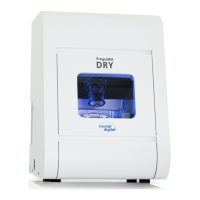
Description of the machine's front side, connection panel, and working chamber door.
Details the working chamber, accessories container, and status lighting colors.
Explains the anti-soiling concept, CNC computer requirements, and sound emission levels.
Describes the linear and rotational axes of the machine.
Comprehensive specifications including dimensions, spindle, air supply, connections, and ambient conditions.
Lists items to verify upon receiving the machine.
Criteria for choosing a suitable location and required safety distances.
Steps for establishing electrical power and connecting compressed air.
Removing transport lock and installing pneumatic hoses and air regulator.
Guidelines for connecting the suction unit for dust extraction.
Procedure for connecting the machine to the CNC computer via USB.
Steps for powering on, referencing, and safely shutting down the machine.
Instructions for correctly mounting discs into the material holder.
Guidance on managing, inserting, and exchanging tools in the tool magazine.
Detailed steps for manually inserting tools into the magazine positions.
Procedures for initiating machining jobs and stopping them if necessary.
Steps to take for interrupted jobs, machine malfunctions, and tool breakages.
Procedures for handling power failures and performing emergency chamber door access.
Schedule for preventive maintenance and how to contact service partners.
Detailed instructions for cleaning the working chamber and the collet chuck.
Procedures for checking the air regulator, water separator, and cleaning the machine housing.
Steps for replacing the main fuse and calibrating the machine axes.
Guidance on updating software/firmware and replacing tool magazine inserts.
Overview of maintenance tasks, intervals, and replaceable wear parts.
Regulations and methods for disposing of processing waste materials.
Guidelines for disposing of the machine itself, including contact with service partners.
Solutions for issues like not being able to open the chamber or the machine not referencing.
Troubleshooting for job failures, unsatisfactory results, and tool breakage.
Diagnosing and resolving problems related to low or fluctuating air pressure and vacuum.
Solutions for suction unit malfunctions and problems with tool magazine inserts.
 General
| Type | Dental milling machine |
|---|---|
| Axis | 5-axis |
| Milling Precision | High precision |
| Software Compatibility | PrograMill CAM software |
| Cooling System | Air cooling |
| Tool Changer | Automatic |
| Manufacturer | Ivoclar |
| Technology | Dry milling |
| Milling Method | Dry |
| Applications | Crowns, Bridges, Inlays, Onlays, Veneers, Abutments |
| Material Compatibility | Zirconium oxide, PMMA, wax |
| Milling Time | Varies depending on material |
| Power Requirements | 100–240 V AC, 50/60 Hz |
| Connectivity | Ethernet, USB |

 To Next Page