Checking the compressed air reg-
ulator
NOTICE
Damaging of the machine when compressed air is
contaminated
Compressed air that does not fulfill the guidelines for
purity according to ISO 8573-1 can damage the
machine.
Check the water separator of the compressed air
regulator daily for contamination.
Never use the machine if there is water, oil or solid
particles in the water separator.
Checking the water separator for condensate
Condensate in the separator usually points to
compressed air not being dry enough.
1. Check if water, oil or solid particles piled up in the
water separator.
2. If this is the case, switch the machine off imme-
diately and proceed as follows:
3. Disconnect the machine from the compressed air
supply.
4. Check the compressed air supply and make sure
that the compressed air fulfills the requirements
for air purity according to ISO 8573-1. Do not use
the machine until the compressed air fulfills this
requirement.
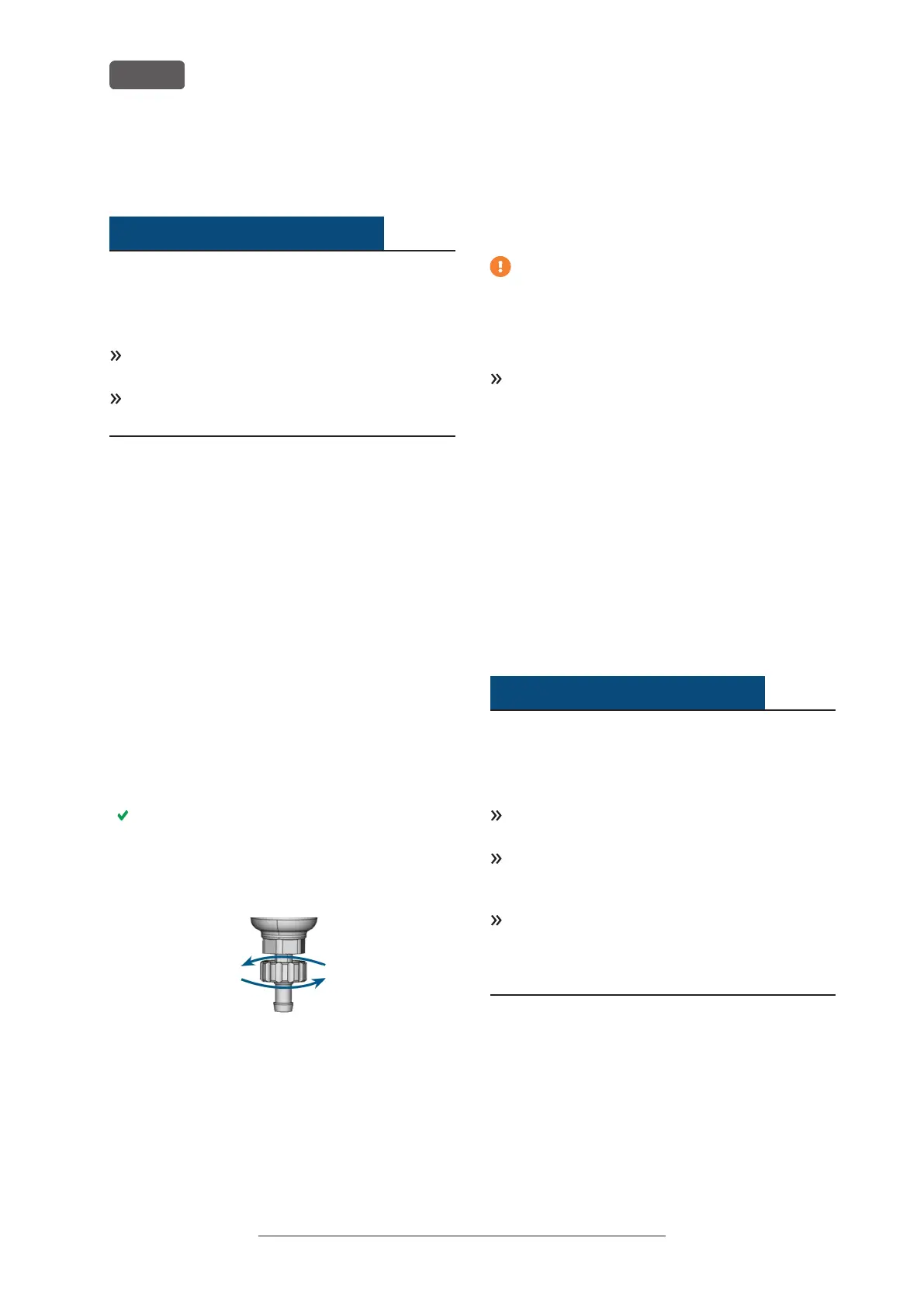
5. Drain the water separator by turning the dis-
charge screw counter-clockwise.
The condensate is blown out downwards under
pressure.
6. Close the discharge screw again by turning it
clockwise.
FIG. 32 – OPENING/ CLOSING THE DISCHARGE SCREW OF THE
COMPRESSED AIR REGULATOR
Exchanging/ cleaning the contaminated filter
cartridge
You have to clean or exchange the filter cartridge in
the water separator in case of strong contamination.
A strongly contaminated cartridge can lead to a
pressure loss.
If the compressed air fulfills the requirements for air
purity according to ISO 8573-1, the filter cartridge
usually does not have to be changed.
If the filter cartridge is contaminated, check the
purity of your compressed air.
You exchange or clean the filter cartridge as follows:
1. Disconnect the machine from the compressed air
supply.
2. Unscrew the bowl of the water separator.
3. Unscrew the filter screw below the filter cartridge.
4. Pull out the filter cartridge and clean it if neces-
sary.
5. Insert the new or cleaned filter cartridge and reas-
semble the water separator.
Cleaning the housing
NOTICE
Damaging of the housing when using an unsuitable
cleaning agent
If you use an unsuitable cleaning agent and/or
cleaning tool for cleaning the machine housing, the
surface or the adhesive foil can get damaged.
To avoid scratches, only use a microfiber cloth to
clean the housing.
Take care of the adhesive symbols so that they do
not peel off. The adhesive foil is especially sensi-
tive to rubbing and strong cleaning agents.
If the usage of a special cleaning agent is neces-
sary to eliminate certain dirt, we recommend check-
ing the suitability of the cleaning agent at a hidden
place of the coated part first.
1. Clean the surface with a dry microfiber cloth.
2. If some dirt cannot be removed this way, moisten
the cloth. Use a pH neutral cleaning agent if
necessary.
Operating Instructions:PrograMill Dry
Version: 11/19/2020
PrograMill Dry – Maintenance and do-it-yourself
EN 34


 To Next Page