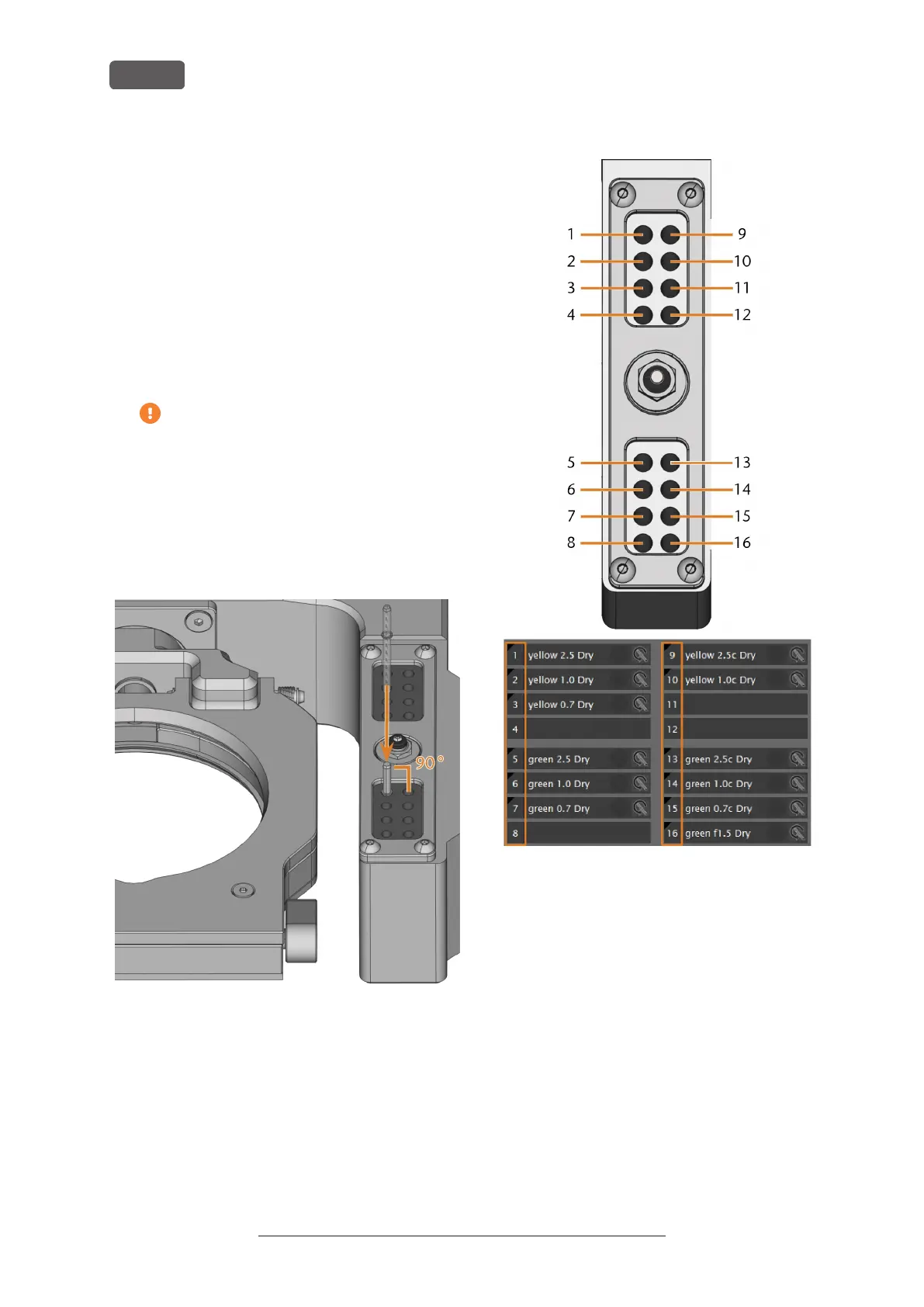
You insert tools manually as follows:
1. Remove worn or damaged tools from the tool
magazine if any.
2. Insert the new tools:
a. Ensure that the positions of the tools in the
tool magazine match the tool positions in
PrograMill CNC.
b. Insert the tools straight into the tool positions
with the cutting edge pointing downwards.
Push them in until the ring touches the rub-
ber.
If the positions of the tools in the tool
magazine do not match the tool positions
in PrograMill CNC, the machine will use
the wrong tool(s) during job execution and
the job result will become unusable.
3. After replacing a tool, reset the tool life value. For
this purpose, use the Tool management view in
PrograMill CNC.
FIG. 21 – INSERTING TOOLS INTO THE TOOL POSITIONS
FIG. 22 – TOP: TOOL POSITIONS 1 – 16 IN THE TOOL MAGAZINE
BOTTOM: TOOL POSITIONS 1 – 16 IN PROGRAMILL CNC
Operating Instructions:PrograMill Dry
Version: 11/19/2020
PrograMill Dry – Operation: Preparing jobs
EN 26


 To Next Page