EasyManua.ls Logo

iWantit iBT4512 - User Manual

iWantit iBT4512
12 pages
Print Icon
To Next Page IconTo Next Page
Loading...
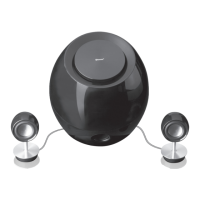
bluetooth wireless speaker system
iBT4512
instruction manual
iBT4512_IB_RC_120928_Annie.indd 1 28/09/2012 6:04 PM
Question and Answer IconNeed help?

Do you have a question about the iWantit iBT4512 and is the answer not in the manual?

Summary

Unpacking

Product Overview

The Main Unit

Overview of the main speaker unit, detailing front and rear views and connection points.

Connections

Connecting the Main Unit and Speakers

Instructions for physically connecting the main unit to its satellite speakers.

Connecting an External Audio Device

How to connect external audio sources using the line-in sockets.

Connecting the AC;DC Power Cord

Steps for connecting the system to a power source via the AC adapter.

Playback

Pairing the Bluetooth Device

Guide to establishing a Bluetooth connection between your device and the speaker system.

Re-connecting a Lost Bluetooth Connection

Cleaning and Maintenance

Cleaning the Unit

Instructions on how to properly clean the speaker unit without causing damage.

Hints and Tips

Specifications

Safety Warnings

General Safety Precautions

Covers damage, location, temperature, flames, moisture, ventilation, and general safety.

Electrical Safety

Warnings regarding electric shock, supervision, service, and maintenance.

Summary

Unpacking

Product Overview

The Main Unit

Overview of the main speaker unit, detailing front and rear views and connection points.

Connections

Connecting the Main Unit and Speakers

Instructions for physically connecting the main unit to its satellite speakers.

Connecting an External Audio Device

How to connect external audio sources using the line-in sockets.

Connecting the AC;DC Power Cord

Steps for connecting the system to a power source via the AC adapter.

Playback

Pairing the Bluetooth Device

Guide to establishing a Bluetooth connection between your device and the speaker system.

Re-connecting a Lost Bluetooth Connection

Cleaning and Maintenance

Cleaning the Unit

Instructions on how to properly clean the speaker unit without causing damage.

Hints and Tips

Specifications

Safety Warnings

General Safety Precautions

Covers damage, location, temperature, flames, moisture, ventilation, and general safety.

Electrical Safety

Warnings regarding electric shock, supervision, service, and maintenance.

Overview

The iWantit iBT4512 is a Bluetooth wireless speaker system designed for playing audio from various external devices. It consists of a main unit, two satellite speakers, and a power/volume control unit.

Function Description:

The iBT4512 allows users to listen to music wirelessly via Bluetooth-enabled devices or through wired connections using its line-in inputs. The system is designed for indoor use.

Important Technical Specifications:

  • Model: iBT4512
  • Power Supply (Adapter):
    • Input: AC 100 - 240V ~ 50/60Hz
    • Output: DC 15V === 2.0A
  • Power Supply (Main Unit):
    • Input: DC 15V === 2.0A
  • Output Power: 2 x 10W + 25W (RMS)
  • Standby Power Consumption: <0.5W
  • Dimensions:
    • Main Unit: Ø175 x 198 mm
    • Speaker: Ø40 x 95 mm
  • Bluetooth Operational Range: Approximately 10 meters (may be reduced by obstacles or interference).
  • Bluetooth Profile Support: Advanced Audio Distribution Profile (AADP)

Usage Features:

Unpacking:

The package includes:

  • The Main Unit
  • AC Adapter
  • Audio Cable
  • Power Switch / Volume Control Knob
  • 2 Speakers
  • Instruction Manual Users are advised to retain packaging and dispose of it according to local regulations if necessary. In case of missing or damaged items, UK customers can contact Partmaster at 0844 800 3456.

Product Overview - Main Unit:

  • Front View: Features a clean, spherical design.
  • Rear View:
    1. LINE IN 1: For connecting external audio devices.
    2. MAINS CONNECTION: DC 15V: Socket for the mains adapter.
    3. LINE IN 2: For connecting external audio devices.
    4. USB SOCKET: Connection for the Power switch/Volume control knob and satellite speaker cable.

Power / Volume Control Unit:

  1. POWER SWITCH / VOLUME CONTROL: Rotary knob to turn the unit on/off and adjust volume.
  2. LED INDICATOR: Provides status feedback (e.g., blinking for pairing, steady for connected).
  3. SPEAKER JACKS: Connections for the two satellite speakers.

Connections:

  1. Connecting the Main Unit and Speakers:
    • Connect the USB plug from the Power Switch / Volume Controls to the main unit's USB socket.
    • Connect the two speaker jacks to the satellite speakers.
    • Rotate the power switch/volume control knob until a click is heard to turn on the unit.
    • The Control's LED indicator will blink slowly.
    • Important: Start with low volume and gradually increase to avoid potential hearing damage from loud volumes.
  2. Connecting an External Audio Device:
    • The unit has two external audio input sockets (Line In 1 and Line In 2).
    • Connect the audio cable from the output sockets of your external audio/media source device to either Line In 1 or Line In 2 on the main unit.
    • Refer to the external device's manual for more information on its audio connections.
  3. Connecting the AC/DC Power Cord:
    • After all other connections are made, connect the AC Adapter to the main unit.
    • Plug the AC Adapter into a mains socket.
    • Safety Note: Unplug the AC adapter from the main socket if leaving the unit unattended for extended periods.

Playback:

Pairing a Bluetooth Device:

  • Operational Range: Approximately 10 meters. Obstacles or other electronic devices may reduce this range or cause interference.
  • Compatibility: Compatibility with all Bluetooth devices is not guaranteed.
  • Steps:
    1. Turn on the unit. The white LED will blink once every second, indicating it's in pairing mode or searching for a Bluetooth device.
    2. Enable Bluetooth on your device and search for "BT Speaker" in the pairing list.
    3. If prompted, enter the default password "0000" or click "OK" to confirm acceptance. The white LED will then shine steadily.
    • When playback starts, the Control's LED will blink briefly before illuminating steadily.
    • Moving the media source device out of range will disconnect the Bluetooth connection.

Re-connecting a Lost Bluetooth Connection:

  1. Ensure the media source device is within operational range and free of obstructions.
  2. Turn on your device's Bluetooth connection.
  • If disconnected, the unit automatically enters pairing mode (white LED blinks once per second), even if previously paired.

Listening to Music from a Bluetooth Device:

  • If the connected Bluetooth device supports Advanced Audio Distribution Profile (AADP):
    1. Pair the Bluetooth device with the unit.
    2. Access and play music normally on your Bluetooth device.
  • Note: If multiple Bluetooth devices are connected, priority will be given to music played via the Bluetooth connection.

Hints and Tips:

  • Troubleshooting Setup Problems:
    • Check all connections between speakers, unit, and Bluetooth device.
    • Ensure mains power supply is switched on.
    • Consult manuals for non-standard audio devices.
    • Check device volume level.
    • Ensure the device can play music with the unit.
    • For poor audio quality, ensure the device is close to the unit and free of obstacles.
    • If device cannot connect:
      • Verify device supports AADP.
      • Ensure device's Bluetooth function is on.
      • Confirm unit is in pairing mode (turn off/on if not).
      • Ensure unit is not connected to another Bluetooth device (turn off/on if it is).
  • Functional Abnormality: Unplug and reconnect the unit from the mains socket.

Maintenance Features:

Cleaning and Maintenance:

  • Safety First: Always ensure the unit is fully unplugged from the mains socket before cleaning.
  • Cleaning the Unit:
    • Wipe the case with a slightly moist, lint-free cloth.
    • Do not use cleaning fluids containing alcohol, ammonia, or abrasives.
    • Do not spray aerosol at or near the unit.
  • General Maintenance:
    • Do not remove screws or open fixed covers; the unit contains no user-serviceable parts. All maintenance should be performed by qualified personnel.
    • Do not use abrasive pads or cleaning solutions that could damage the surface.
    • Do not use liquids to clean the unit.

Safety Warnings:

  • General: Read all instructions, retain the manual, and ensure mains voltage matches the rating label.
  • Damage: Inspect for damage after unpacking. Do not operate if damaged or malfunctioning; switch off, unplug, and consult dealer.
  • Location: Place on a flat, stable surface, away from vibrations. Avoid sloped surfaces. Mains socket should be easily accessible. For indoor use only.
  • Temperature: Avoid extreme hot or cold temperatures. Keep away from heat sources (radiators, fires) and direct sunlight.
  • Naked Flames: Never place candles or open flames on or near the unit.
  • Moisture: Do not expose to rain, moisture, dripping, or splashing. Do not place liquid-filled objects (e.g., vases) on the unit. If liquid spills into the unit, switch off, unplug, and consult dealer immediately.
  • Ventilation: Ensure ventilation vents are not obstructed by curtains or other materials to prevent overheating. Do not install in confined spaces (bookcases, built-in cabinets); ensure good ventilation.
  • Safety (Connections/Power):
    • Always disconnect from mains supply before connecting/disconnecting other devices or moving.
    • Unplug during lightning storms.
    • To avoid unnecessary energy consumption, switch off and disconnect the mains adapter when unattended for long periods (overnight, holiday, etc.).
  • Mains Adapter: The adapter draws electricity when plugged in. Disconnect it from the power supply when unattended.
  • Interference: Do not place near appliances that may cause electromagnetic interference, as this can adversely affect performance and cause distorted audio/picture.
  • Supervision: Children should be supervised to prevent them from playing with the unit or inserting objects into openings, which could cause electric shock.
  • Warning Symbols:
    • Lightning flash with arrowhead symbol: Indicates uninsulated "dangerous voltage" within the unit, posing a risk of electric shock.
    • Exclamation point: Alerts user to important operating and maintenance instructions in the manual.

iWantit iBT4512 Specifications

General IconGeneral
BrandiWantit
ModeliBT4512
CategorySpeakers
LanguageEnglish