9
99
9
!
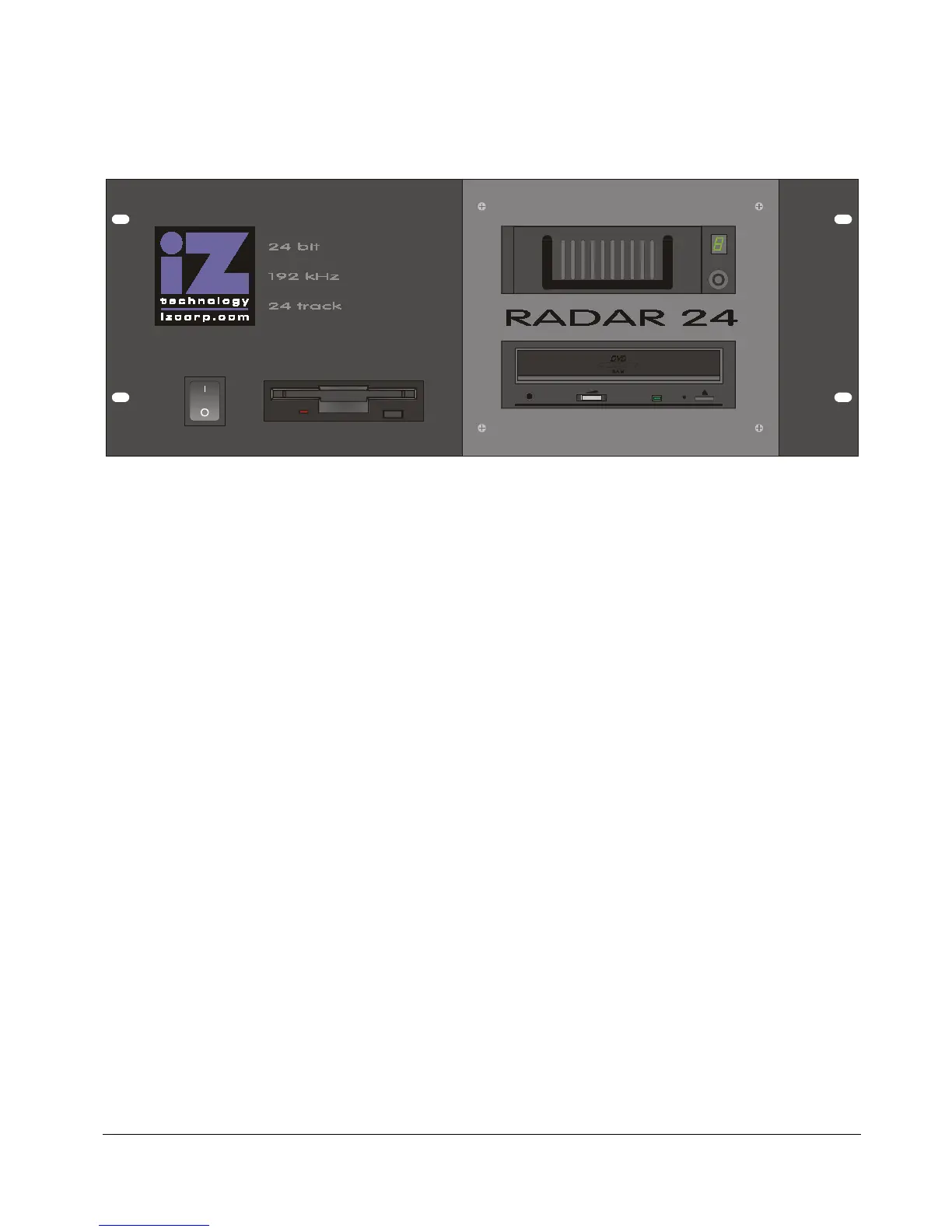
Front Panel
RADAR
24
has a simple front panel layout due to the products remote-centric design philosophy.
Diagram 1.0
-
RADAR
24 Front Panel Controls & Indicators
(unit shown with DVD-RAM backup device installed)
! POWER ON/OFF SWITCH
It is recommended that you choose
SHUTDOWN RADAR
from the
MAIN MENU
prior to powering down the
system using the front panel power switch.
! FLOPPY DRIVE
High-density 3.5” floppy disk drive for software upgrades and of text file import/export.
! DRIVE BAY 1
Holds a single high-capacity hard disk drive in a removable carrier.
! DRIVE BAY 2
2X DVD-RAM or optional backup approved backup device.
IMPORTANT NOTE: System software has been pre-installed on the internal hard disk. It
is not necessary to put the supplied system software diskettes in the floppy disk drive.
Please keep the supplied diskettes in a safe place in case it becomes necessary to re-
install the system software in the future.



 To Next Page