EasyManua.ls Logo

Izzo Golf SWAMI 6000 - User Manual

Izzo Golf SWAMI 6000
3 pages
Print Icon
To Next Page IconTo Next Page
Loading...
Satellite
Connection
1. Insert the micro USB charging end into the Swami 6000 & then insert the
USB end of the charging cord into a USB charging port or AC adapter
(included). The recommended USB charging rate is 5V, 1A.
2. A complete full charge will take roughly 6 hours of charging time.
Micro
USB
The Swami 6000 has a set of strong internal magnets which holds on the
metal belt clip. The belt clip must be removed before being able to attach
to a cart frame. To remove the belt clip:
MAGNETIC BELT CLIP REMOVAL:
CHARGING
BUTTON DESCRIPTION
1. With the unit vertical, rotate the belt clip 90 degrees in either direction.
2. Next, lift up on the top end of the clip & push down on the other end to
lift o󰀨 from the magnets.
NOTE: The internal magnets are very strong. A generous amount of force is
required to separate the clip from the magnets
To attach, simply line up the square backing of the
belt clip and let the magnets attract the backing.
Lift
Up
Push
Down
To view complete user manual visit: WWW.IZZO.COM
Question and Answer IconNeed help?

Do you have a question about the Izzo Golf SWAMI 6000 and is the answer not in the manual?

Summary

Charging the Swami 6000

Magnetic Belt Clip Removal

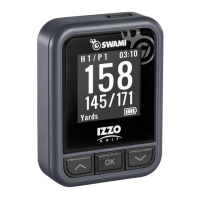
Swami 6000 Button Functions

Enter Button Function

Hold to power on; press to select options.

Page Button Function

Toggle between screens or return to previous screen.

Up Button Function

Scroll up or change holes.

Down Button Function

Scroll down or change holes.

Using the Swami 6000 on the Course

Play Mode Navigation

Displays distances to green edges. Access Hazards, Scorecard, or Shot Distance.

Hazards Screen

View hazard distances from your current location.

Scorecard Functionality

Enter scores for each hole; requires activation in Settings.

Shot Distance Measurement

Measure distance traveled by a shot; requires activation in Settings.

Force Shut Down Procedure

Izzo Golf SWAMI 6000 Specifications

General IconGeneral
Battery LifeUp to 16 hours
TouchscreenNo
BluetoothNo
Auto Course RecognitionYes
Auto Hole AdvanceYes
Shot TrackingYes
Digital ScorecardYes
Preloaded Courses38, 000+
Distance AccuracyWithin 1 yard
Key Featuresdigital scorecard

Related product manuals