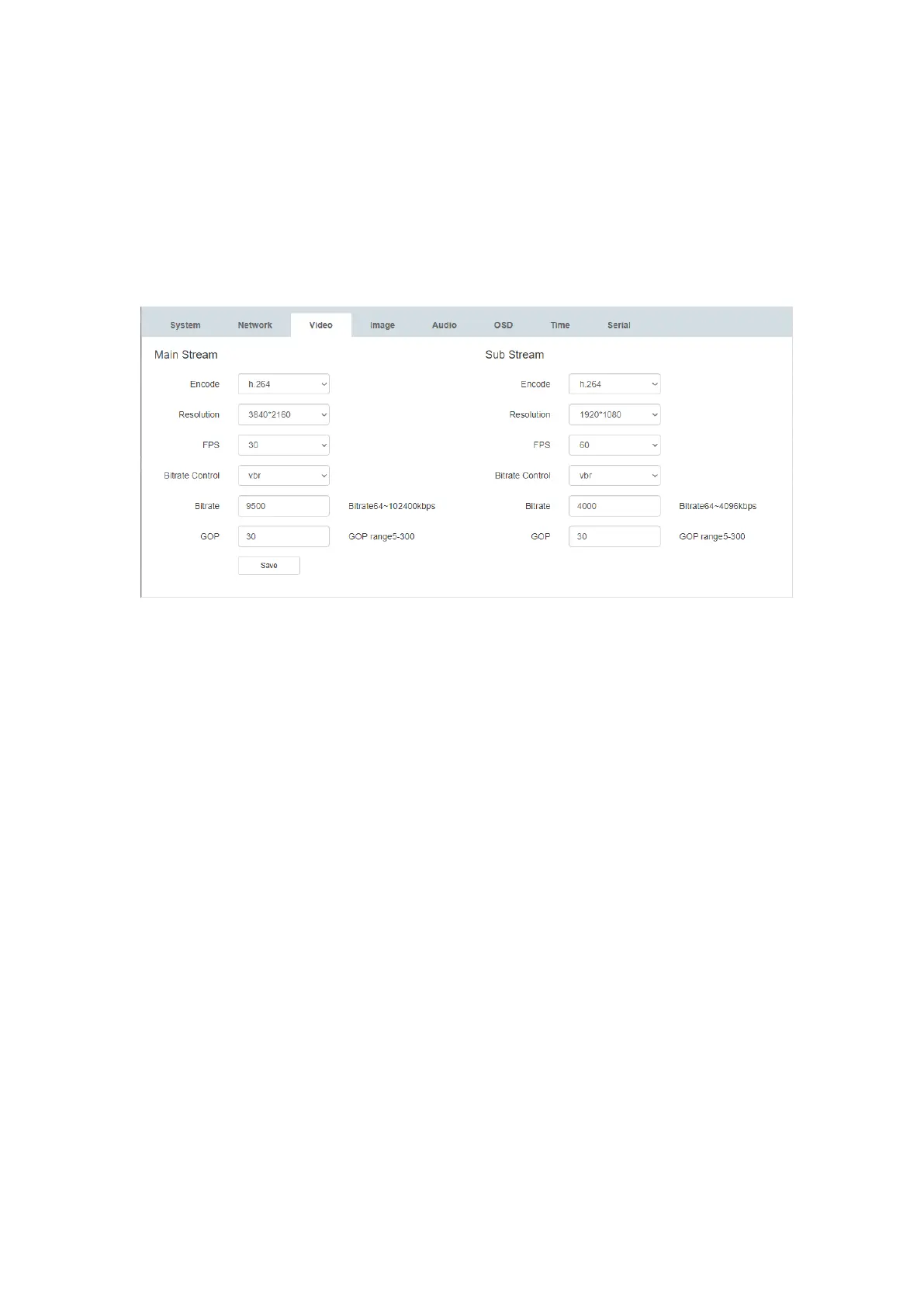
● Resolution: 3840×2160(Default) | 1920×1080 | 1280×720 | 640×360
● FPS (frames per second):1 – 60 fps | 30fps (Default)
● Bitrate Control: CBR (constant) | VBR (variable)
● Bitrate (Kbps): 64 – 102400
● GOP (group of pictures): 5 – 300 | 30 (default)
6.6. Image settings
1) In the ‘Image’ tab, you can adjust the luminance, contrast, hue and saturation of the
image
● Luminance: 0 - 100
● Contrast: 0 - 100
● Hue: 0 - 100
● Saturation: 0 - 100
● System Default: 50
2) Image Adjustment
• Mirror: Check the ‘Mirror’ box to flip the stream image on both the x and y axis
• Flip: Check the ‘Flip’ box to flip the stream image on the x axis
• Capture Pic: Check the ‘Capture Pic’ to preview the stream image
o Use the ‘FPS’ drop down menu to select the capturing frame rate (1-15)
• Open Pic: Click ‘Open Pic’ to view a still image of the stream image in a new
tab


 To Next Page