EasyManua.ls Logo

Jabra Evolve 65 SE MS Mono - User Manual

Jabra Evolve 65 SE MS Mono
2 pages
Print Icon
To Next Page IconTo Next Page
Loading...
Jabra Evolve 65 SE MS Mono
How do I pair my Jabra Evolve 65 with my mobile device?
To pair your Jabra Evolve 65 with your smartphone, tablet, or other mobile
device, follow these steps.
1. Turn on the Bluetooth setting on your mobile device.
2. To enter pairing mode, hold (3 seconds) the On/off/pairing switch in
the Bluetooth position until the LED flashes blue. Alternatively, wear
the headset to hear the pairing instructions.
The headset is now ready to pair with your mobile device.
3. To pair, go to the Bluetooth menu on your mobile device and select the
Jabra Evolve 65 from the list of available devices.
Enter "0000" (4 zeros) if you are asked for a pin code.
Note
If pairing is not successful, try the pairing steps again, or try pairing with a
different Bluetooth device. For troubleshooting tips, see here.
Optionally, try using the Bluetooth Pairing Guide which provides detailed
steps for pairing with a mobile device.
23/10/2022 20:18
https://www.jabra.com/supportpages/jabra-evolve-65se/6593-833-309/faq/00cc28ed-
29a0-4c68-9df4-ceec90251fc2
Page 1 of 2

Other manuals for Jabra Evolve 65 SE MS Mono

Question and Answer IconNeed help?

Do you have a question about the Jabra Evolve 65 SE MS Mono and is the answer not in the manual?

Summary

Pairing Jabra Evolve 65 with Mobile Device

Enable Mobile Bluetooth

Turn on the Bluetooth setting on your smartphone, tablet, or other mobile device.

Activate Headset Pairing Mode

Hold the On/off/pairing switch in the Bluetooth position for 3 seconds until the LED flashes blue.

Select Device and Enter PIN

Choose Jabra Evolve 65 from your device's list and enter '0000' if a PIN is required.

Troubleshooting and Pairing Guide

If pairing fails, retry steps or consult the Bluetooth Pairing Guide for further assistance.

Summary

Pairing Jabra Evolve 65 with Mobile Device

Enable Mobile Bluetooth

Turn on the Bluetooth setting on your smartphone, tablet, or other mobile device.

Activate Headset Pairing Mode

Hold the On/off/pairing switch in the Bluetooth position for 3 seconds until the LED flashes blue.

Select Device and Enter PIN

Choose Jabra Evolve 65 from your device's list and enter '0000' if a PIN is required.

Troubleshooting and Pairing Guide

If pairing fails, retry steps or consult the Bluetooth Pairing Guide for further assistance.

Overview

The Jabra Evolve 65 SE MS Mono is a professional wireless headset designed for unified communication (UC) and Microsoft Teams (MS) environments, offering seamless connectivity and high-quality audio for calls and music. This specific model is a mono headset, meaning it covers one ear, allowing the user to remain aware of their surroundings while on a call. It is part of the broader Jabra Evolve 65 series, which includes various configurations such as mono and stereo, and versions optimized for Microsoft Teams (MS) or general unified communication (UC) platforms.

Function Description:

The primary function of the Jabra Evolve 65 SE MS Mono is to provide a reliable and comfortable audio solution for business professionals. It facilitates clear communication in various work settings, from open offices to remote work environments. The headset connects wirelessly to smartphones, tablets, and computers via Bluetooth, offering freedom of movement up to 30 meters (100 feet) from the connected device. It is designed to enhance productivity by providing excellent sound quality for both the user and the listener, reducing background noise, and offering intuitive controls. The "SE" in the name indicates a "Special Edition," often implying updated features or design compared to earlier models. The "MS" designation signifies its optimization for Microsoft Teams, ensuring full compatibility and integration with the platform's features, such as call control and status synchronization.

Important Technical Specifications:

While specific technical specifications like battery life in hours, driver size, or frequency response are not explicitly detailed in the provided document, the manual highlights key connectivity and pairing features. The headset utilizes Bluetooth technology for wireless connection, supporting a range that allows users to move away from their desks. The pairing process involves holding the On/off/pairing switch in the Bluetooth position for 3 seconds until the LED flashes blue, indicating it's in pairing mode. It requires a standard Bluetooth PIN code of "0000" if prompted during pairing. The headset is designed to be compatible with a wide range of mobile devices, including smartphones and tablets, as well as computers when used with a Jabra Link 370 or Link 380 Bluetooth adapter (though the adapter is not explicitly mentioned for this specific model in the provided text, it's common for the Evolve 65 series). The mono design implies a single ear cup, which typically means it's lighter and less intrusive than a stereo headset.

Usage Features:

The Jabra Evolve 65 SE MS Mono is designed for ease of use and intuitive operation.

  • Wireless Connectivity: Bluetooth allows for wireless connection to mobile devices and computers, providing flexibility and mobility.
  • Intuitive Pairing: The pairing process is straightforward, requiring a simple 3-second hold of the On/off/pairing switch. Audio prompts guide the user through the pairing process when wearing the headset.
  • Multi-device Connectivity: The headset can connect to multiple devices simultaneously, allowing users to switch between calls on a mobile phone and a computer without re-pairing.
  • Call Control: While not explicitly detailed in the provided text, Jabra headsets typically offer on-ear controls for answering/ending calls, adjusting volume, and muting the microphone.
  • Microsoft Teams Optimization: The "MS" variant ensures seamless integration with Microsoft Teams, providing dedicated call control and status updates within the Teams application.
  • Comfortable Design: As a mono headset, it is generally lightweight and designed for extended wear, allowing users to stay connected without discomfort. The single ear cup design also allows for situational awareness.
  • LED Indicators: An LED indicator on the headset provides visual cues for pairing status, battery life, and call status.

Maintenance Features:

The provided document does not explicitly detail maintenance features for the Jabra Evolve 65 SE MS Mono. However, based on general best practices for electronic devices and Jabra headsets, the following can be inferred:

  • Cleaning: Regular cleaning of the ear cushion and headset body with a soft, dry cloth is recommended to maintain hygiene and appearance. Avoid using harsh chemicals or abrasive materials.
  • Storage: When not in use, storing the headset in a protective case (if provided) or a safe place can prevent damage from dust, spills, or physical impact.
  • Charging: The headset is rechargeable, and it's important to use the recommended charging cable and power source to ensure optimal battery life and prevent damage. Avoid overcharging or completely draining the battery frequently.
  • Troubleshooting: The manual suggests troubleshooting steps for pairing issues, such as retrying the pairing process or attempting to pair with a different Bluetooth device. It also directs users to a "Bluetooth Pairing Guide" and general troubleshooting tips online, indicating that support resources are available for common issues.
  • Firmware Updates: Jabra often provides firmware updates for their headsets to improve performance, add new features, and fix bugs. These updates are typically managed through Jabra's software applications (e.g., Jabra Direct for computers or Jabra Sound+ for mobile devices), though this is not mentioned in the provided document.

In summary, the Jabra Evolve 65 SE MS Mono is a professional-grade, single-ear Bluetooth headset optimized for Microsoft Teams, offering a blend of wireless freedom, clear communication, and user-friendly features for the modern workplace. Its design prioritizes comfort and situational awareness, making it suitable for professionals who need to stay connected while remaining aware of their surroundings.
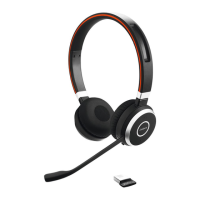
Jabra Evolve 65 SE MS Mono Specifications

General IconGeneral
BrandJabra
ModelEvolve 65 SE MS Mono
CategoryHeadphone
LanguageEnglish

Related product manuals