
 Need help?
Do you have a question about the Jabra Steel and is the answer not in the manual?
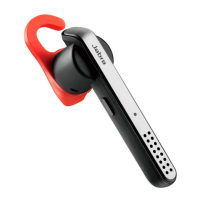
Choose between different ergo-designed EarGels for optimal fit and comfort.
Turn the headset on, press and hold the Answer/end button until the Bluetooth indicator flashes blue, then follow voice-guided instructions.
Instructions for answering, ending, rejecting calls, redialing, and checking headset battery status.
Commands to speak to control the headset, including answer, ignore, pair new device, and check battery.
Voice announcements for guidance and status updates like connection and battery status.
Use voice commands to operate Siri, Google Now, or Cortana on your mobile phone.
Manage multiple calls simultaneously by ending, switching, holding, or rejecting calls.
Jabra Assist is a smartphone app for GPS tracking, connection assistance, and battery status.
View the comprehensive FAQ on Jabra.com/steel for support.
Store the headset with power off and protected, avoid extreme temperatures to maintain battery life and operation.
 General
| Impedance | 16 Ω |
|---|---|
| Ear coupling | Intraaural |
| Microphone type | Boom |
| Microphone frequency | 300 - 3400 Hz |
| Microphone direction type | Omnidirectional |
| Cables included | Micro-USB |
| Eartips material | Silicone |
| Standby time | 240 h |
| Charging source | USB |
| Battery recharge time | 2 h |
| Storage temperature (T-T) | -20 - 70 °C |
| Operating temperature (T-T) | -10 - 55 °C |
| Headset type | Monaural |
| Product type | Headset |
| Certification | CE, FCC, IC, EAC, RCM, SRRC, REACH |
| Product color | Black, Yellow |
| Wearing style | Ear-hook, In-ear |
| Recommended usage | Calls/Music |
| Protection features | Water resistant |
| International Protection (IP) code | IP54 |
| Number of simultaneously connected devices (max) | 2 |
| Wireless range | 10 m |
| Bluetooth version | 4.1 |
| Bluetooth profiles | HSP |
| Connectivity technology | Wireless |
| Microphone cartridge | 4 mm |
| Applications supported | Jabra Assist |
| Number of products included | 1 pc(s) |
| Sustainability certificates | RoHS |
 Weight and Dimensions
| Depth | 71.5 mm |
|---|---|
| Width | 15 mm |
| Height | 710 mm |
| Weight | 10 g |







 To Next Page
