Home
Jadis
Amplifier
JA30
Page 6 (Product Description)
Jadis JA30 - Product Description; Front View Controls
15 pages
Manual
Save Page as PDF
To Next Page
To Next Page
To Previous Page
To Previous Page
Loading...
Description
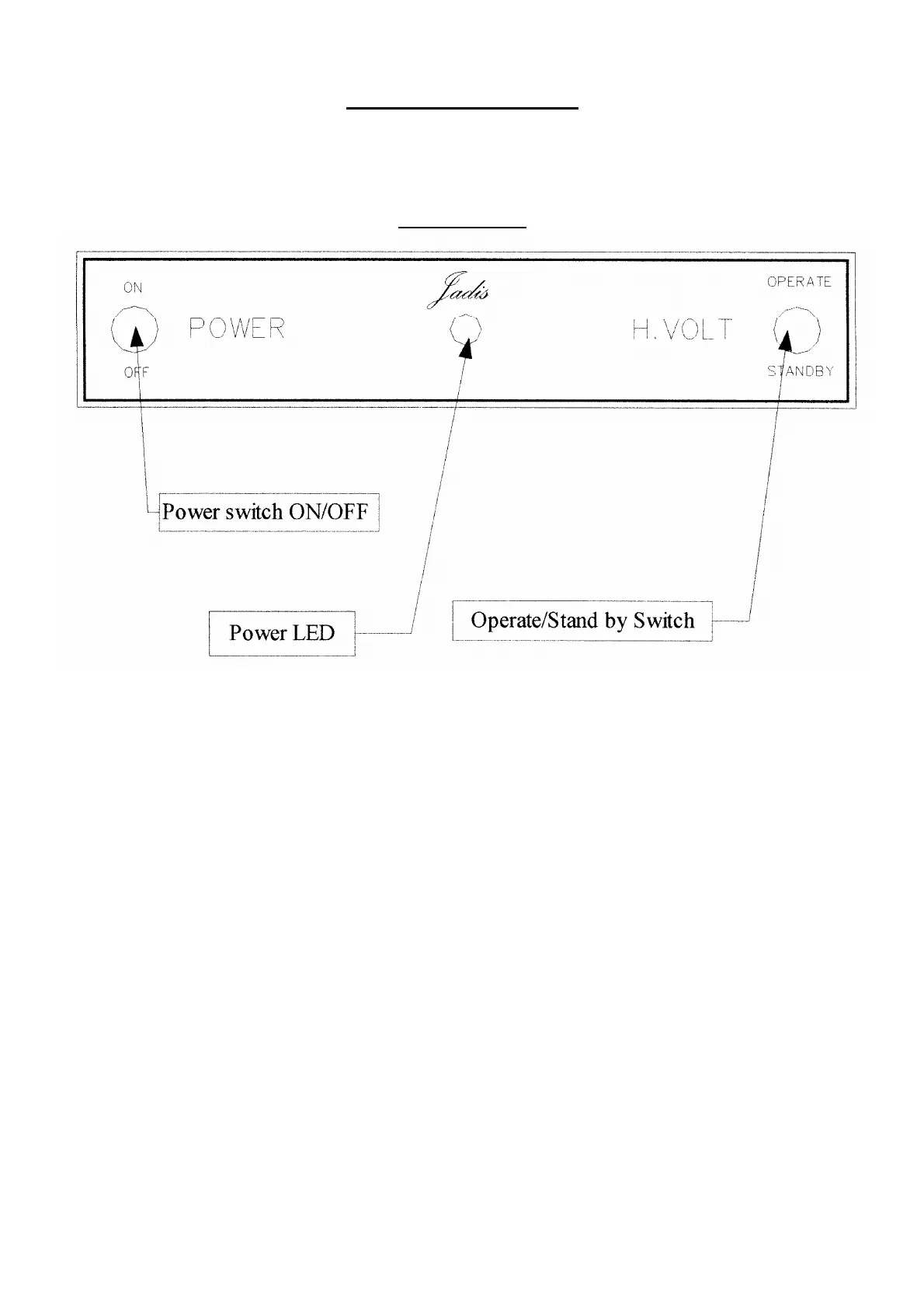
Front View
On the front side of the amplifier, you will find:
- The power switch ON/OFF.
- The OPERATE/ STANDBY switch.
- The Power led, red when the
unit is turned on at stand by
state, and green at operate state.
5
7
Table of Contents
Main Page
Table of Contents
2
Introduction
3
Warning
4
Unpacking and Checking
5
Description
6
Back View
7
Installation Instruction
8
How to Match Your Amplifier to Your Loudspeaker
12
How to Turn on Your Amplifier
13
Maintenance
14
JA30 Specifications
15
Related product manuals
Jadis JP2
8 pages
Jadis JPL
12 pages
Jadis Orchestra reference
12 pages
Jadis Orchestra
12 pages
Jadis DA88 Signature
13 pages



 To Next Page