Fridgewatch 2000 Controller Mk5
Publication 3-59 Section 3
Page 143 of 222 Issue 3.2 : 05.23
This is the maximum permitted error on the compressor LVDT slide valve
reading, with respect to the required slide valve position, calculated by
the P + I algorithm internal to Fridgewatch.
Example 1
If the current slide valve position is 50 % and the result of the P + I
algorithm calculation requires the slides to move to 72 %, then
Fridgewatch provides load pulses until the slide valve position is
within S18 % of 72 %.
If S18 is set to 2 %, then Fridgewatch provides load pulses when
the LVDT reading is less than 70 %, and unload pulses when the
reading is greater than 74 %.
It is important to note that if the S18 Slide Valve Error Value is too small,
or the time taken for the slide valves to travel from minimum to maximum
load or vice versa (i.e. the slide valve’s speed of operation) is too fast,
then hunting will occur. The slide valves load then unload, load then
unload, because each pulse supplied by Fridgewatch produces more
movement than the permitted error (S18 value). This phenomenon is
best illustrated by a second example.
Example 2
In this example the slide valves move by 6 % during one
load/unload pulse. The slide valve error (S18 value) is set to 2 %.
If the required slide valve position is 72 % and the current slide
valve position is 69 %, the slide valves will load to 75 % (69 % +
6 %). The new slide valve position (75 %) is still 3 % away from
the required slide valve position (72 %). As the error value (3 %) is
larger than the S18 value (2 %), Fridgewatch supplies an unload
signal, and as the slide valves move by 6 % during one
load/unload pulse, this takes them back to 69 %.
This cycle is repeated ad infinitum.
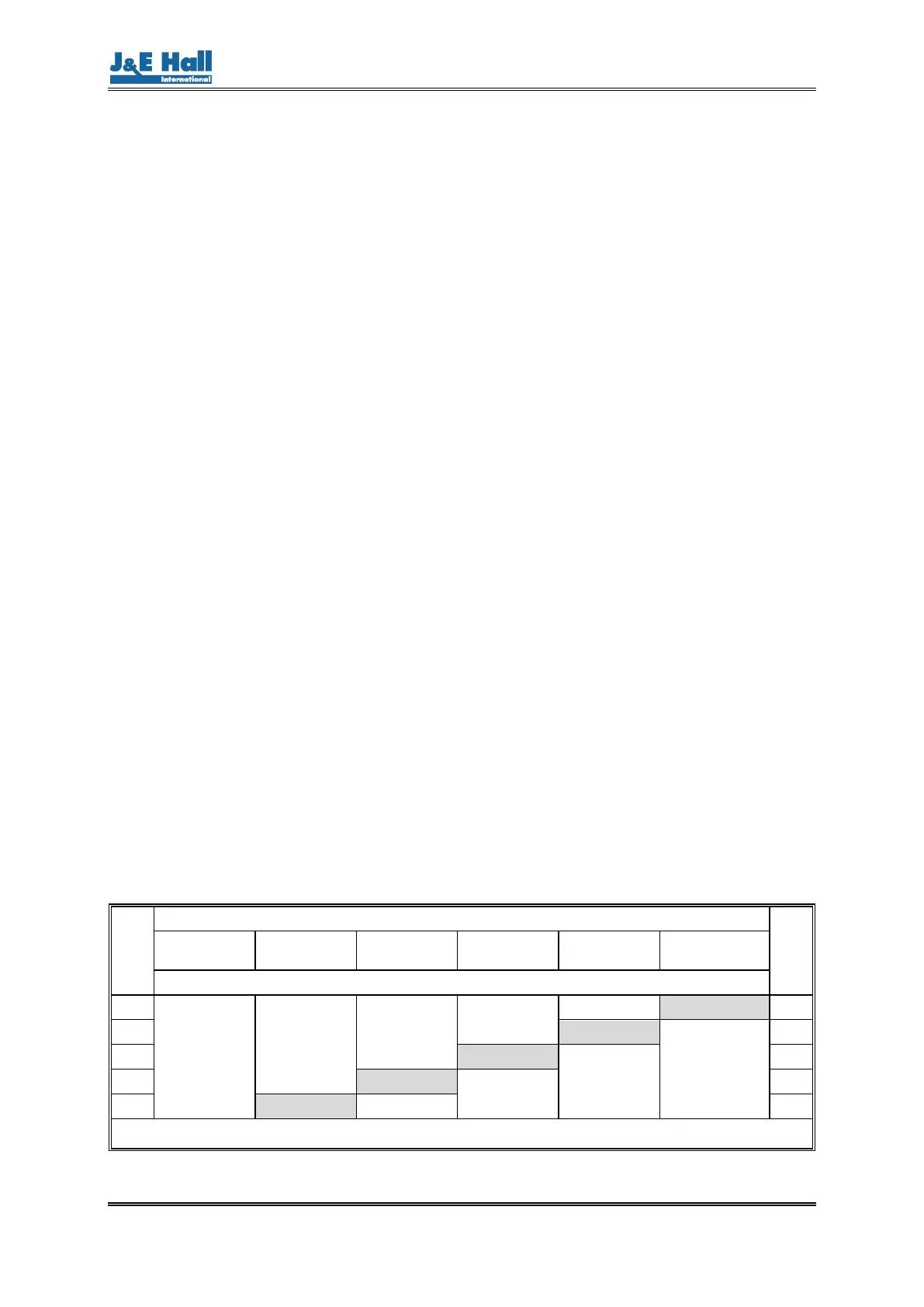
S19 Primary / Secondary connected or operating mode
indication
If this Fridgewatch is connected in a Primary / Secondary configuration
with another Mk5 Fridgewatch 2000, S19 for both Mk5 Fridgewatch 2000
Controllers must be set to 1.
If this Fridgewatch is not connected in Primary / Secondary configuration,
S19 can be configured to provide a digital output on terminal 147 to
confirm that the correct operating mode is selected.
NOTE: This feature cannot be used with Primary /
Secondary connected package units as this terminal is
already used for Primary to Secondary interconnection.
S19
Mk5 Fridgewatch 2000 Controller Operating Mode
S19
Off
Manual/
Manual
Manual/
Auto
Auto/
Auto
Remote/
Auto
Remote/
Remote
Operating Mode Confirmation (Digital Output on Terminal 147)
0
Off
Off
Off
Off
Off On 0
–1 On
Off
-1
–2 On
Off
-2
–3 On
Off
-3
–4 On Off -4
Table 14 Operating Mode Indication Using Setting S19
Set S19 according to Table 14 to indicate the chosen operating mode.


 To Next Page