EasyManua.ls Logo

Janome 444 - Page 9

Janome 444
16 pages
Print Icon
To Next Page IconTo Next Page
To Previous Page IconTo Previous Page
Loading...
ADJUSTING
THE
PHASE
OF
AUTOMATIC
CAM
HOLDER
ASSEMBLY
(FOR
445
ONLY)
When
patterns
are
deformed
in
automatic
pattern
sewing,
make
adjustment
as
follows:
1.
Set
needle
position
selecting
lever
at
R.
2.
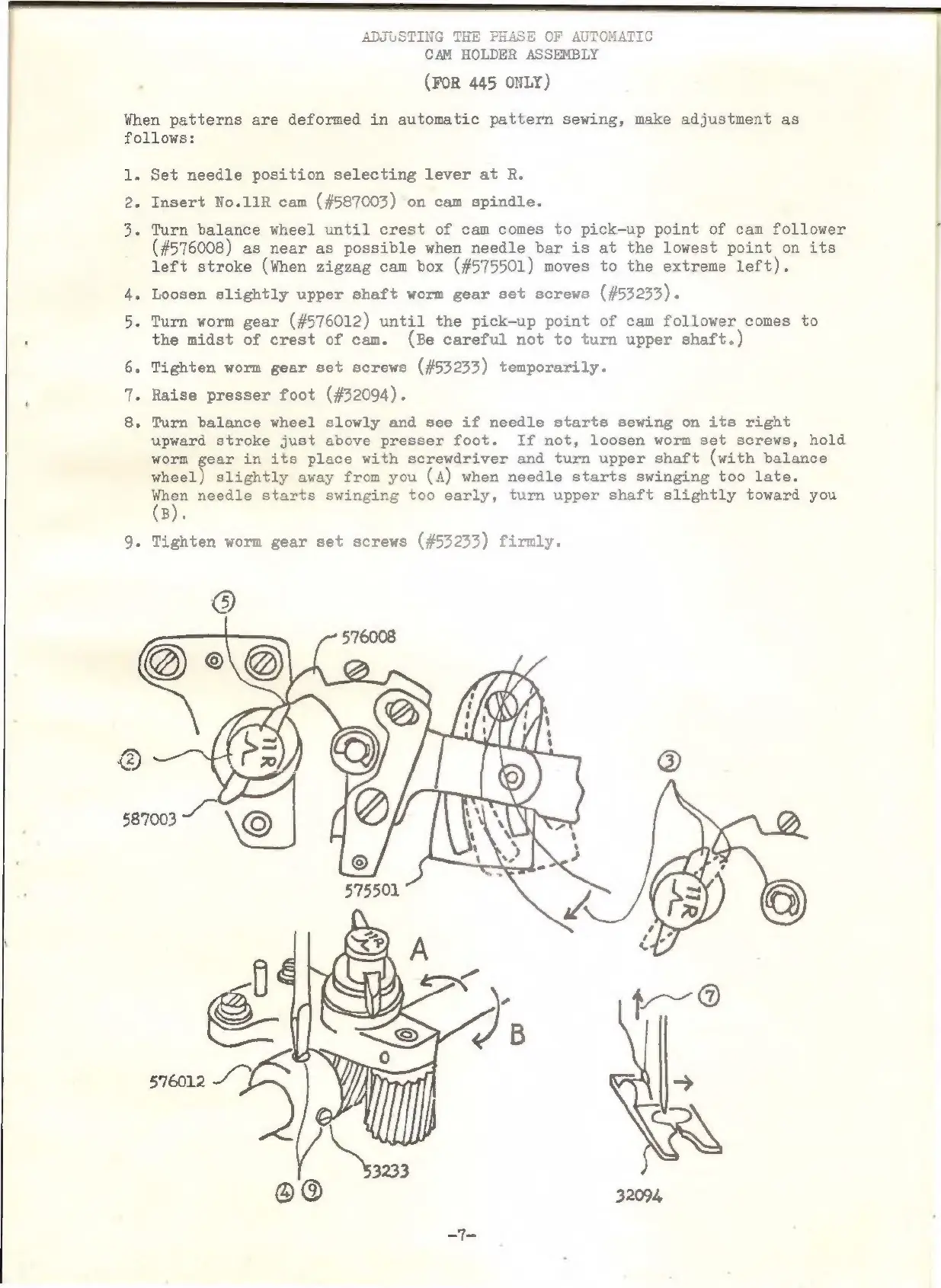
Insert
No.11R
cam
(#587003)
on
cam
spindle.
3.
Turn
balance
wheel
until
crest
of
cam
comes
to
pick-up
point
of
cam
follower
(#576008)
as
near
as
possible
when
needle
bar
is
at
the
lowest
point
on
its
left
stroke
(When
zigzag
cam
box
(#575501)
moves
to
the
extreme
left).
4.
Loosen
slightly
upper
shaft
worm
gear
set
screws
(#53233).
5.
Turn
worm
gear
(#576012)
until
the
pick-up
point
of
cam
follower
comes
to
the
midst
of
crest
of
cam.
(Be
careful
not
to
turn
upper
shaft.)
6.
Tighten
worm
gear
set
screws
(#53233)
temporarily.
7.
Raise
presser
foot
(#32094).
8.
Turn
balance
wheel
slowly
and
see
if
needle
starts
sewing
on
its
right
upward
stroke
just
above
presser
foot.
If
not,
loosen
worm
set
screws,
hold
worm
gear
in
its
place
with
screwdriver
and
turn
upper
shaft
(with
balance
wheel)
slightly
away
from
you
(A)
when
needle
starts
swinging
too
late.
ee
needle
starts
swinging
too
early,
turn
upper
shaft
slightly
toward
you
B).
9.
Tighten
worm
gear
set
screws
(#53233)
firmly.

Related product manuals