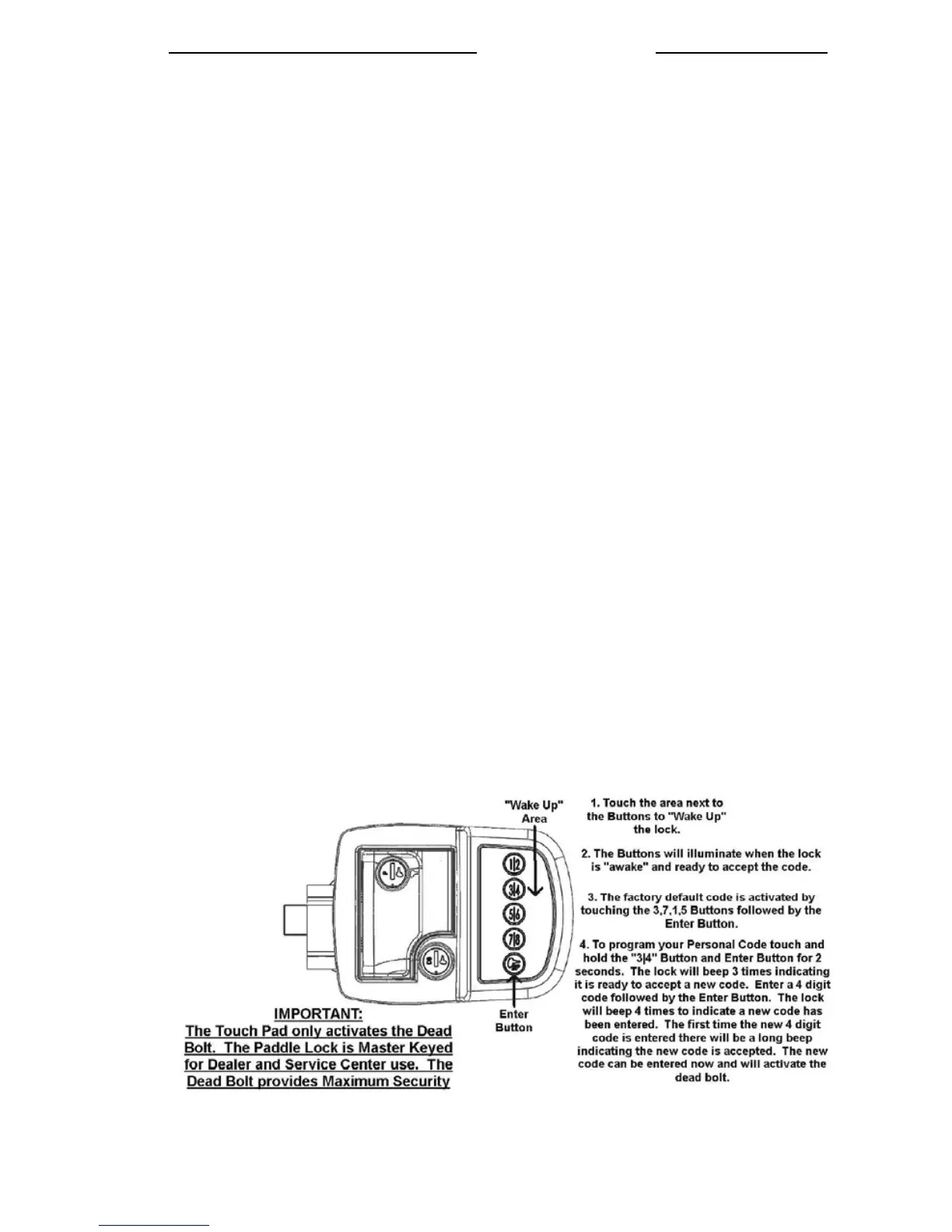
To operate the lock you first must “wake up” the lock, by touching the “wake up area” to
the right of the buttons. The buttons will illuminate once the Touch Pad is wakened. This
indicates that the touch pad is ready for the code to be entered. (Refer to the diagram on
next page).
Preset Factory Code
The entry system has a factory set code of 3,7,1,5 followed by the Enter button. The Enter
button is the bottom button with the picture of the key. The Enter button is required to be
touched after the code is entered. The factory code resets every time the batteries are
removed for at least 10 seconds.
Programming New Code
To set a new code, wake up the lock by touching the “wake up area”. Then touch and hold
both the “3|4” button and the Enter Button for 2 seconds. The system will provide three
short beeps, indicating it is ready to accept a new code. Enter the new 4 digit code
followed by the Enter button. The system will provide four short beeps to indicate new
code acceptance. This new code will now activate the lock.
To reset the code, remove the batteries for at least 10 seconds. Re-install the batteries; and
follow the steps to Programming New Code.
System Fault Logic:
Action Response
Ready to Accept New Code Three short beeps
New Code Entered Four short beeps
Wrong Code Entered One long beep
Dead Bolt Locks Two short beeps
Dead Bolt Unlocks Two short beeps
Dead Bolt fails to Lock One long beep
Dead Bolt fails to Unlock One long beep
Low Battery One Long beep after the Lock/Unlock beeps
The lock will cycle up to 10 more times once the low battery indication occurs. After this
the final electric function in a low battery condition will be unlock and will not lock until
the batteries have been replaced. Please note that if the deadbolt is in the locked position
and the batteries die the deadbolt will remain locked. The key will always be able to
activate the deadbolt lock.
Please enter your Personal Code to prevent inadvertent programming
4-5




 To Next Page