131
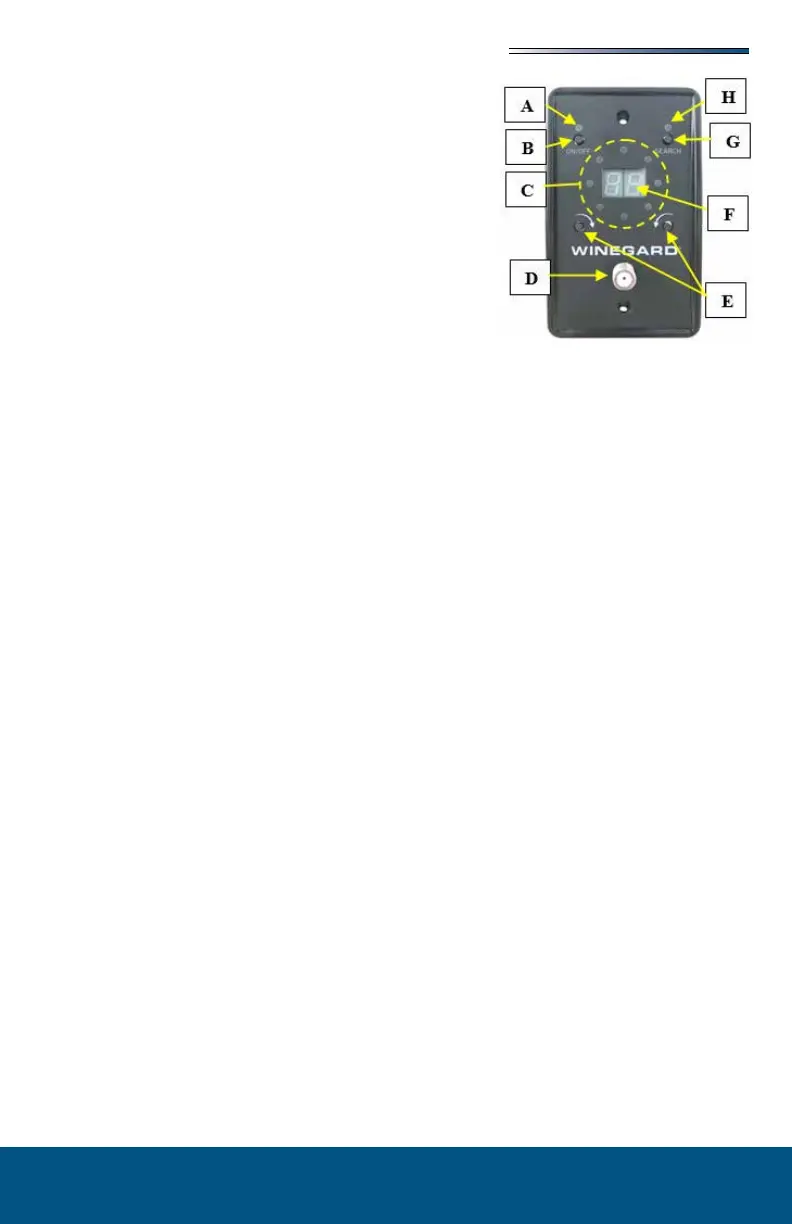
A. Green LED lights when antenna
amplier is turned on and system is in Antenna
Mode.
B. Used to turn the antenna on and
o. When turned ON it is in Antenna Mode and
will receive Over-The-Air (OTA) signals. When
turned OFF it is in Cable Mode and will receive
campground (park) cable signals (provided you
have the park cable attached to the cable input con-
nector on the antenna control panel).
C. 8 green/red
LEDs in a circular pattern. Top of wall plate repre-
sents the front of RV, bottom is back of RV.
• If (2) green LEDs are lit, the antenna is posi-
tioned between those positions.
• If both the red and green LEDs are lit on the same spot, that indicates the current
antenna position and optimal pointing location.
• Refer to the for more information.
D. Connection for cable TV. There is an additional con-
nection on the rear of the antenna control panel.
E. Fine tune a channel that may be pixelating or weak. Manually point
towards a known antenna location.
F. Will show the number of TV frequencies found at the
current position. This is the number of RF Signals available and will dier from the
amount of virtual channels scanned on a TV because of multi-casting. Typically, a TV
scan will result in 2x to 3x more channels than RF Signals.
G.
• Initiates a new search after powering antenna on.
• Press and hold the search button for 2 seconds to clear the memory and start a new
search.
• The system will also clear all search results each time antenna is powered o.
• Typical search will take 2 to 3 minutes. A red LED cycles through the 8 positional
LEDs to indicate the antenna is moving and which direction it is moving. After the
search is complete, the antenna automatically goes to the position that results in the
most watchable TV channels.
• The display will show number of frequencies seen at that position. Both the green
and the red LEDs will light to indicate successful search. Additional red LEDs will
light to show channels found in alternate positions.
• Pressing search moves antenna to next best location. Continue pressing search to
cycle through all other positions with additional channels until it returns to rst
search location. Pressing and holding the search button clears the memory and
starts a new search.
When the system is powered on, and no buttons are pressed for 3 minutes the system enters
Sleep Mode. The power LED will remain lit and the antenna amplier will be on allowing
you to watch TV. All other LEDs will be o. Press any button on the antenna control panel
to exit Sleep Mode.











 To Next Page