ENGLISH
05EN
FRONT PANEL
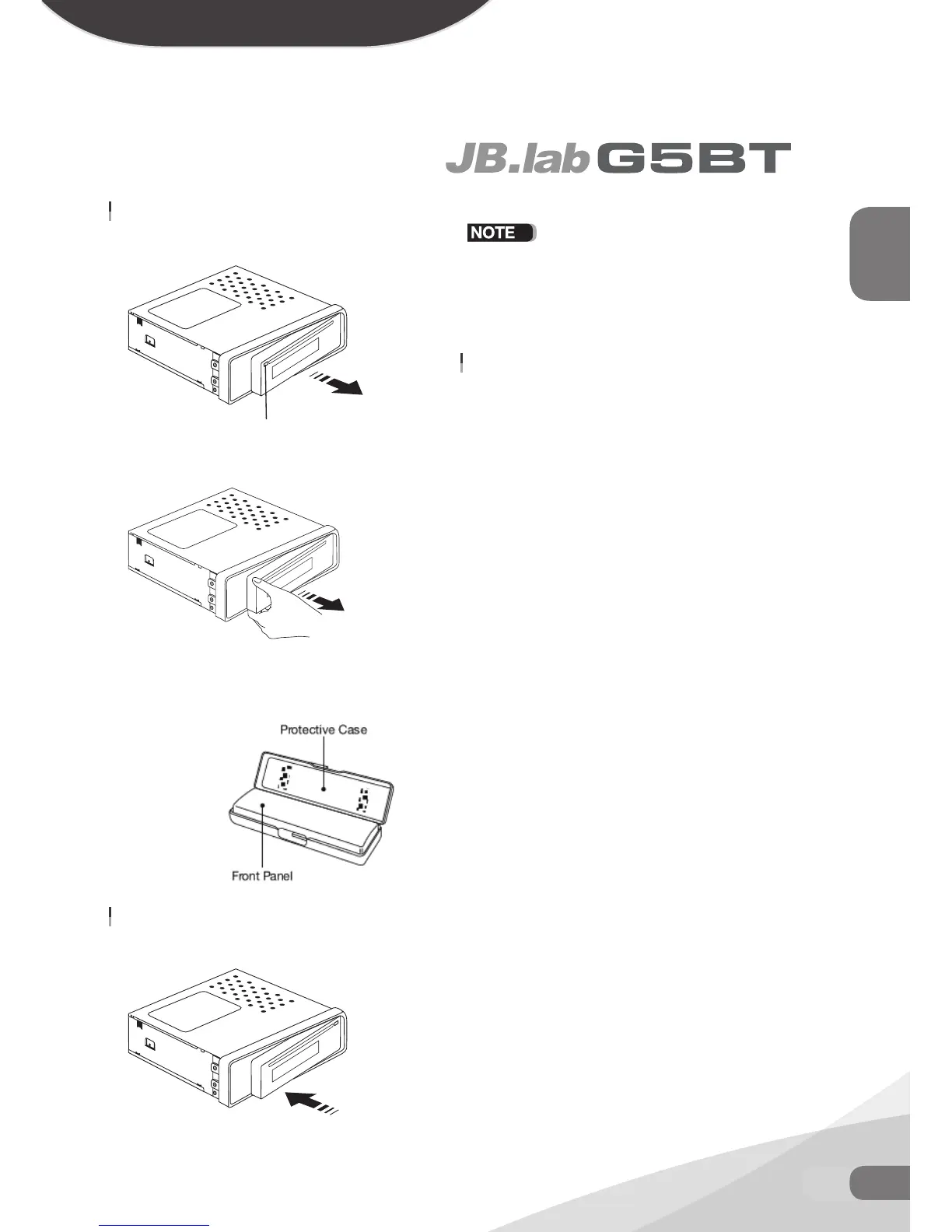
TO DETACH THE FRONT PANEL
1. Press the release button to release the panel from the left side
2. Grasp the left side of the panel and pull to remove it.
3. Immediately place the front panel in its protective case for safe
and clean storage.ㅇㅇㅇㅇ
TO INSTALL THE FRONT PANEL
1. Push the front panel into the main body. You should hear a
“Click”.
If the panel fails to lock into position properly, the function
of some controls may be impaired and some segments of
the display may not become illuminated. If this occurs, press
RELEASE and reinstall the front panel.
PRECAUTIONS WHEN HANDLING
1. Do not drop the front panel.
2. Do not put pressure on the display or control buttons when de
taching or re-installing the front panel.
3. Do not touch the contacts on the front panel or on the main unit
body. It may result in poor electrical contact.
4. If any dirt or foreign substances adhered on the contacts, they
can be removed with a clean and dry cloth.
5. Do not expose the front panel to high temperatures or direct
sunlight in anywhere.
6. Keep away any volatile agents (e.g. benzene, thinner, or insecti
cides) from touching the surface of the front panel.
7. Do not attempt to disassemble the front panel.
Release button
push panel into main unit until you hear a “click”


 To Next Page