5
www.jbl.com
English
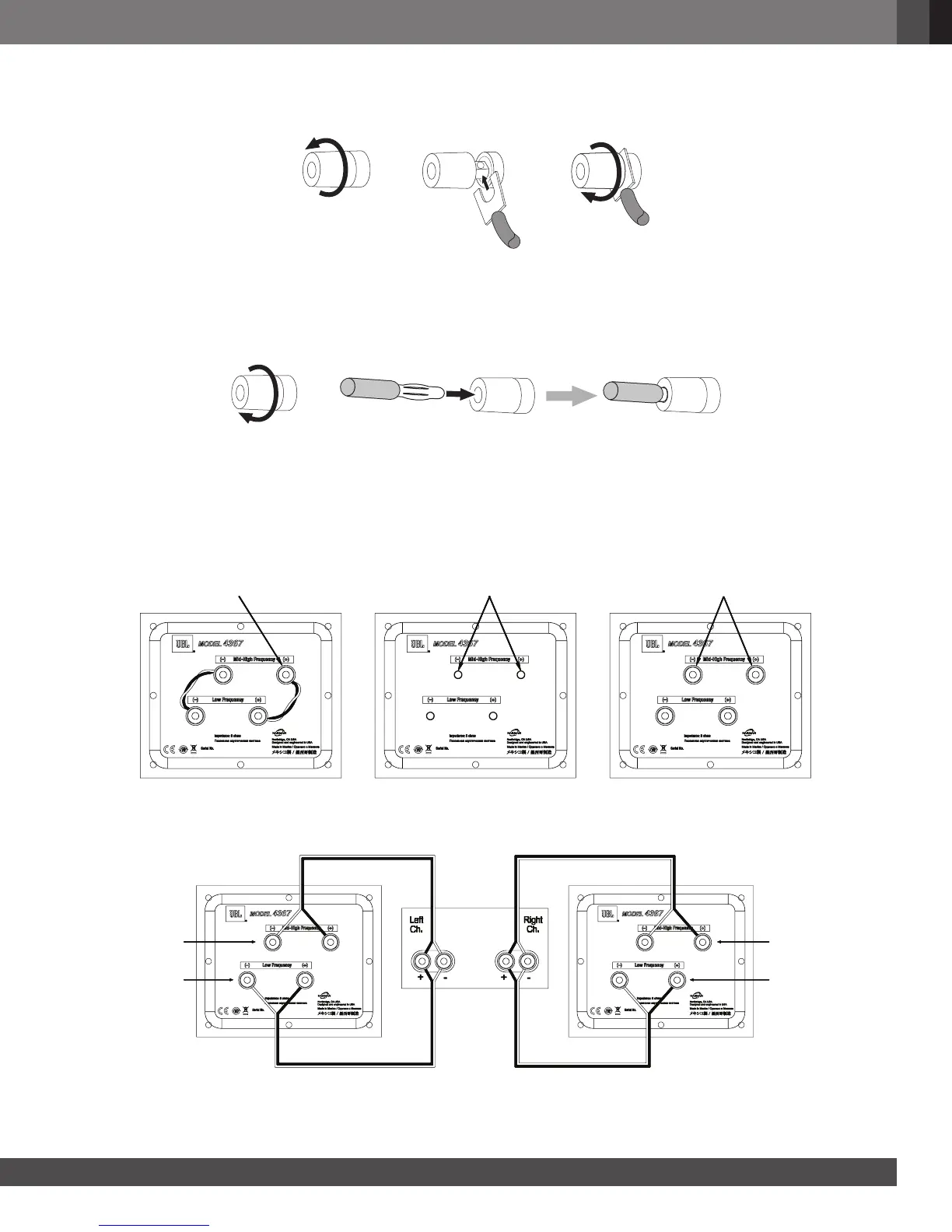
Using Spade Connectors:
A. Unscrew Cap B. Insert Spade Connector
Blades around Post
C. Tighten Cap
IMPORTANT: Make sure the (+) and (–) spade connector blades do not touch each other or the other terminal.
Touching blades can cause a short circuit that can damage your receiver or amplifier.
Using Banana Connectors:
A. Tighten Cap B. Insert Banana Connector into
Hole in Cap
BI-WIRE CONNECTION:
The 4367 connection assembly has two sets of input terminals that are connected by jumper wires. The upper set of
terminals is for high-frequency/ultrahigh-frequency drivers, and the lower set of terminals is for the woofer.
This arrangement allows you to bi-wire the speakers using a single stereo power amplifier or two stereo power
amplifiers. Bi-wiring can offer sonic advantages and more flexibility in power-amplifier selection over a conventional
single-wire connection.
To bi-wire the 4367, first remove the terminal jumper wires as shown in the illustration.
Remove Caps Replace CapsRemove Jumpers from Posts
If you’re bi-wiring with a single stereo power amplifier, connect the speakers according to the following illustration.
Left Speaker
Midrange/
Tweeter
Connection
Midrange/
Tweeter
Connection
Woofer
Connection
Woofer
Connection
Right Speaker
Amplifier



 To Next Page