Need help?
Do you have a question about the JBL Authentics 200 and is the answer not in the manual?
Instructions for safe voltage connection to prevent hazards and unit damage.
Advises using only the supplied power cord to avoid safety hazards.
Emphasizes pulling the plug, not the cord, when disconnecting power.
Warns against opening the cabinet due to shock hazard and warranty voiding.
Details app functionalities for connecting, voice assistants, settings, and music streaming.
Explains hands-free control using Google Assistant and Amazon Alexa.
Lists items in the box and advises contacting support if parts are missing or damaged.
Details controls and indicators on the front and top of the speaker.
Details ports and features located on the back of the speaker.
Instructions for connecting the speaker to the AC power outlet.
Explains automatic switch to standby mode after inactivity.
Describes how the speaker wakes up from standby mode.
Guides connection to Wi-Fi or Ethernet for network services.
Details pairing and connecting Bluetooth devices for audio streaming.
Instructions for connecting via a 3.5mm audio cable.
Steps to configure Google Assistant and Alexa via the JBL One app.
How to issue voice commands for music, answers, and smart home control.
Streaming audio through Wi-Fi network services.
Stream audio from music services using the JBL One app.
Stream audio from Android or iOS devices using Chromecast.
Stream audio from iOS devices using AirPlay.
Stream music from Amazon Music library via Alexa Cast.
Experience Dolby Atmos sound effects on Authentics 500.
Stream music to multiple speakers via Chromecast or AirPlay.
Stream audio from a Bluetooth-enabled device to the speaker.
Manage music playback using speaker controls.
Listen to music from an external audio device via AUX input.
Adjust tone controls and EQ settings for customized sound.
Automatic sound optimization based on listening environment.
How the speaker software automatically updates via internet connection.
Procedure to reset the speaker to its original factory defaults.
Detailed technical specifications for the Authentics 200 model.
Detailed technical specifications for the Authentics 500 model.
Solutions for unit not turning on or responding to buttons.
Troubleshooting steps for device connection and audio quality.
Steps to resolve issues with connecting to a Wi-Fi network.
Tips for when voice commands are not recognized.
Resolving problems with AirPlay, audio sources, and Dolby Atmos.
Information on registered trademarks for Bluetooth and Wi-Fi.
Details on Spotify connect and Dolby Atmos licensing.
Information on Google Assistant, Chromecast, and Alexa trademarks.
Notes on AirPlay 2 compatibility and requirements.
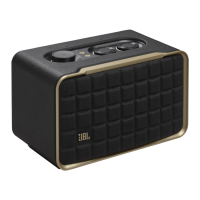
The JBL Authentics speaker is a versatile audio device designed for a rich listening experience, offering both the Authentics 200 and Authentics 500 models. This owner's manual provides comprehensive instructions for setting up, using, and maintaining your speaker, ensuring you get the most out of its features.
The JBL Authentics speaker serves as a high-quality audio output device, capable of playing music from various sources. It integrates seamlessly into your home network, allowing for wireless streaming via Wi-Fi, Bluetooth, and popular casting technologies like Chromecast built-in™, AirPlay, and Alexa Multi-Room Music. The Authentics 500 model further enhances the audio experience with Dolby Atmos® Music support, delivering an immersive 3D surround sound.
Beyond music playback, the speaker acts as a smart home hub, featuring simultaneous Google Assistant and Amazon Alexa voice assistants. This enables hands-free control of your music, management of smart home devices, and access to a wide range of everyday tasks using simple voice commands. The speaker also includes physical controls for volume, playback, and tone adjustments, offering flexibility in how you interact with your audio.
 General
| Product type | Stereo portable speaker |
|---|---|
| Product color | Black |
| Product design | Rectangle |
| Housing material | Aluminium, Fabric, Recycled plastic |
| Wi-Fi | Yes |
| Frequency range | 2.4 - 2.483 GHz |
| Wi-Fi standards | 802.11a, 802.11b, 802.11g, Wi-Fi 4 (802.11n), Wi-Fi 5 (802.11ac), Wi-Fi 6 (802.11ax) |
| 3.5 mm connector | No |
| Bluetooth version | 5.3 |
| Bluetooth profiles | A2DP, AVRCP |
| USB connector type | USB Type-C |
| Connectivity technology | Wired |
| Battery type | - |
| DC input voltage | 5 V |
| Power source type | AC |
| AC adapter frequency | 50/60 Hz |
| AC adapter input voltage | 100 - 240 V |
| Bluetooth transmitter power | 17 dBm |
| Power consumption (standby) | 2 W |
| Power consumption (typical) | 90 W |
| Operating temperature (cooling) (T-T) | 0 - 45 °C |
| RMS rated power | 45 W |
| Audio formats supported | MP3, WAV |
| Signal-to-Noise Ratio (SNR) | 80 dB |
| Recommended usage | Universal |
| Number of speakers | 1 |
| Package type | Box |
| Package depth | 218 mm |
| Package width | 319 mm |
| Package height | 254 mm |
| Package weight | 4150 g |
| Quantity per pack | 1 pc(s) |
| Tweeter diameter | 25 mm |
| Number of drivers | 3 |
| Speaker placement | Tabletop/bookshelf |
| Audio output channels | - channels |
| Number of tweeter drivers | 2 |
| Woofer diameter (imperial) | 5 \ |
 Weight and Dimensions
| Depth | 167.4 mm |
|---|---|
| Width | 266.3 mm |
| Height | 171.7 mm |
| Weight | 3120 g |

 To Next Page