EasyManua.ls Logo

JBL CINEMA SB100 - User Manual

JBL CINEMA SB100
7 pages
Print Icon
To Next Page IconTo Next Page
Loading...
CINEMA SB100
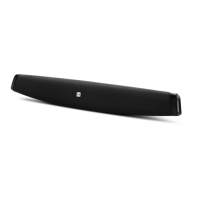
powered soundbar speaker
quICk-StArt guIdE
thANk You For ChooSINg thIS JBL
®
ProduCt
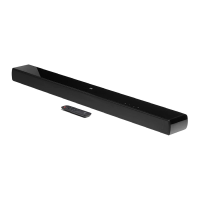
The JBL Cinema SB100 powered soundbar speaker is a complete,
integrated sound system that will dramatically improve the sound
of programs you watch on your television. It can mount on a wall
or sit on a shelf and includes all of the cables you need to connect
it to your TV and your cable/satellite tuner or disc player.
We’re confident that this JBL system will provide every note
of enjoyment that you expect – and that when you think about
purchasing additional audio equipment for your home, car or
office, you will once again choose JBL products.
This quick-start guide contains all the information you need to set
up, connect and adjust your new speaker system. For more in-
depth information, go to our Web site: www.jbl.com.
INCLudEd ItEMS
BASS
1x
1x
1x
1x
1x
1x
Question and Answer IconNeed help?

Do you have a question about the JBL CINEMA SB100 and is the answer not in the manual?

Summary

Included Items

Soundbar and Accessories Overview

Lists and illustrates all components included in the JBL Cinema SB100 package.

Soundbar Controls and Operation

Rear-Panel Controls and Connections

Details the physical ports and switches on the back of the soundbar.

Top-Panel and Remote Control Functions

Explains the buttons on the soundbar's top panel and the remote control.

Soundbar Placement

Tabletop Placement Guide

Instructions for positioning the soundbar on a flat surface like a table.

Wall Mounting Instructions

Steps for securely mounting the soundbar to a wall using the provided bracket.

Audio Connections

Connecting Audio Sources

How to connect TVs, disc players, or tuners via analog or optical inputs.

Subwoofer Connection

Guide for connecting an optional powered subwoofer to the soundbar.

System Usage and Features

Powering the System On and Off

Instructions for connecting power and turning the soundbar on/off or standby.

Soundbar Modes and Switching

Explains muting, switching audio sources, and changing surround modes.

Advanced Functions and Specifications

Enhancing Bass Performance

How to use the Bass Boost feature for improved low-frequency sound.

TV Remote Command Learning

Steps to program the soundbar to respond to your TV remote's volume and mute commands.

JBL Cinema SB100 Specifications

Technical details including dimensions, power, and frequency response.

Summary

Included Items

Soundbar and Accessories Overview

Lists and illustrates all components included in the JBL Cinema SB100 package.

Soundbar Controls and Operation

Rear-Panel Controls and Connections

Details the physical ports and switches on the back of the soundbar.

Top-Panel and Remote Control Functions

Explains the buttons on the soundbar's top panel and the remote control.

Soundbar Placement

Tabletop Placement Guide

Instructions for positioning the soundbar on a flat surface like a table.

Wall Mounting Instructions

Steps for securely mounting the soundbar to a wall using the provided bracket.

Audio Connections

Connecting Audio Sources

How to connect TVs, disc players, or tuners via analog or optical inputs.

Subwoofer Connection

Guide for connecting an optional powered subwoofer to the soundbar.

System Usage and Features

Powering the System On and Off

Instructions for connecting power and turning the soundbar on/off or standby.

Soundbar Modes and Switching

Explains muting, switching audio sources, and changing surround modes.

Advanced Functions and Specifications

Enhancing Bass Performance

How to use the Bass Boost feature for improved low-frequency sound.

TV Remote Command Learning

Steps to program the soundbar to respond to your TV remote's volume and mute commands.

JBL Cinema SB100 Specifications

Technical details including dimensions, power, and frequency response.

JBL CINEMA SB100 Specifications

General IconGeneral
Audio decoders-
RMS rated power- W
Audio output channels2.0 channels
ManualYes
Frequency range80 - 18000 Hz
Apple docking compatibilityNot supported
Soundbar dimensions (WxDxH)810 x 92 x 108 mm
Woofer diameter77 mm
Tweeter diameter38 mm
Number of tweeter drivers2
Woofer diameter (imperial)3 \
Tweeter diameter (imperial)1.5 \
Subwoofer includedNo
Cables includedAC, AUX
Product colorBlack
Recommended usageTV
Connectivity technologyWired
Digital audio optical in1
Power sourceAC
AC input voltage100-240 V
AC input frequency50 - 60 Hz
Power consumption (standby)0.5 W
Power consumption (typical)30 W
Weight and Dimensions IconWeight and Dimensions
Soundbar weight3800 g

Related product manuals