EasyManua.ls Logo

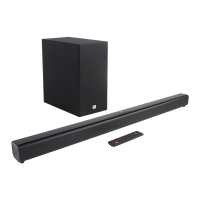
JBL Simply Cinema ESC333 - User Manual

JBL Simply Cinema ESC333
16 pages
Print Icon
To Next Page IconTo Next Page
Loading...
TM
®
ESC333
Simple
setup guide
thank you for choosing JBL. For more than 50 years, JBL
has been involved in every aspect of music and film recording
and reproduction, from live performances to the recordings you play
in your home, car or office.
We’re confident that the JBL system you have chosen will
provide every note of enjoyment that you expected – and that
when you think about purchasing additional audio equipment for
your home, car or office, you will once again choose JBL.
JBL Consumer Products
Question and Answer IconNeed help?

Do you have a question about the JBL Simply Cinema ESC333 and is the answer not in the manual?

Summary

Declaration of Conformity

Important Note: Automatic On;Off and Digital-Input Selection

Included Components

System Features

About Dolby Digital

Speaker Placement

Satellite and Surround Placement

Guidance on positioning satellite and surround speakers for optimal audio experience.

Mounting Options for Speakers

Details on wall-mounting and stand placement for satellite speakers.

Speaker, Source, and Remote-Sensor Connectors

Operation

Remote-Control-Battery Installation

Instructions for inserting or replacing the battery in the remote control.

Rear-Panel Control Functions

Description of the master power switch and indicator lights on the subwoofer.

Remote and Front-Panel Controls and Indicators

Status-Bar Indicators Explained

Surround Modes

Test Tone Calibration

Troubleshooting Common Issues

No Sound from Speakers

Steps to resolve issues with no sound from any speakers.

No Sound from Surround or Low Volume

Troubleshooting no sound from surround speakers or very low volume.

No Sound from Center Speaker

Steps to fix issues where the center speaker produces no sound.

Low Bass Output

Tips to improve bass output from the subwoofer.

System Specifications

Summary

Declaration of Conformity

Important Note: Automatic On;Off and Digital-Input Selection

Included Components

System Features

About Dolby Digital

Speaker Placement

Satellite and Surround Placement

Guidance on positioning satellite and surround speakers for optimal audio experience.

Mounting Options for Speakers

Details on wall-mounting and stand placement for satellite speakers.

Speaker, Source, and Remote-Sensor Connectors

Operation

Remote-Control-Battery Installation

Instructions for inserting or replacing the battery in the remote control.

Rear-Panel Control Functions

Description of the master power switch and indicator lights on the subwoofer.

Remote and Front-Panel Controls and Indicators

Status-Bar Indicators Explained

Surround Modes

Test Tone Calibration

Troubleshooting Common Issues

No Sound from Speakers

Steps to resolve issues with no sound from any speakers.

No Sound from Surround or Low Volume

Troubleshooting no sound from surround speakers or very low volume.

No Sound from Center Speaker

Steps to fix issues where the center speaker produces no sound.

Low Bass Output

Tips to improve bass output from the subwoofer.

System Specifications

JBL Simply Cinema ESC333 Specifications

General IconGeneral
TypeHome Theater Speaker System
Configuration5.1 Channel
SubwooferYes
Subwoofer Power100W
Frequency Response35Hz - 20kHz
Satellite Speakers4
Center Speaker1
Remote ControlYes
Wall MountableYes
Satellite Speakers Power40W per channel

Related product manuals