EasyManua.ls Logo

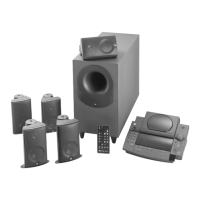
JBL Simply Cinema ESC550 - User Manual

JBL Simply Cinema ESC550
24 pages
Print Icon
To Next Page IconTo Next Page
Loading...
TM
ESC550
simple
setup guide
TM
ESC550 Simply Cinema OM 7/22/98 4:34 PM Page 1
Question and Answer IconNeed help?

Do you have a question about the JBL Simply Cinema ESC550 and is the answer not in the manual?

Summary

Important Safety Precautions

General Operational Safety

Covers reading instructions, retaining them, heeding warnings, following procedures, cleaning, and using correct attachments.

Environmental and Installation Safety

Addresses water and moisture, accessory stability, moving precautions, ventilation, power sources, and outdoor factors like lightning.

Electrical Safety Guidelines

Focuses on grounding, polarization, power cord protection, avoiding overloading, and preventing object/liquid entry.

Servicing and Replacement Parts

Details on when to seek professional servicing, using correct replacement parts, and post-service safety checks.

Speaker Placement

Front Speaker Placement Options

Describes placement options for front satellite and center speakers on shelves, walls, or stands.

Surround Speaker Placement Options

Describes placement options for surround speakers on shelves, walls, or stands.

System Connections

Connect TV, VCR, or Other Audio Sources

Connect audio sources like TVs, VCRs, or cassette decks to The Source unit.

Connect Antennas

Connect FM and AM antennas to The Source for radio tuning.

Connect The Source to Subwoofer

Instructions for connecting The Source unit to the powered subwoofer.

Speaker Connection Tips

Guidance on correctly connecting speaker wires to terminals for proper phase and sound.

Remote Control Battery Installation

Steps for installing or replacing batteries in the remote control.

System Operation

Basic Audio Controls

Controls for adjusting volume, mute, bass, and treble levels.

CD Player Operations

How to play, pause, stop, skip, scan, play randomly, and repeat CD tracks.

Tuner Operations

Instructions for tuning AM/FM stations, switching bands, and improving reception.

Surround Sound Setup

Guide to surround modes, calibration, balance, and volume adjustments.

Troubleshooting

No Sound Issues

Steps to diagnose and resolve issues with no sound from speakers or low surround sound.

Audio Output Imbalances

Troubleshooting steps for issues like sound only from the center speaker or low bass output.

Radio Reception Problems

Solutions for difficulties in picking up radio stations, including antenna checks.

Specifications

Component Specifications

Detailed technical specifications for The Source, Subwoofer, Satellite Speakers, and System Remote.

System Performance Metrics

Key performance indicators including amplifier output, frequency response, and signal-to-noise ratio.

Summary

Important Safety Precautions

General Operational Safety

Covers reading instructions, retaining them, heeding warnings, following procedures, cleaning, and using correct attachments.

Environmental and Installation Safety

Addresses water and moisture, accessory stability, moving precautions, ventilation, power sources, and outdoor factors like lightning.

Electrical Safety Guidelines

Focuses on grounding, polarization, power cord protection, avoiding overloading, and preventing object/liquid entry.

Servicing and Replacement Parts

Details on when to seek professional servicing, using correct replacement parts, and post-service safety checks.

Speaker Placement

Front Speaker Placement Options

Describes placement options for front satellite and center speakers on shelves, walls, or stands.

Surround Speaker Placement Options

Describes placement options for surround speakers on shelves, walls, or stands.

System Connections

Connect TV, VCR, or Other Audio Sources

Connect audio sources like TVs, VCRs, or cassette decks to The Source unit.

Connect Antennas

Connect FM and AM antennas to The Source for radio tuning.

Connect The Source to Subwoofer

Instructions for connecting The Source unit to the powered subwoofer.

Speaker Connection Tips

Guidance on correctly connecting speaker wires to terminals for proper phase and sound.

Remote Control Battery Installation

Steps for installing or replacing batteries in the remote control.

System Operation

Basic Audio Controls

Controls for adjusting volume, mute, bass, and treble levels.

CD Player Operations

How to play, pause, stop, skip, scan, play randomly, and repeat CD tracks.

Tuner Operations

Instructions for tuning AM/FM stations, switching bands, and improving reception.

Surround Sound Setup

Guide to surround modes, calibration, balance, and volume adjustments.

Troubleshooting

No Sound Issues

Steps to diagnose and resolve issues with no sound from speakers or low surround sound.

Audio Output Imbalances

Troubleshooting steps for issues like sound only from the center speaker or low bass output.

Radio Reception Problems

Solutions for difficulties in picking up radio stations, including antenna checks.

Specifications

Component Specifications

Detailed technical specifications for The Source, Subwoofer, Satellite Speakers, and System Remote.

System Performance Metrics

Key performance indicators including amplifier output, frequency response, and signal-to-noise ratio.

JBL Simply Cinema ESC550 Specifications

General IconGeneral
BrandJBL
ModelSimply Cinema ESC550
CategorySpeaker System
LanguageEnglish

Related product manuals