EasyManua.ls Logo

JBL DCR600 II - User Manual

JBL DCR600 II
72 pages
Print Icon
To Next Page IconTo Next Page
Loading...
X +
0 +
Y
2
0
M
HZ
MODEL NUMBER:
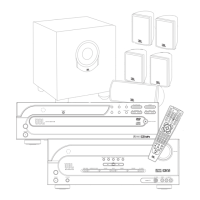
CINEMA PROPACK
600
II
Includes: DCR600
II
, DVD600
II
and SCS135P
DESIGN GOAL: Re-create the excitement of the movies using high-performance separate components in one convenient package.
AUDIO/VIDEO RECEIVER: DCR600
II
With Dolby* Digital, Dolby Pro Logic* II, DTS
®
and Logic 7
®
SOURCE UNIT: DVD600
II
Five-Disc Carousel DVD/CD/CD-R/CD-RW/VCD Changer With MP3 Decoding and
On Screen Library™ (patent pending) Feature
REMOTE CONTROL:JBL One-Click™ (patent pending) Remote Commander
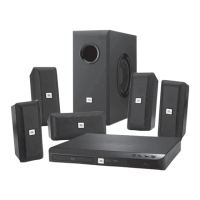
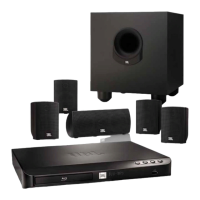
LOUDSPEAKERS: SCS135P Six-Piece Home Cinema Speaker System With Four Satellites, One Center and
OWNER’S GUIDE
One 100-Watt, 8-Inch Subwoofer

Questions and Answers

  • E
    Erin MarshallJul 28, 2025
    Why is there no sound from any speaker on my JBL Home Theater System?
    • K
      Katrina ColemanJul 28, 2025
      First, ensure that all input and speaker connections are securely connected. If connections are fine, check if the mute function is enabled and, if so, disable it by pressing the Mute button. Finally, verify that the volume control is not set too low and increase the volume as needed.
  • C
    cruzericaAug 1, 2025
    What to do if my DVD600II JBL Home Theater System does not turn on?
    • T
      Terri DavidAug 1, 2025
      Check the AC power plug to ensure it is properly connected and verify that any switched outlet being used is turned on.
  • J
    Jesse IrwinAug 6, 2025
    How to fix a DCR600II JBL DCR600 II that does not function when the Power Switch is pushed?
    • J
      Jasmin WilcoxAug 6, 2025
      First, ensure that the AC power cord is properly plugged into a live electrical outlet. Also, check that the Main Power Switch is pressed in to turn the device on.
  • T
    Tony RamirezAug 10, 2025
    Why is there no picture on my JBL DCR600 II Home Theater System?
    • A
      Andrew PayneAug 10, 2025
      Check all video connections to ensure they are properly connected. Also, verify that the correct input is selected on both the TV and the DCR600II. Mixing different types of video connections is not allowed.
  • M
    Mary JohnsonAug 14, 2025
    What to do if my JBL DCR600 II Home Theater System disc does not play?
    • A
      Aaron SchultzAug 14, 2025
      Ensure the disc is loaded correctly with the label-side facing up. Verify that the disc type is compatible (CD, CD-R, CD-RW, DVD-Movie, or Video CD). Confirm that you are using a Region 1 disc. If the rating is above the parent settings, enter the password to override or change the rating settings.
  • D
    David DeleonAug 19, 2025
    Why is the picture distorted during Fast Forward or Reverse Play on my JBL Home Theater System?
    • I
      Isaac DavisSep 12, 2025
      This distortion is a normal artifact of DVD playback during rapid play due to MPEG-2 decoding. If the issue persists, inspect your discs for any damage, scratches, or fingerprints.
  • L
    Leah WebsterAug 23, 2025
    Why do some remote buttons not operate during DVD play on my JBL DCR600 II?
    • K
      kimemilyAug 25, 2025
      Some functions may be intentionally disabled during the playback of certain discs.

Summary

Important Safety Precautions

General Safety Warnings

Comprehensive safety guidelines and precautions for operating the equipment.

Getting Started

Whats Included

Lists all components included in the JBL Cinema ProPack 60011 system package.

System Installation and Connections

Guidance on physically connecting the audio/video system and making initial connections.

Quick Installation Diagrams

Visual guides for basic and alternate system connections.

Speaker Placement and Mounting

Instructions for optimal placement of speakers and available mounting options.

Operating the DCR600ıı Receiver

Surround Sound Modes and Digital Sources

How to select surround modes, use digital sources, and understand status indicators.

Tuner Operation and Presets

Instructions for selecting stations, setting presets, and tape recording.

Operating the DVD600ıı DVD Changer

Disc Compatibility, Loading, and Playback

Information on disc formats, loading, and basic playback controls.

DVD Disc Features and Menus

Explains random play, repeat options, programmed playlists, bookmarks, and menus.

DVD Configuration Settings

Settings for languages, parental controls, aspect ratio, and audio output.

MP3 and VCD Playback

Guide to playing discs containing MP3 audio files and Video CDs.

Programmed Play and Playlists

Instructions for creating custom playback sequences for discs.

Remote Control Functions

Remote Programming and Setup

Methods for programming the remote, entering codes, and auto-searching.

Advanced Remote Operations

Using macros, erasing commands, and device functions for enhanced control.

Remote Control Feature Customization

Setting up punch-through functions and resetting the remote's memory.

Troubleshooting

Technical Specifications

DCR600ıı Receiver Specifications

Technical details for the audio/video receiver's performance and features.

DVD600ıı Changer Specifications

Technical details for the DVD changer's playback media and video/audio sections.

SCS135 P Speaker Specifications

Technical details for the satellite, center, and subwoofer speaker units.

JBL DCR600 II Specifications

General IconGeneral
BrandJBL
ModelDCR600 II
CategoryHome Theater System
LanguageEnglish

Related product manuals