EasyManua.ls Logo

JBL EON 206P - Page 8

JBL EON 206P
16 pages
Print Icon
To Next Page IconTo Next Page
To Previous Page IconTo Previous Page
Loading...
8
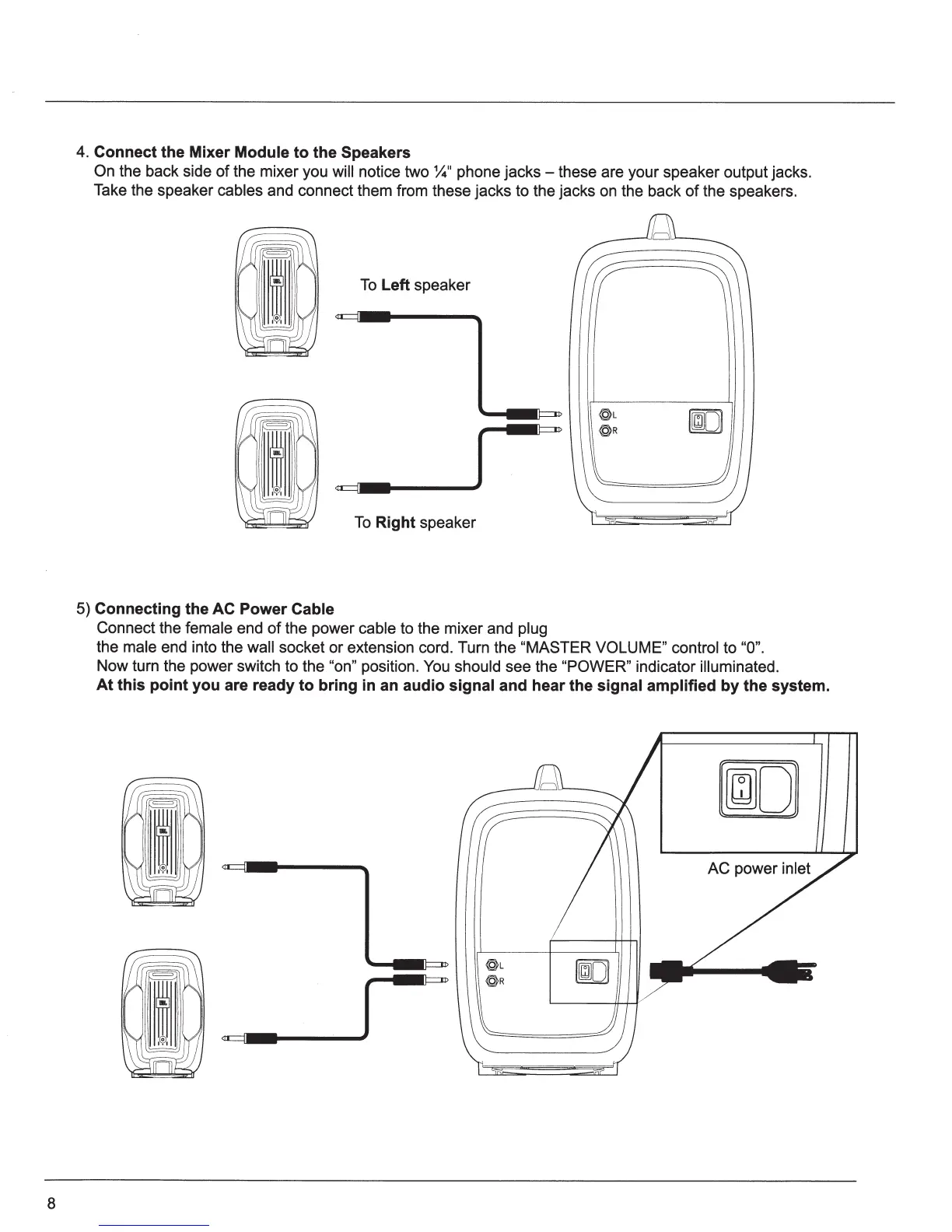
4.
Connect the Mixer
Module
to
the Speakers
On the back side
of
the mixer you
will notice two
~"
phone jacks - these are your speaker output jacks.
Take the speaker
cables
and connect them from these jacks to the jacks on the back
of
the speakers.
To
Left speaker
~----------J~~----~
To
Right
speaker
5)
Connecting the AC Power
Cable
Connect the
female
end
of
the power
cable
to the mixer and
plug
@L
@R
the
male
end into the wall
socket
or
extension cord. Turn the
"MASTER VOLUME" control to
"0".
Now turn the power switch to the
"on"
position.
You
should
see the
"POWER" indicator
illuminated.
At
this point you are ready
to
bring in an audio
signal and hear the
signal amplified
by
the system.
~
-
..
-------JI,----
~

Related product manuals