11
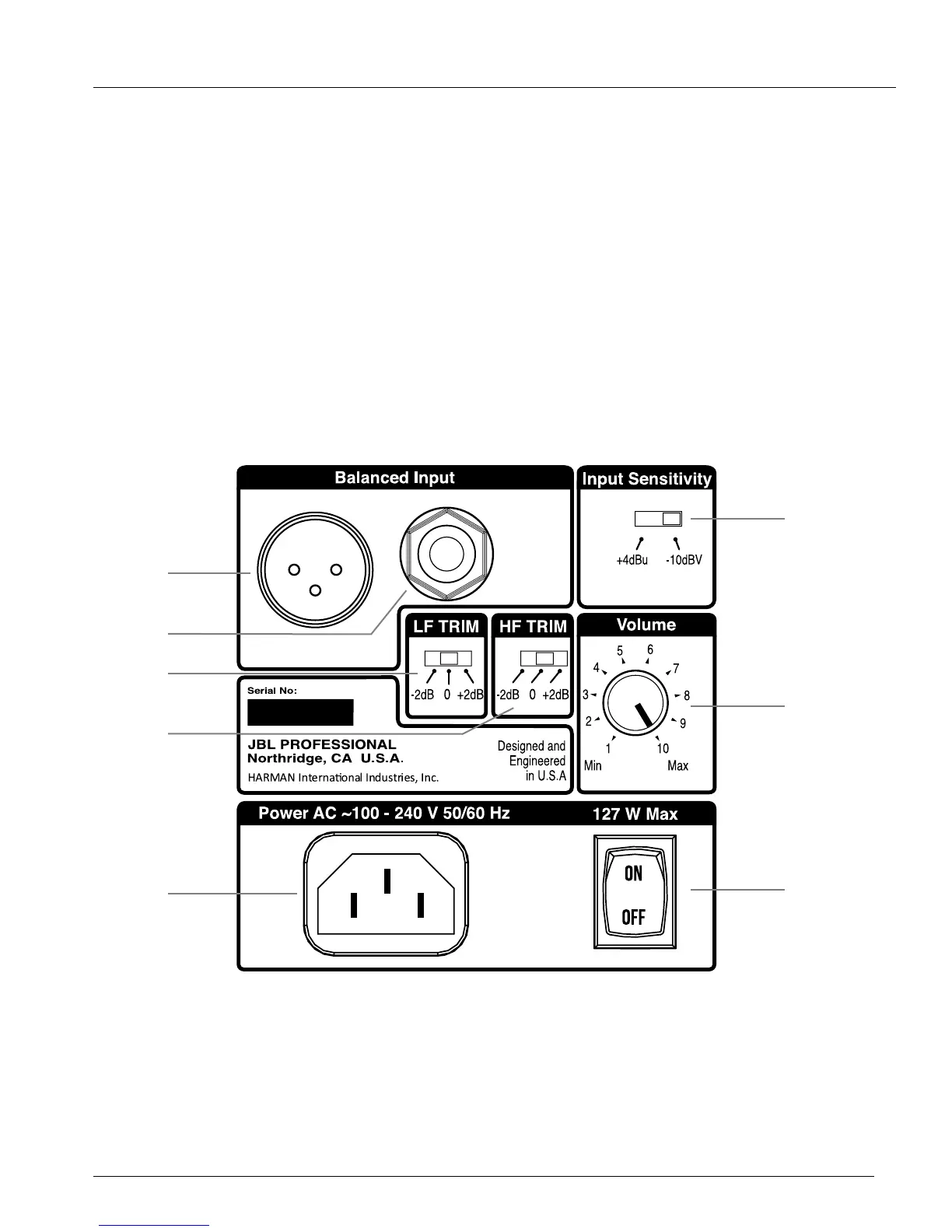
INPUT PANEL
10. XLR INPUT – Connect professional equipment using an XLR connector.
11. 6 mm (¼") INPUT - Connect equipment using a 6 mm (¼") balanced or unbalanced connector.
12. INPUT SENSITIVITY SWITCH – Set this switch to +4 dBu to protect from overload when connecting to
professional equipment and sources with very high output.
13. LOW FREQUENCY TRIM – Allows boost or attenuation of low frequency output by 2 dB.
14. HIGH FREQUENCY TRIM – Allows boost or attenuation of high frequency output by 2 dB.
15. VOLUME CONTROL – Use this control to set the maximum listening level.
16. POWER RECEPTACLE – Connection for the power cord.
17. POWER SWITCH – Activates power for the system.
AUDIO CONNECTIONS
Connect signal sources to either the XLR or 6 mm (¼") INPUT CONNECTORS. Connect only a single signal
source to the speaker using either the XLR INPUT CONNECTOR, OR the 6 mm (¼") TRS INPUT CONNECTOR.
Do not connect multiple signal sources to both input connectors simultaneously.
13
15
12
11
10
16
14
17



 To Next Page