Need help?
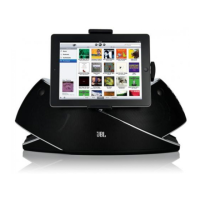
Do you have a question about the JBL OnBeat Xtreme and is the answer not in the manual?
Instructions for attaching the correct adapter clip for different Apple devices to the dock.
Guide on connecting external audio sources using an auxiliary cable.
Steps for connecting the dock to a computer for iTunes synchronization.
Instructions for connecting the dock to a TV to view video or photos.
How to connect the speaker dock to a power source for operation.
Explains the functions of the Power, Volume, Source Select, and Bluetooth buttons.
Details the actions and functions of each button on the remote control.
 General
| Type | Docking Speaker |
|---|---|
| Brand | JBL |
| Model | OnBeat Xtreme |
| Power Output | 30W |
| Frequency Response | 60Hz - 20kHz |
| Signal-to-Noise Ratio | >80dB |
| Bluetooth | Yes |
| Battery Life | Up to 5 hours |
| Color Options | Black |
| Compatibility | Apple iPad, iPhone, iPod |
| Input Connections | 3.5mm audio jack, USB |

 To Next Page