Need help?
Do you have a question about the JBL PARTYBOX Encore Essential and is the answer not in the manual?
Provides essential safety guidelines for product operation, cleaning, and usage.
Covers electrical safety warnings and FCC/IC regulatory compliance statements.
Congratulates user and explains manual's purpose for setup and safety.
Lists the main unit, power cord, and documentation included with the speaker.
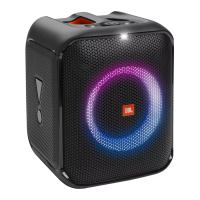
Details buttons, LED ring, and battery indicator on the speaker's top panel.
Describes ports for microphone, USB, AC power, and AUX input on the back panel.
Advises on placing the speaker on a flat, stable surface for optimal performance and safety.
Instructions on connecting AC power, using the built-in battery, and initial charging.
Guides on pairing and connecting Bluetooth devices for audio streaming.
Explains how to connect USB storage devices for audio playback and supported formats.
Details playback controls, volume adjustment, and bass boost function.
Instructions for connecting external audio devices via 3.5mm audio cable.
Guide on connecting and adjusting microphone volume and gain for mixing.
Instructions for using the speaker's USB port to charge a mobile device.
Advises on safely disconnecting cords and holding the speaker firmly by the handle.
Information on downloading and installing the JBL Partybox App for enhanced features.
How to select light patterns and control strobe effects on the speaker.
Instructions for connecting two Partybox speakers wirelessly for stereo sound.
Steps to restore the speaker to its original factory settings.
Details on the speaker's splash resistance and precautions for maintaining it.
Solutions for the speaker not turning on or buttons not responding.
Troubleshooting steps for no sound, poor audio quality, or connection failures.
Information on Bluetooth connection requirements and sleep mode power consumption.
Details on standby mode power consumption and re-activation.
 General
| Tweeter | Yes |
|---|---|
| Woofer diameter | 133 mm |
| Tweeter diameter | 45 mm |
| Number of speakers | 1 |
| Number of tweeter drivers | 2 |
| Woofer diameter (imperial) | 5.25 \ |
| Tweeter diameter (imperial) | 1.75 \ |
| Frequency range | 50 - 20000 Hz |
| RMS rated power | 100 W |
| Signal-to-Noise Ratio (SNR) | 80 dB |
| Wi-Fi | - |
| Bluetooth version | 5.1 |
| Bluetooth profiles | A2DP, AVRCP |
| Connectivity technology | Wired & Wireless |
| Bluetooth transmitter modulation | 8DPSK, DQPSK, GFSK |
| Product type | Mono portable speaker |
| Product color | Black |
| International Protection (IP) code | IPX4 |
| Certification | CE |
| Recommended usage | Universal |
| Card reader integrated | No |
| Audio formats supported | MP3, WAV, WMA |
| Cables included | AC |
| Battery type | Built-in battery |
| Battery voltage | 3.7 V |
| Battery capacity | 17.76 Wh |
| Battery life (max) | 6 h |
| AC adapter frequency | 50/60 Hz |
| Battery recharge time | 3.5 h |
| AC adapter input voltage | 100 - 240 V |
| Package depth | 326 mm |
| Package width | 472 mm |
| Package height | 354 mm |
| Package weight | 7270 g |
 Weight and Dimensions
| Depth | 293 mm |
|---|---|
| Width | 276 mm |
| Height | 327 mm |
| Weight | 5900 g |

 To Next Page