EasyManua.ls Logo

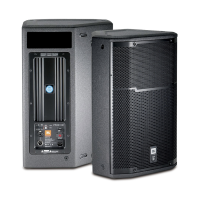
JBL PRX600 series - User Manual

JBL PRX600 series
36 pages
Print Icon
To Next Page IconTo Next Page
Loading...
PRX612M
PRX615M
PRX625
PRX635
PRX618S
PRX618S-XLF
Users Guide

Questions and Answers

  • D
    David WattsAug 14, 2025
    What to do if my JBL PRX600 signal sounds distorted and very loud?
    • T
      Tracy ShieldsAug 14, 2025
      If the signal from your JBL Speaker System sounds distorted and very loud, and the OVERLOAD light is frequently lit, it likely means that the input signal is too high, exceeding what the speakers can handle. To fix this, reduce the output level of the source and lower the level controls on the speaker.
  • N
    Nicholas FieldsAug 17, 2025
    How to fix hum or buzz in JBL PRX600?
    • E
      eric63Aug 17, 2025
      Humming or buzzing sounds in your JBL Speaker System can stem from several factors: * Improper A/C grounding or ground loops. You can try to 'telescope' the audio ground using an XLR/F to XLR/M adapter on one end or re-route the audio cable away from AC power and lighting cables. * Excessively long unbalanced cable runs. To address this, utilize the balanced outputs (if available) of your mixer to drive your speakers. Alternatively, use a DI (direct injection) box to convert your unbalanced equipment output to a balanced output. * Improper system gain structure. Review your system setup and adjust controls as needed, paying attention to input sensitivity (gain).
  • J
    Jessica CordovaAug 20, 2025
    What to do if my JBL PRX600 turns on but has no sound?
    • P
      patrick52Aug 20, 2025
      If your JBL Speaker System turns on but produces no sound, the problem may be with faulty cables and connections. Check the VU meters on the source mixer and verify that the CD/MP3 is playing. Use headphones to confirm that the instrument is sending an audio signal. Also, disconnect and re-seat the signal cables and replace any suspected faulty cables with known-good ones.
  • M
    Maurice JensenAug 25, 2025
    Why do my JBL Speaker System howl when I turn up the microphone volume?
    • I
      Isaac CarterAug 25, 2025
      If your JBL Speaker System is experiencing feedback and howling when the microphone volume is increased, it could be due to several reasons: * The microphones may be pointed towards the speakers. To resolve this, reposition the speakers so they are not directed at the microphone's pickup pattern. * The equalizer settings might be incorrect. In this case, identify the feedback frequency and lower it using the mixer EQ or an external equalizer. * The gain might be too high. Try reducing the gain on the mixer and move the microphone closer to the sound source.
  • V
    vdorseyAug 27, 2025
    Why does my JBL PRX600 sound distorted even at moderate volumes?
    • J
      Jessica DouglasAug 27, 2025
      If your JBL Speaker System sounds distorted even at moderate volumes, and the OVERLOAD light is not lit, the issue might be that the mixer or another source is overdriven (clipping). Review the owner’s manual for your system setup and adjust controls as needed. Specifically, check the input sensitivity (gain) and the gain structure of the signal chain.
  • K
    Kelly KellyAug 31, 2025
    Why does the hum or buzz in my JBL Speaker System change when I move the mixer level controls?
    • T
      teresarodriguezAug 31, 2025
      If the hum or buzz in your JBL Speaker System increases or decreases when the mixer level controls are adjusted, it could be due to an improper A/C ground or faulty equipment connected to the mixer input. Try disconnecting or muting channels one at a time to identify the source of the problem. Also, a faulty cable between the source equipment and mixer could be the cause; try substituting it with a known-good cable.
  • K
    Katie IngramSep 3, 2025
    How to eliminate noise or hiss from JBL PRX600 output?
    • S
      Sarah HaleySep 3, 2025
      If you hear noise or hiss from your JBL Speaker System's output, it may be due to a noisy source device. Disconnect the devices connected to your speaker one at a time. If the noise disappears, the issue lies with the source or its connecting cable.
  • D
    David MoralesSep 7, 2025
    Why is there no sound when I connect a microphone directly to the MIC input of my JBL PRX600 Speaker System?
    • S
      Scott PearsonSep 7, 2025
      If you're not getting any sound when connecting a microphone directly to the MIC input on your JBL Speaker System, the microphone may require 48V phantom power, which the PRX600 speakers do not supply. Try switching to a dynamic microphone, using a battery in the microphone (if possible), or using an external phantom power supply. Also, check the cable.
  • J
    James RichardsSep 9, 2025
    How to reduce excessive low frequencies on JBL PRX600 Speaker System?
    • J
      Jocelyn VargasSep 10, 2025
      If you are experiencing too much low frequencies when playing back prerecorded music on your JBL Speaker System, this may be caused by recorded music with excessive low frequencies. Switch the EQ switch to 'flat'.

Summary

Important Safety Instructions

Precautions

Suspension of Loudspeaker Systems

Safe Rigging Practices

Hearing Damage Warning

Warning about potential hearing damage from prolonged exposure to high sound pressure levels (SPL).

Watch For These Symbols!

The PRX600 Series Power Amplifier

AC Power Requirements

Details on AC power requirements, supply robustness, and potential effects of multiple systems.

Powering Up

Procedure for powering up the speaker system, emphasizing it as the last device to power on.

Changing Voltage

Instructions on how to verify and change the voltage selector setting for proper operation.

SYSTEM SPECIFICATIONS | PRX612 M

System Type and Performance (PRX612 M)

Details system type, maximum SPL output, and frequency response for the PRX612M.

Amplifier Specifications (PRX612 M)

Details the amplifier design (Crown Class D) and power rating for the PRX612M.

Speaker Component and Physical Specifications (PRX612 M)

Lists LF/HF drivers, coverage pattern, enclosure, mounting, finish, and dimensions of the PRX612M.

PRX615 M System Specifications

System Type and Performance (PRX615 M)

Details system type, maximum SPL output, and frequency response for the PRX615M.

Amplifier Specifications (PRX615 M)

Details the amplifier design (Crown Class D) and power rating for the PRX615M.

Speaker Component and Physical Specifications (PRX615 M)

Lists LF/HF drivers, coverage pattern, enclosure, mounting, finish, and dimensions of the PRX615M.

PRX625 System Specifications

System Type and Performance (PRX625)

Details system type, maximum SPL output, and frequency response for the PRX625.

Amplifier Specifications (PRX625)

Details the amplifier design (Crown Class D) and power rating for the PRX625.

Speaker Component and Physical Specifications (PRX625)

Lists LF/HF drivers, coverage pattern, enclosure, mounting, finish, and dimensions of the PRX625.

PRX635 System Specifications

System Type and Performance (PRX635)

Details system type, maximum SPL output, and frequency response for the PRX635.

PRX618 S System Specifications

System Type and Performance (PRX618 S)

Details system type, maximum SPL output, and frequency response for the PRX618S.

PRX618 S-XLF System Specifications

System Type and Performance (PRX618 S-XLF)

Details system type, maximum SPL output, and frequency response for the PRX618S-XLF.

SYSTEM SET UP - FULL RANGE MODELS

Full Range Model Setup Details

INPUT MIC; LINE Selection

Allows selection of input sensitivities for connecting various sources, including microphones and line-level.

SYSTEM SET UP - SUBWOOFER

Subwoofer Setup Details

SETTING THE INPUT SENSITIVITY

MIC Input Sensitivity

Procedure for setting input sensitivity to 'Mic' for microphones or instruments, with level adjustment advice.

LINE Input Sensitivity

Procedure for setting input sensitivity to 'Line' for mixers or professional audio sources.

SETTING THE GAIN

Gain Structure Setup Steps

Step-by-step guide to setting gain structure for optimal performance, minimizing distortion and feedback.

APPLICATION EXAMPLES

Music Playback with Subwoofer

Live Performance System with Monitors

Large System Configuration Example

TROUBLESHOOTING

Common Troubleshooting Scenarios

Lists common symptoms like 'No sound' or 'Distorted signal' with likely causes and solutions.

Advanced Troubleshooting Topics

Noise, Hum, Feedback, and EQ Issues

Addresses issues like noise, hum, buzz, feedback, and low frequency problems with solutions.

JBL PRX600 series Specifications

General IconGeneral
BrandJBL
ModelPRX600 series
CategorySpeaker System
LanguageEnglish

Related product manuals