Operation
Instruments
33 9831/0650-3 33
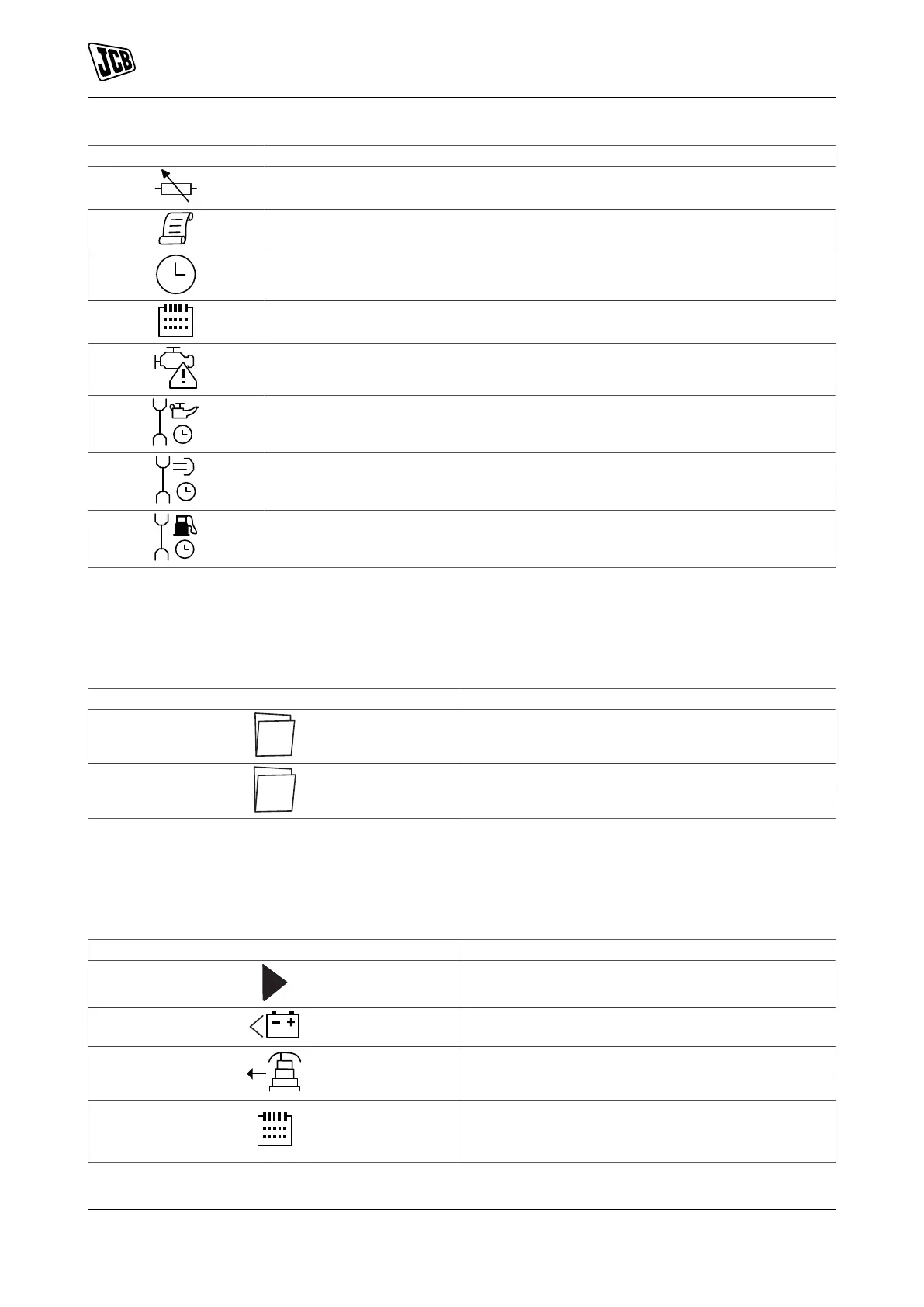
Icons Description
Flexible sender instrumentation screen
Appears when the event log is being displayed
Current time held in the unit
The current value of the scheduler run time and duration
ECU (Electronic Control Unit) diagnostic trouble codes
Oil filter maintenance timers
Air filter maintenance timers
Fuel filter maintenance timers
Active Configuration
An icon is displayed in the Active Config section to indicate the active configuration within the currently selected
within the controller.
Table 5.
Icons Description
Appears when the main configuration is selected.
Appears when the alternative configuration is select-
ed.
Front Panel Editor (FPE)/Auto Run Icon
When running in AUTO mode and on the Home page, an icon is displayed in the FPE/Auto Run section to
indicate the source of the auto start signal.
Table 6.
Icons Description
Appears when a remote start input is active
Appears when a low battery run is active
Mains failure
Appears when a scheduled run is active



 To Next Page