Safety devices programming
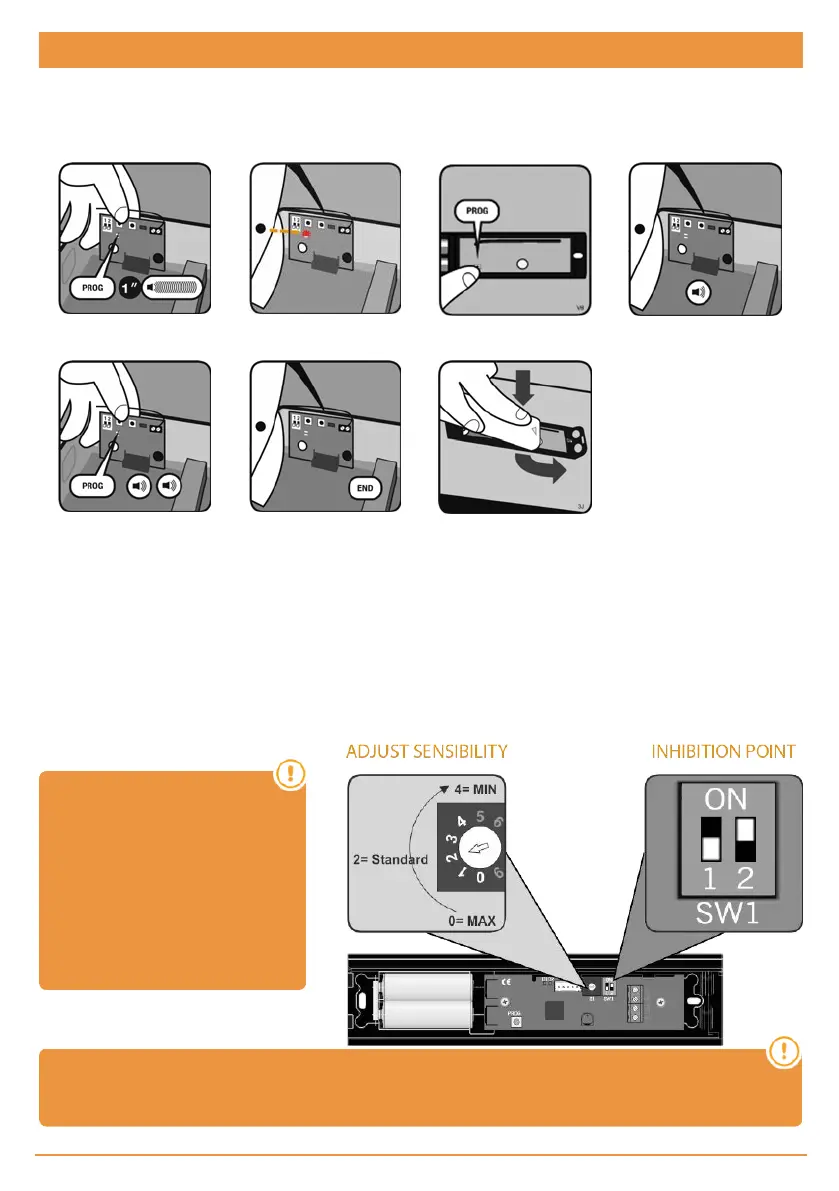
RadioBand3 / RadioSens3 Transmitter Programming in RSEC3 Receiver
PRESS PROG BUTTON OF
THE PLUGABLE CARD
RSEC3
LED TURNS ON
PRESS PROG
TRANSMITTER
ONE BEEP AND
PROGRAMMED
PRESS RPROG BUTTON
LED TURNS OFF AND END
PROG
SLIDE THE COVER TO
CLOSE
Adjust the sensibility and inhibition point
In order to adapt the operation of the system to the irregular conditions of the floor, the equipment can be inhibited the lasts
4cm at the end of the travel of the door. In the inhibition zone, obstacles will not be detected
Setting the inhibition point is optional. In case it is desired, it can be fixed in two ways: automatically or manually.
If the inhibition point is set automatically, put the transmitter switch SW1: 2 to ON. During the programming of the maneuver
the equipment will automatically detect the ground and set the inhibition point automatically.
If the inhibition point is set manually, proceed as defined in the control manual section: Maneuver programming: Programming
the door maneuver with RadioSens3 system.
On the RadioSens3 transmitter,
the sensitivity can be adjusted. If
sensitivity is modified, the Radi-
oSens3 transmitter must be repro-
grammed. You must require the
entire system to comply with the
safety standards to which it is sub-
ject.
Attention: Only one system (RadioBand3 or RadioSense3) can be programmed in the RSEC3
receiver.
jcmtechnologies
8



 To Next Page