PO BOX 7231, COLORADO SPRINGS, COLORADO 80933 USA E-mAIL: jRDG@jEffROwLAND.COm www.jEffROwLAND.COm TELEPHONE (719) 473-1181
12
1 2 3 4 5 6 7
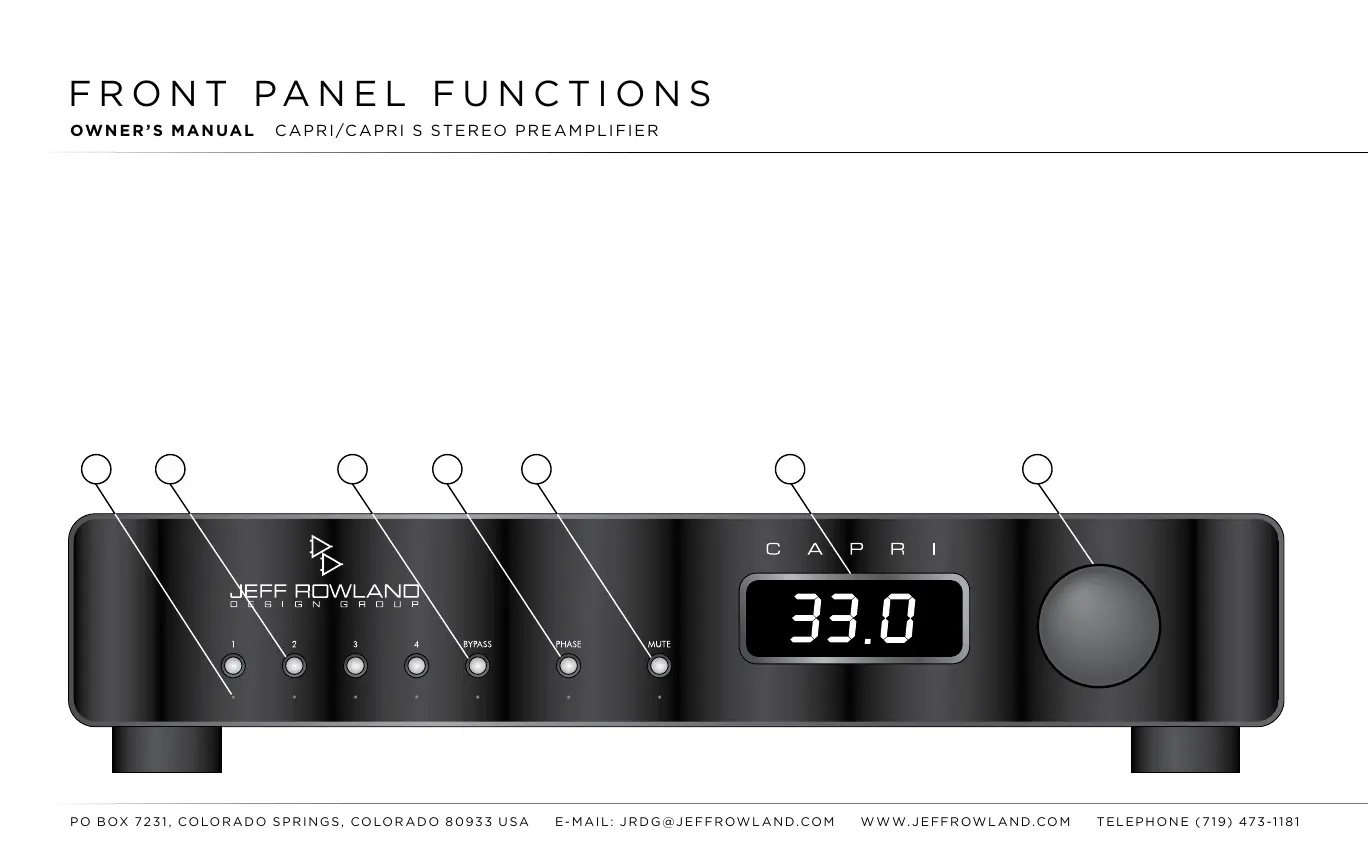
(1) INPUT INDICATORS:
Inputs 1 through 4 have a small indicator light below the Input Selector
Buttons.
An indicator will illuminate green when selected to show that the input is currently active.
(2) INPUT SELECTOR BUTTONS:
Pressing these buttons selects an input source (CD, tuner,
phono, etc.)
connected to the associated rear panel inputs (see Rear Panel Signal Connections
on page 14). To select a
desired input, press the corresponding Input Selector Button. When an
input is activated, the small, green Input
Indicator below the Input Selector Button will illuminate.
Before attempting any system inter con-
nection, please familiarize yourself with
the front panel controls and indicators
of the
CAPRI
Stereo Preamplifier. The
descriptions refer to the illustration below.
OWNER’S MANUAL CAPRI/CAPRI S STEREO PREAMPLIFIER





 To Next Page