EasyManua.ls Logo

Jensen CAR723W - User Manual

Jensen CAR723W
27 pages
Print Icon
To Next Page IconTo Next Page
Loading...
INSTALLATION &
OWNER’S MANUAL
CAR723W
Media Receiver with Android Auto™ and Apple CarPlay
®
featuring a 7" digital TFT Display

Other manuals for Jensen CAR723W

Question and Answer IconNeed help?

Do you have a question about the Jensen CAR723W and is the answer not in the manual?

Summary

Safety and Compliance

Critical Driving Safety Warnings

Important safety restrictions regarding driver distraction and vehicle operation.

FCC Compliance Information

Details on regulatory compliance and potential radio frequency interference.

Installation and Wiring

Wiring Diagram and Connections

Visual guide to all input and output connections for installation.

Installation Preparation and Controls

Steps before starting installation and identification of unit controls.

General Operations and Settings

Basic Unit Operations

Covers power, volume, mute, mode selection, and reset functions.

System Settings Overview

Introduces categories for system configuration like General, Audio, and Display.

Media and Tuner Operations

AM;FM Radio Tuning

Instructions for operating the AM/FM tuner, presets, and seeking stations.

USB Media Playback

Guide to connecting and playing media files via USB.

Media File Compatibility

Information on supported and unsupported media file types and formats.

Smartphone Connectivity Features

Bluetooth Connectivity and Calling

Steps for pairing, connecting, and using Bluetooth for calls and audio.

Apple CarPlay Operation

Steps for connecting an iPhone and controlling CarPlay features.

Android Auto Operation

Guides on connecting an Android phone and using Android Auto features.

Advanced Features and Support

Camera and A;V Input

Details on connecting cameras and A/V sources for external inputs.

Steering Wheel Control Integration

Information on integrating steering wheel controls via PAC SWI-RC.

Troubleshooting Guide

Solutions for common unit problems and error conditions.

Limited Warranty Information

Details on product warranty coverage, terms, and claims.

Summary

Safety and Compliance

Critical Driving Safety Warnings

Important safety restrictions regarding driver distraction and vehicle operation.

FCC Compliance Information

Details on regulatory compliance and potential radio frequency interference.

Installation and Wiring

Wiring Diagram and Connections

Visual guide to all input and output connections for installation.

Installation Preparation and Controls

Steps before starting installation and identification of unit controls.

General Operations and Settings

Basic Unit Operations

Covers power, volume, mute, mode selection, and reset functions.

System Settings Overview

Introduces categories for system configuration like General, Audio, and Display.

Media and Tuner Operations

AM;FM Radio Tuning

Instructions for operating the AM/FM tuner, presets, and seeking stations.

USB Media Playback

Guide to connecting and playing media files via USB.

Media File Compatibility

Information on supported and unsupported media file types and formats.

Smartphone Connectivity Features

Bluetooth Connectivity and Calling

Steps for pairing, connecting, and using Bluetooth for calls and audio.

Apple CarPlay Operation

Steps for connecting an iPhone and controlling CarPlay features.

Android Auto Operation

Guides on connecting an Android phone and using Android Auto features.

Advanced Features and Support

Camera and A;V Input

Details on connecting cameras and A/V sources for external inputs.

Steering Wheel Control Integration

Information on integrating steering wheel controls via PAC SWI-RC.

Troubleshooting Guide

Solutions for common unit problems and error conditions.

Limited Warranty Information

Details on product warranty coverage, terms, and claims.

Overview

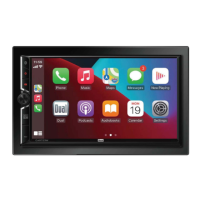
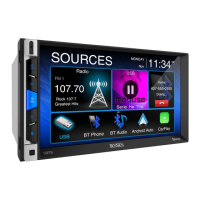
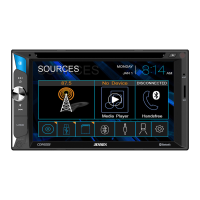
The JENSEN CAR723W is a media receiver designed for in-dash vehicle installation, offering a comprehensive suite of entertainment, navigation, and communication features. It boasts a 7-inch digital TFT display and supports both Android Auto™ and Apple CarPlay®, allowing for seamless integration with a wide range of smartphones.

Function Description:

The CAR723W serves as a central hub for in-vehicle media and connectivity. Its primary functions include:

  • Media Playback: Supports AM/FM radio tuning, USB media playback (MP3, FLAC, OGG), and Bluetooth audio streaming.
  • Smartphone Integration: Features Android Auto and Apple CarPlay for voice-controlled access to navigation (Maps, Waze), communication (Phone, Messages, Contacts, Recents), and music apps (Podcasts, Audiobooks, YT Music). This integration is designed to minimize driver distraction by allowing hands-free operation via Siri or Google Assistant.
  • Bluetooth Connectivity: Enables hands-free calling, phone book access, and audio streaming from Bluetooth-enabled devices. The unit supports pairing multiple devices and offers auto-connect functionality.
  • Camera Inputs: Provides dedicated inputs for front and rear cameras, enhancing safety and parking assistance. The unit can automatically switch to camera mode when the vehicle is in reverse.
  • Audio Control: Offers extensive audio adjustment options, including a 10-band tone control, 7 preset EQ settings, fader/balance controls, subwoofer level and frequency adjustments, loudness control, and source level settings.
  • General Operation: Includes basic controls for power on/off, volume adjustment, mute, and mode selection. The main menu provides quick access to all available sources and settings.
  • Steering Wheel Control (SWC) Compatibility: Built-in SWC interface is compatible with PAC steering wheel control modules, allowing users to control the unit using existing steering wheel buttons.

Important Technical Specifications:

  • Display: 7-inch digital TFT display with a resolution of 1024 (H) x 600 (V) pixels. Brightness is 500 cd/m² and contrast ratio is 500:1. Total pixels: 1,152,000.
  • FM Tuner: Tuning range 87.5MHz-107.9MHz. Usable sensitivity 10dBf, 50dB quieting sensitivity 20dBf. Stereo separation @ 1kHz: 38dB. Frequency response: 30Hz-13kHz.
  • AM Tuner: Tuning range 530kHz-1710kHz. Usable sensitivity 24uV. Frequency response: 30Hz-2.3kHz.
  • USB: High Speed USB 2.0, Mass storage class compatible.
  • Amplifier (CEA-2006 Compliant): Power Output: 16 Watts RMS x 4 channels at 4 ohms and < 1% THD+N. Signal to Noise Ratio: 80dBA (reference: 1 watt into 4 ohms).
  • Speaker Output Impedance: 4 ohms.
  • Line Output Voltage: 4 volt RMS.
  • Line Output Impedance: 200 ohms.
  • Chassis Dimensions: 7" X 4" X 4" (W x D x H).
  • Power Requirement: 12VDC negative ground only.

Usage Features:

  • Safety Features: In-dash video functions operate only when the vehicle is in Park and the parking brake is engaged, preventing driver distraction. A parking brake lock-out feature is integrated to ensure compliance with safety regulations. The unit also warns against high volume levels to ensure traffic-related sounds can be heard.
  • Intuitive Interface: The 7-inch touchscreen display provides an intuitive graphical user interface with large icons for easy navigation. The main menu offers quick access to various modes and settings.
  • Voice Control: Full voice control capabilities via Siri (for Apple CarPlay) and Google Assistant (for Android Auto) allow users to make calls, send messages, get directions, and control music hands-free.
  • Customizable Settings: Users can adjust various settings, including display illumination, gray level, brightness, LED button light color and animation, and wallpaper. Audio settings are highly customizable with EQ presets and manual adjustments.
  • Driver Orientation Settings: The unit allows configuration for both Left Hand Drive (LHD) and Right Hand Drive (RHD) vehicles, optimizing the Apple CarPlay and Android Auto interfaces for the driver's perspective.
  • Camera View Reversal: For front and rear cameras, the display image can be reversed through the settings menu to correct the viewing angle.
  • Media Compatibility: Supports MP3 files with various bitrates (32-320kbps for MPEG 1) and sampling frequencies. It is recommended to use 128kbps or higher constant bit rate and 44.1kHz or higher sampling frequency for best results.
  • Bluetooth Pairing: Simple pairing process with "CAR723W" as the device name. The unit can automatically connect to the last paired device.
  • Reset Function: A reset button is available on the front panel to restore the main processor to default settings, useful for resolving abnormal operation.

Maintenance Features:

  • Fuse Replacement: The unit uses a 15 amp ATC mini style fuse located on the power connector. Users are advised to use the correct type and amperage when replacing fuses to prevent damage.
  • Cleaning: The monitor should be cleaned with a dry silicone cloth or other soft cloth. Solvents, paint thinner, and alcohol should be avoided as they can scratch the surface or remove printing.
  • Troubleshooting Guide: A dedicated troubleshooting section in the manual helps users diagnose and resolve common issues such as power problems, no sound, blown fuses, or no video.
  • Technical Assistance: Contact information for technical assistance (1-888-921-4088) is provided for issues that cannot be resolved through troubleshooting.
  • Warranty: The product comes with a limited three-year warranty, with an option to extend to five years upon online registration. The warranty covers defects in material and workmanship, but excludes software, installation costs, and damage from misuse or improper installation.

Jensen CAR723W Specifications

General IconGeneral
BrandJensen
ModelCAR723W
CategoryCar Receiver
LanguageEnglish

Related product manuals