EasyManua.ls Logo

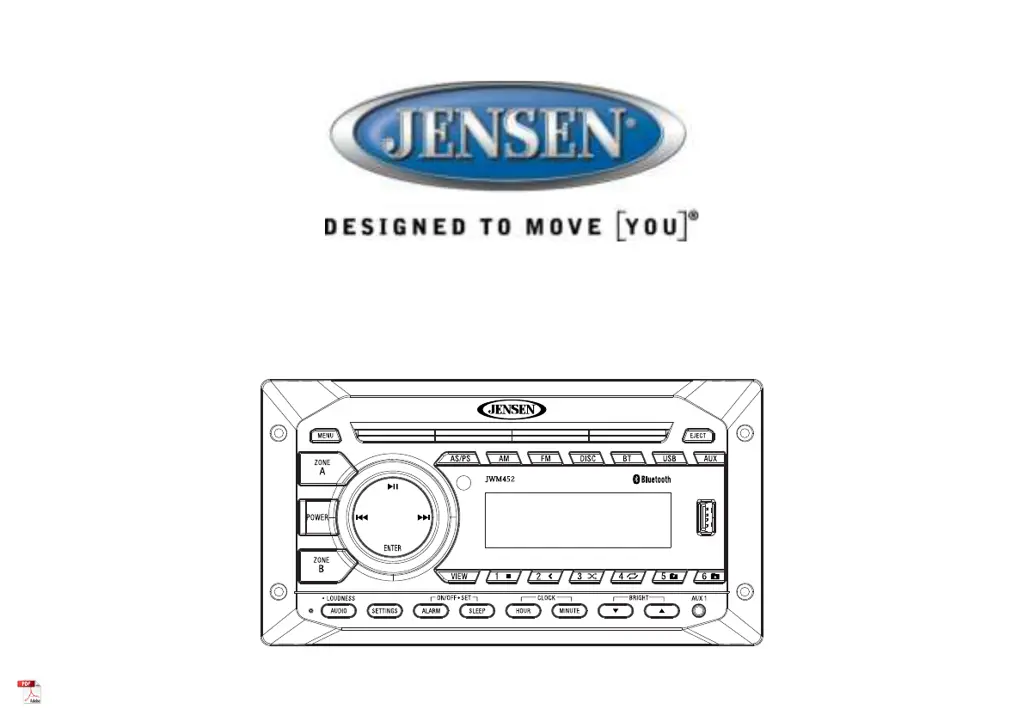
Jensen JWM452 - User Manual

Jensen JWM452
25 pages
Print Icon
To Next Page IconTo Next Page
Loading...
Installation and Owner's Manual
MOBILE AUDIO SYSTEM
JWM452

Questions and Answers

  • L
    Lori BradleyJul 28, 2025
    What to do if Bluetooth device will not connect or pair with Jensen JWM452 Car Receiver?
    • R
      Rick FrancisJul 28, 2025
      If your Bluetooth device won't connect or pair with the Jensen Car Receiver, ensure no other devices are already connected and disconnect any that are. On your smart device, turn Bluetooth off and then on again, and try again.
  • R
    Richard JohnsonAug 1, 2025
    Why Jensen Car Receiver radio turns on, but there is no sound?
    • T
      tmcbrideAug 1, 2025
      If your Jensen Car Receiver turns on but produces no sound, verify the volume, fader/balance, and mute controls are correctly set. Try the reset button. Also, verify proper speaker selection and connections. Check for shorts or open circuits on the speaker wires.
  • J
    jean70Aug 5, 2025
    What to do if Jensen Car Receiver radio will not turn on or no front panel operation?
    • A
      Andrew CarlsonAug 5, 2025
      If your Jensen Car Receiver does not turn on or the front panel is unresponsive, try the reset button. Check the fuse, ensure there is 12V+ on the accessory wire to the radio (RED wire), and verify the ground connection.
  • A
    Anne WoodsAug 9, 2025
    Why there is no AM or FM reception on Jensen JWM452?
    • T
      terri38Aug 9, 2025
      If you are experiencing no AM or FM reception on your Jensen Car Receiver, first verify you are tuned to a valid station. Then, check your antenna connection on the rear of the stereo. You might also want to try a different antenna.
  • C
    Charles TaylorAug 14, 2025
    What to do if DVD plays sound but no video on Jensen JWM452 Car Receiver?
    • J
      John BensonAug 14, 2025
      If your Jensen Car Receiver plays sound from a DVD but shows no video, ensure the HDMI cable is correctly connected from the HDMI output to the input on your television and verify that you have a clear line of sight for the IR signal.
  • A
    Amy NguyenAug 18, 2025
    What to do if CD/DVD does not load fully in Jensen JWM452 Car Receiver?
    • N
      Nicole PottsAug 18, 2025
      If your CD/DVD does not load fully in the Jensen Car Receiver, make sure the disc is compatible and inserted correctly. Verify the disc is free from dirt and scratches. Check with factory CDs and look for compatibility warnings due to copy-protection or multimedia content.
  • A
    Adam BeckAug 22, 2025
    What to do if the display is blank on Jensen JWM452?
    • I
      ikleinAug 22, 2025
      If the display on your Jensen Car Receiver is blank, turn the unit off and on to reset the display.

Summary

INTRODUCTION

Precautions

Details critical safety warnings and handling instructions for safe operation and longevity.

INSTALLATION

Disconnecting the Battery

Explains the critical step of disconnecting the vehicle battery to prevent short circuits during installation.

WIRING

CONNECTIONS

Illustrates the pin assignments and wiring harness connections required for unit operation.

BASIC OPERATION

Audio Menu Setting

Guide to accessing and adjusting audio parameters like Bass, Treble, Balance, and Fader.

System menu setting

Steps to navigate and configure various system settings through the menu interface.

TUNER OPERATION

Automatically Store; Preset Scan (AS;PS)

Instructions for automatically scanning and storing radio stations, and for preset scanning.

DISC OPERATION

DVD;VCD OPERATION

MP3;USB OPERATION

Inserting a USB Device

Instructions for connecting and accessing music files from a USB storage device.

BLUETOOTH OPERATION

Bluetooth Pair (ENTER)

Steps to initiate and complete the pairing process with a Bluetooth-enabled device.

Pairing a Bluetooth Device

Detailed guide on preparing and pairing a Bluetooth device with the JWM452.

Bluetooth Audio (A2 DP)

Enables streaming audio from a connected Bluetooth phone to the unit.

REMOTE CONTROL OPERATION

DVD SETUP MENU

System Setup

Configures TV system, screen saver, resolution, password, rating, and default settings.

Language Setup

Sets OSD, audio, subtitle, and menu languages for DVD playback.

Audio Setup

Defines digital audio output format and changes audio key.

VIDEO SETUP

Brightness

Adjusts the screen's brightness level.

Contrast

Adjusts the screen's contrast level.

Hue

Adjusts the screen's hue level.

Saturation

Adjusts the screen's saturation level.

Sharpness

Adjusts the screen's sharpness level.

DIGITAL SETUP

OP Mode

Selects the audio output mode, such as LINE OUT or RF REMOD.

Dynamic Range

Sets the dynamic range for audio playback.

Dual Mono

Configures the audio output for stereo or mono playback.

SPEAKER SETUP

Downmix

Selects the audio downmix mode for surround sound.

Front

Sets the size configuration for the front speakers.

TROUBLESHOOTING

SPECIFICATIONS

Jensen JWM452 Specifications

General IconGeneral
BrandJensen
ModelJWM452
CategoryCar Receiver
LanguageEnglish

Related product manuals