EasyManua.ls Logo

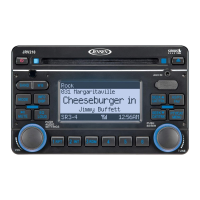
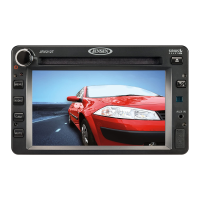
Jensen JRV212T - User Manual

Jensen JRV212T
24 pages
Print Icon
To Next Page IconTo Next Page
Loading...
JRV212T
Installation and Operation Manual
TOUCH PANEL MOBILE AUDIO AND OBSERVATION SYSTEM
JRV212T

Other manuals for Jensen JRV212T

Questions and Answers

  • J
    Joe GrahamAug 14, 2025
    How to troubleshoot a Jensen JRV212T with no power?
    • J
      Joshua WilliamsAug 14, 2025
      If your Jensen Car Receiver has no power, first ensure the vehicle’s ignition is switched to “ACC” if the power supply is properly connected to the vehicle accessory terminal. Also, check the fuse and replace it if it's blown.
  • B
    Brittany DiazAug 18, 2025
    What to do if my Jensen JRV212T has no sound?
    • M
      Mary BellAug 18, 2025
      If there is no sound from your Jensen Car Receiver, start by adjusting the volume to an audible level. If that doesn't work, press the AUDIO button to access the menu and check the Fader settings. Ensure that the wiring is properly connected and that Mute is off. If you are using a camera, ensure the Mic is off in camera mode.
  • M
    Michael GeorgeAug 21, 2025
    Why my Jensen JRV212T cannot tune to radio station, auto-seek does not work?
    • A
      Amy WheelerAug 21, 2025
      If your Jensen Car Receiver cannot tune to a radio station or the auto-seek function isn't working, make sure the antenna cable is firmly inserted. If the signals are too weak, try selecting a station manually.
  • L
    Lisa HernandezAug 25, 2025
    What to do if disc cannot be loaded or ejected on Jensen Car Receiver?
    • A
      Ashley AllenAug 25, 2025
      If your Jensen Car Receiver's disc cannot be loaded or ejected, first remove any disc currently in the player before inserting a new one. Ensure you are inserting the compact disc with the label facing upward. If the disc is dirty or defective, clean it or try a new one. If the temperature inside the vehicle is too high, wait until it returns to normal. If condensation has formed, leave the player off for about an hour before trying again.
  • J
    John GrahamAug 28, 2025
    Why does the sound skip on my Jensen JRV212T Car Receiver?
    • M
      Michael ZamoraAug 28, 2025
      If your Jensen Car Receiver sound skips, adjust the installation angle to be less than 30 degrees. If the disc is dirty or defective, clean it and try playing it again, or use a new disc.
  • C
    clarkepamelaAug 31, 2025
    What to do if the operation keys do not work on Jensen Car Receiver?
    • K
      Katie TurnerAug 31, 2025
      If the operation keys on your Jensen Car Receiver do not work, press the RESET button. This is because the built-in microcomputer may not be operating properly due to noise.
  • D
    Derek HudsonSep 3, 2025
    Why does my Jensen JRV212T Car Receiver radio automatically switches to WB (Weather Band)?
    • C
      Colton SteinSep 3, 2025
      The Jensen Car Receiver automatically switches to WB (Weather Band) because a Weather Band warning is being received. If you do not want this to occur, set the WB Alert setting to “Off” in the System Setup menu.
  • M
    Morgan BookerSep 7, 2025
    Why does my Jensen JRV212T Car Receiver radio automatically turns on (ignition on) and tunes to WB (Weather Band)?
    • T
      Tyler ClarkSep 7, 2025
      The Jensen Car Receiver radio automatically turns on (ignition on) and tunes to WB (Weather Band) because the Alert Power feature is set to “On” in the System Setup menu and a Weather Band warning is being received. To prevent this, set the Alert Power setting to “Off” in the System Setup menu.
  • S
    stanley61Sep 10, 2025
    Why does my Jensen JRV212T radio mutes audio when vehicle is in reverse gear?
    • M
      Melissa FreemanSep 12, 2025
      The Jensen Car Receiver mutes audio when the vehicle is in reverse gear as a normal function. If the camera has a microphone, the camera audio will play when in reverse gear.

Summary

Legal and Safety Notices

General Safety Information

Crucial warnings for safe operation and installation.

Installation Guide

Installation Preparation

Essential preparatory steps and important notes for installation.

2-DIN Dashboard Mounting

Detailed instructions for dashboard mounting.

Unit Removal Procedure

Procedure for safely detaching the unit.

Basic Operation Guide

Camera Mode Operation

Accessing and operating the camera mode.

Audio Settings and Sources

Managing audio sources and settings.

Power and Screen Brightness

Unit power management and screen brightness.

System Menu Configuration

System Menu Options Overview

Overview of adjustable system settings.

Sirius Satellite Radio Features

Camera Setup Options

Options for camera setup and behavior.

Radio Controls and Operation

Radio Tuning Functions

How to tune radio stations manually or via seek.

Preset Station Management

Managing and selecting preset radio stations.

Weather Band Operation

Weather Band Tuning

Accessing and tuning weather band stations.

NOAA Weather Alert Function

Automatic switching to weather alerts.

Media Playback Operations

Sirius Satellite Radio

Sirius Tuning and Access

Methods to tune SIRIUS channels.

iPod Player Operation

Camera System Operation

Entering Camera View

Accessing the camera display.

Camera Display Controls

Managing cameras, audio, and display settings.

Troubleshooting Common Issues

Power Issues

Solutions for unit power issues.

Disc Loading and Ejection Problems

Solutions for disc loading problems.

No Sound or Poor Audio

Solutions for audio output issues.

Unresponsive Control Keys

Solutions for unresponsive control keys.

Audio Skipping Issues

Solutions for audio skipping issues.

Radio Tuning Failures

Solutions for radio tuning failures.

Jensen JRV212T Specifications

General IconGeneral
Display TypeLCD
BluetoothYes
USB PortYes
Aux InputYes
Radio TunerAM/FM
TypeSingle DIN
TouchscreenNo
NavigationNo
Pandora SupportNo
iHeartRadio SupportNo
SiriusXM SupportNo
Backup Camera InputYes
Remote ControlYes
Compatible with Steering Wheel ControlsYes

Related product manuals