Need help?
Do you have a question about the Jensen JCD3007 and is the answer not in the manual?
Keep volume low to remain aware of surroundings while driving.
Protect from water and avoid high temperatures to prevent damage.
Disconnect battery, remove transport screws, and important installation notes.
Step-by-step guide for mounting the unit in a front DIN slot.
Addressing no sound, unresponsive keys, skips, or tuning errors.
Handling specific error codes and potential mechanism-related problems.
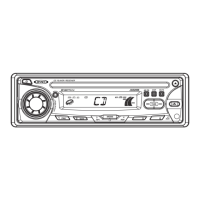
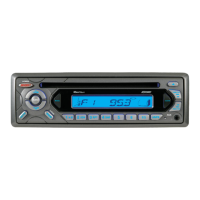
The Jensen JCD3007 is a mobile CD player/receiver designed for in-vehicle use, offering a range of audio playback and radio tuning functionalities. Its primary function is to provide entertainment through CD playback and radio reception within a mobile environment.
The JCD3007 serves as a central audio unit for a vehicle, capable of playing audio CDs and receiving AM/FM radio broadcasts. It features a detachable front panel for security and includes a standard CD slot for disc insertion. The unit is designed to be powered by a 12-volt DC negative ground battery system, typical of most vehicles.
For CD playback, the device supports standard Audio CDs, as well as CD-R and CD-RW discs, provided they are finalized. It offers basic CD controls such as track select (forward/backward), play/pause, intro scan (playing the first 10 seconds of each track), repeat play (repeating the current track), and random play (shuffling all tracks). The display provides visual feedback on the current track number and playback status.
In radio mode, the JCD3007 allows users to tune into FM and AM bands. It supports auto seek tuning, which automatically searches for the next available station, and manual tuning for precise frequency selection. A signal strength meter helps indicate the quality of the current radio station broadcast. The unit also includes preset stations, allowing users to store and recall up to six stations for each band (three FM bands and one AM band). An automatic store/preset scan (AS/PS) function enables the unit to automatically find and store the six strongest stations in the current band or scan through previously stored presets.
The JCD3007 incorporates an audio menu for sound customization. Users can adjust the volume level, bass, treble, balance (left/right speakers), and fader (front/rear speakers). Additionally, a preset equalizer (EQ) offers various sound profiles such as FLAT, CLASSIC, POP M, and ROCK, or can be turned off to allow manual bass/treble adjustments. The unit also features a mute function to quickly silence the audio output and a loudness control to enhance bass and treble at lower volumes.
An auxiliary input (Aux In) is available on the front panel, allowing users to connect external audio devices. This expands the unit's versatility, enabling playback from smartphones, MP3 players, or other portable audio sources.
The JCD3007 is designed with user-friendly controls on its front panel. A large volume knob serves multiple purposes, including adjusting volume and navigating through the audio menu. Dedicated buttons are provided for power on/off, mode selection (Radio, CD, Aux In), band selection (FM1, FM2, FM3, AM), and various CD playback and radio tuning functions.
The display panel shows important information such as the current radio frequency, track number, playback status, and audio menu settings. The unit also includes a clock function, which is typically displayed when the unit is off or in standby mode.
For security, the front panel is detachable. This feature allows users to remove the panel when leaving the vehicle, deterring theft of the main unit.
The JCD3007 includes a reset button, which can be activated using a non-metallic object. This function restores the unit to its factory default settings and is useful for troubleshooting or resolving operational issues. The unit also has a memory backup feature, which retains settings like the last played radio station and preset stations even after the ignition is turned off.
Disc maintenance is crucial for optimal performance. Users are advised to wipe discs with a clean cloth, moving from the center hole towards the outside edge, to prevent sound dropouts caused by dirt or defects. The manual explicitly warns against using benzene, thinners, cleaning fluids, or anti-static liquids. It also emphasizes using only round CDs and avoiding discs with labels, stickers, or sticky residue, as these can cause malfunctions. Proper disc handling, such as inserting the label side up and avoiding bending or touching the underside, is also highlighted.
The unit is designed for interior mounting and is not waterproof. Therefore, it should not be exposed directly to water. Protection from high temperatures is also important; the unit should not be installed in direct sunlight or near heat sources, and the vehicle interior should be allowed to cool down before operation after prolonged exposure to heat.
In case of operational issues, the manual provides a troubleshooting guide. Common problems like no power, disc loading/ejection issues, no sound, unresponsive keys, sound skips, or radio tuning difficulties are addressed with potential causes and solutions. For example, if there's no power, checking the vehicle's ignition and the unit's fuse is recommended. If a disc cannot be loaded or ejected, checking for another disc inside or ensuring correct disc insertion is suggested. For more complex issues or error codes like "ERROR 1" or "ERROR 2," users are advised to consult a qualified technician or the nearest service dealer.
The installation process itself involves several steps, including disconnecting the battery, removing transport screws, and carefully wiring the unit. Proper support for the rear of the radio with a strap is recommended to prevent damage from vibration. These installation guidelines contribute to the long-term stability and performance of the device.
 General
| Type | Car Receiver |
|---|---|
| DIN Size | Single DIN |
| Bluetooth | Yes |
| USB Port | Yes |
| USB Input | Yes |
| Aux Input | Yes |
| Auxiliary Input | Yes |
| AM/FM Radio | Yes |
| Radio Tuner | AM/FM |
| CD Player | Yes |
| MP3 Playback | Yes |
| SD Card Input | No |
| Preamp Outputs | Yes |
| Peak Power Output | 200W |
| Display Type | LCD |
| Display | Yes |
| Remote Control | Yes |
| Steering Wheel Control Compatible | Yes |
| Detachable Face | No |
| Power Output | 200W |
| RMS Power Output | 50W |

 To Next Page