EasyManua.ls Logo

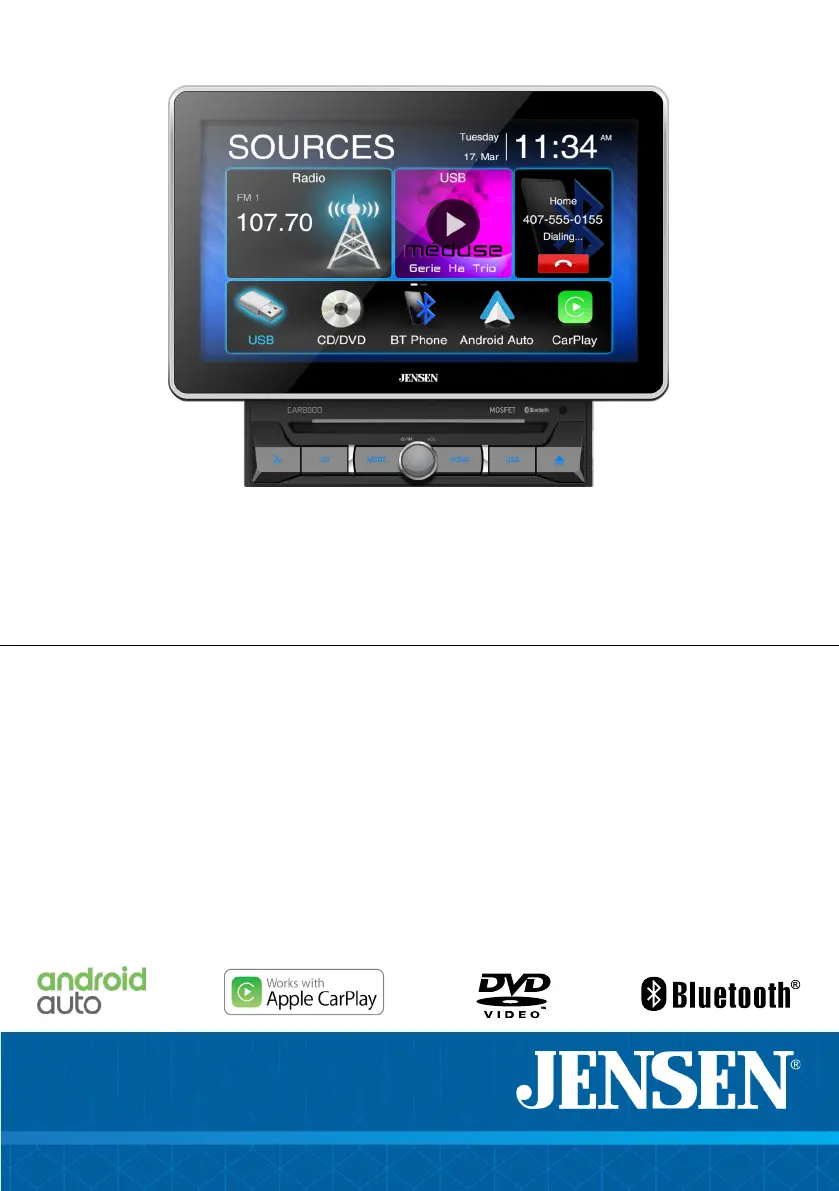
Jensen CAR8000 - User Manual

Jensen CAR8000
30 pages
Print Icon
To Next Page IconTo Next Page
Loading...
INSTALLATION &
OWNER’S MANUAL
CAR8000
10.1”CAPACITIVE TOUCH SCREEN
2 DIN MULTIMEDIA CD/DVD RECEIVER
AM-FM
USB/SD Multimedia Player
Rear Camera Input

Questions and Answers

Summary

Critical Safety Warnings

Driver Distraction Hazards

Warns against operating the unit while driving and highlights risks of distraction.

Parking Brake Lock-Out

Explains the necessity of connecting the parking brake wire for operation.

Auditory Awareness

Advises keeping volume low to hear emergency vehicle sounds.

General Safety Information

Installation and Operation Precautions

Recommends professional installation and outlines basic safety rules for operation.

Wiring Diagram and Connections

Input;Output Harnesses

Shows connections for USB, CarPlay/Android Auto, Radio Antenna, and microphone.

General Unit Operation

Power, Volume, and Mute

Explains how to turn the unit on/off, adjust volume, and use the mute function.

Setup Menu and Configuration

General and Audio Settings

Covers date, time, beep tone, radio region, EQ presets, and subwoofer controls.

Time Alignment and Loudness

Details how to adjust time correction and loudness settings.

Display and System Settings

Display Adjustments Menu

Covers brightness, dimmer mode, video brightness, contrast, saturation, and hue.

AM;FM Tuner Operation

Tuner Interface and Controls

Explains the radio screen layout and button functions.

Station Tuning and Presets

Details how to tune stations, use presets, and auto-store.

USB;microSD Media Playback

Accessing Media Content

Describes how to select USB/microSD as a source and navigate files.

CD;DVD Playback Operations

Initiating Disc Playback

Describes how to enter CD/DVD mode and the initial playback process.

Bluetooth Connectivity and Pairing

Bluetooth Device Pairing

Explains the necessity of pairing a Bluetooth device for calls and audio.

Bluetooth Features and Controls

Music Streaming and Setup

Covers transferring audio and accessing Bluetooth settings.

Apple CarPlay Integration

CarPlay Introduction and Benefits

Introduces CarPlay as an iPhone interface for voice control and reduced distraction.

Controlling and Exiting CarPlay

CarPlay Interface Navigation

Explains the home button and application access within CarPlay.

Android Auto Operation

Android Auto Overview

Introduces Android Auto for accessing apps and driving focus.

Using and Exiting Android Auto

Android Auto Home Screen

Describes the personalized information displayed on the home screen.

Rear Input Options

Rear Camera Operation

Connecting a Rear Camera

Details connecting an optional rear camera to the Camera Input connector.

Steering Wheel Control (SWC) Integration

SWC Compatibility and Adapters

States compatibility with PAC steering wheel control modules and the need for adapters.

Troubleshooting Common Issues

Unit Power and Sound Problems

Lists causes and actions for power issues and lack of sound.

Product Specifications

Tuner and USB Specifications

Details tuning range, sensitivity, USB compatibility, and mass storage class.

Summary

Critical Safety Warnings

Driver Distraction Hazards

Warns against operating the unit while driving and highlights risks of distraction.

Parking Brake Lock-Out

Explains the necessity of connecting the parking brake wire for operation.

Auditory Awareness

Advises keeping volume low to hear emergency vehicle sounds.

General Safety Information

Installation and Operation Precautions

Recommends professional installation and outlines basic safety rules for operation.

Wiring Diagram and Connections

Input;Output Harnesses

Shows connections for USB, CarPlay/Android Auto, Radio Antenna, and microphone.

General Unit Operation

Power, Volume, and Mute

Explains how to turn the unit on/off, adjust volume, and use the mute function.

Setup Menu and Configuration

General and Audio Settings

Covers date, time, beep tone, radio region, EQ presets, and subwoofer controls.

Time Alignment and Loudness

Details how to adjust time correction and loudness settings.

Display and System Settings

Display Adjustments Menu

Covers brightness, dimmer mode, video brightness, contrast, saturation, and hue.

AM;FM Tuner Operation

Tuner Interface and Controls

Explains the radio screen layout and button functions.

Station Tuning and Presets

Details how to tune stations, use presets, and auto-store.

USB;microSD Media Playback

Accessing Media Content

Describes how to select USB/microSD as a source and navigate files.

CD;DVD Playback Operations

Initiating Disc Playback

Describes how to enter CD/DVD mode and the initial playback process.

Bluetooth Connectivity and Pairing

Bluetooth Device Pairing

Explains the necessity of pairing a Bluetooth device for calls and audio.

Bluetooth Features and Controls

Music Streaming and Setup

Covers transferring audio and accessing Bluetooth settings.

Apple CarPlay Integration

CarPlay Introduction and Benefits

Introduces CarPlay as an iPhone interface for voice control and reduced distraction.

Controlling and Exiting CarPlay

CarPlay Interface Navigation

Explains the home button and application access within CarPlay.

Android Auto Operation

Android Auto Overview

Introduces Android Auto for accessing apps and driving focus.

Using and Exiting Android Auto

Android Auto Home Screen

Describes the personalized information displayed on the home screen.

Rear Input Options

Rear Camera Operation

Connecting a Rear Camera

Details connecting an optional rear camera to the Camera Input connector.

Steering Wheel Control (SWC) Integration

SWC Compatibility and Adapters

States compatibility with PAC steering wheel control modules and the need for adapters.

Troubleshooting Common Issues

Unit Power and Sound Problems

Lists causes and actions for power issues and lack of sound.

Product Specifications

Tuner and USB Specifications

Details tuning range, sensitivity, USB compatibility, and mass storage class.

Jensen CAR8000 Specifications

General IconGeneral
TouchscreenYes
BluetoothYes
USB PortYes
Audio Output4 x 45W
Apple CarPlayYes
Android AutoYes
Backup Camera InputYes
Steering Wheel Control CompatibleYes
Built-in DVD PlayerNo
AM/FM RadioYes
Auxiliary InputYes
Rear Camera InputYes
Power Output4 x 45W
CompatibilityUniversal
Resolution800 x 480
SD Card SlotYes
Video Playback FormatsMPEG-4, MP4, AVI

Related product manuals